


Psy Keystone Helper
- By
Psy Keystone Helper
Ever wanted a simple way of seeing which keystones your party have are an upgrade for the team?
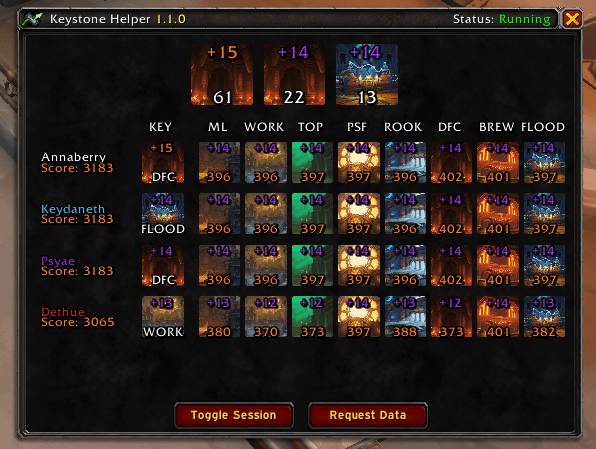
Then look no further -- this addon will show you the top 3 keystones for score gain in your party, as well as a breakdown of each party members score per dungeon.
Note: This addon uses addon communication to send details to each party member such as current keystone and score breakdown and thus each member of the party needs to install this addon.
How To Use
A 'session state' is used in order to control if the player wishes to receive and display the incoming information from party members, so that if you're pugging or playing with people without the addon - simple do not enable the session.
A session can be enabled by:
- Opening the Key Helper frame and clicking the
Toggle Sessionbutton - Right clicking the minimap icon
- Using the chat command
/pkh session
Once in session, data received by party members will be cached and displayed in the Key Helper Frame.
Feature List
- Data is syncronised automatically across all party members
- A minimap icon is included which has three interactions:
- Show the Key Helper Frame
- Output commands that can be used
- Toggle the session state
- When the session is running, data is collected and displayed in the Key Helper Frame
- Each players current score
- Each players current keystone (This will show either the key, if the key should be rerolled at the next opportunity, or if the key is dead)
- The breakdown of each players score per dungeon
- The calculated top three keystones the group could run to gain score
- A top keystone or player keystone can be clicked to 'Call Out' that key to the rest of the party. This then presents a UI to every member of the party to notify them of the dungeon and allow them to click the icon to teleport if the spell is known.
- When a dungeon is completed, the Key Helper Frame will appear to help decide the next dungeon to go
- When a dungeon is completed, a reminder frame will be shown if your keystone should be rerolled
- When entering a dungeon, a reminder frame that your current key matches the dungeon will be shown
- Commands, which can be prefix with either
/pkhor/keyhelper/pkhor/pkh show- Display the Key Helper Frame/pkh session- Toggle the state of the session/pkh request- Trigger a data request to the party/pkh send- Trigger a sending of your data to the party/pkh clear- Clear all local stored data/pkh version- Show the current version and the received version from party members
Psy Keystone Helper Team
