


UIMem Tooltip v1.06
Description
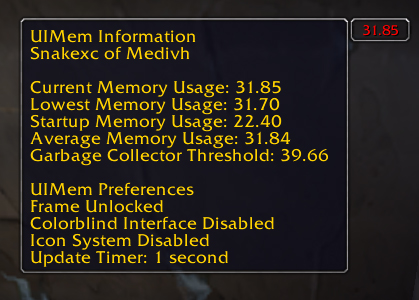
UIMem is a UI memory usage display tool. Frustrated with the generic macro that only spits out memory usage on click, I created this addon which keeps track of the memory usage in real time. Since first release, UIMem has grown to incorporate colorblind support, a user-defined update timer, an average UI memory usage calculation system, and a host of other features. More features, such as a GUI configuration screen, are planned for the very near future.
Note: This addon supports myAddons and Titan Panel as optional dependencies.
UIMem Usage
/uimem or /uimem help - Display help message
/uimem show - Show UIMem Frame
/uimem hide - Hide UIMem Frame
/uimem lock - Lock the UIMem window
/uimem unlock - Unlock the UIMem window
/uimem start - Show UI memory in use at startup of UIMem
/uimem low - Show your lowest UI memory usage
/uimem gc - Show garbage collector threshold
/uimem avg - Show average UI memory usage (rolling average)
/uimem cb (on|off) - Enable or disable colorblind-friendly interface
/uimem icons (on|off|explain) - Enable or disable icons or explain what icons represent
/uimem timer (#|show|default) - Set update timer or show current update timer
/uimem maxsize (#|show|default) - Set maximum UI size or show current maximum UI size
/uimem tooltip (on|off) - Enable or disable tooltip
/uimem toggle (frame|lock|cb|icons|tooltip|status|titan) - Toggle various UIMem features
/uimem reset - Reset UIMem to the middle of the screen, and unlock the frame
/uimem reload confirm - Reload the UI
/uimem bgalpha (0-255) - Set the background alpha
/uimem borderalpha (0-255) - Set the border alpha
/uimem status (on|off) - Check current status, or enable/disable status display in tooltip
/uimem titan (on|off) - Enable or disable Titan Panel support
/uimem vistext (default|diff|avgdiff|time) - Set text to show for UIMem
UIMem Memory Suggestions...
When you do /uimem low, UIMem will give a suggestion based off of your lowest UI memory usage. Below is the conditions and text that is displayed when you do /uimem low. Note that the suggestions will now scale based off of your maximum UI memory size. The suggestions below reflect the default values with a maximum UI memory size of 32 MB (the maximum size prior to WoW v1.3.0).
Less than 20 MB: Your UI memory usage is below 20 MB. Congratulations!
Between 20 MB and 25 MB: Your UI memory usage is between 20 MB and 25 MB. Please reconsider adding any other addons.
Between 25 MB and 30 MB: Your UI memory usage is between 25 MB and 30 MB. Please consider disabling some addons.
Greater than 30 MB: Your UI memory usage is above 30 MB. You are in danger of exceeding the allowed UI memory size. Disable addons immediately to reduce memory usage.
Exactly 35 MB: UIMem hasn't had a chance to update your lowest UI memory yet. Please wait a few seconds and try again.
To Do:
- Configuration frame. Allow configuration via a visual interface instead of all by command line.
The UIMem Team
