


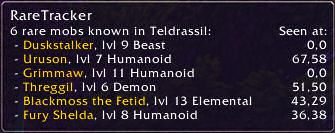
Known rares on Teldrassil. Not sorted (default).
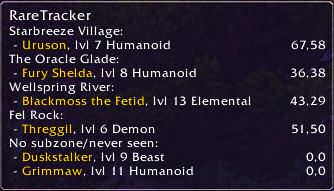
Known rares on Teldrassil. Sorted by subzone.
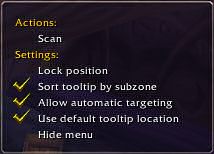
The settings menu.
Description
This addon is currently out of date and will not work properly in the current patch.
They are scattered around in the stereotypical masses of mobs Azeroth. They usually drop something nice, and might even look cool or have a funny name. They? They are the rare spawns.
Whereever you venture, RareTracker will present you with a list of all the "silver elites" mobs that are known to be nearby. RareTracker will record the position, level, and race of all rare spawns when you find them. It will also add any rare mobs you manage to find if they are not in the database already.
About installation:
RareTracker is based on one core addon with all related and necessary functions. It works under the hood, and you need an interface to interact with it. Which interface to use depends on what other addons you have. I have provided a standard interface for anyone to use, and there are plugins for some popular addons (like Titan Panel).
Installation:
You will find the following folders when you are done extracting RareTracker:
- TNE_RareTrackerBIB: A plugin to Bhaldie Infobar (thanks Bhaldie!) (optional)
- TNE_RareTrackerCore: The core addon (required)
- TNE_RareTrackerFuBar: A plugin to FuBar (optional)
- TNE_RareTrackerMap: An interface for your worldmap (optional, experimental)
- TNE_RareTrackerStandard: A standalone interface (optional)
- TNE_RareTrackerTitan: A plugin to TitanPanel (optional)
Move the core and the interfaces you want to your Addons folder, just like you install other addons. You can safely delete the interfaces you don't want to use.
Usage:
Each interface displays two numbers; the first is the number of known mobs in the zone, and second (in parenthesis) is the number of mobs in or near the subzone you're currently in. This is your general guide to the zone.
You can move the mouse cursor over the RareTracker frame to see a tooltip with more detailed information. Each mob will be listed with race and level, and if it's elite you'll see that too. You will also see coordinates for where you last saw each mob, or 0,0 if you havn't seen it before.
There are two ways to find rare mobs. The first is to tab through or mouse over mobs you come across. If you find a rare mob this way, RareTracker will send an alert and make sure you target the mob. The other way is through 'scanning'. Right-click the RareTracker frame and choose 'Scan' from the menu (or simply click the frame), and it will automatically target any known rare mob nearby (note: you will NOT be able to discover new rares this way).
Known issues:
- World coordinates are 'bugged' since 1.10, and will report 0,0 if you *walk* from one zone to another. Opening your world map will correct this. (Fixed in Standard UI)
- Scanning may sometimes change target. I have an idea on how to solve this.
- Using RareTrackerTitan and RareTrackerStandard at the same time will make setting menus act weird. This is caused by TitanPanel's UI changes.
Credits:
- English data was compiled from http://wow.allakhazam.com/dyn/mobs/rare.html
- German data was compiled from http://blasc.planet-multiplayer.de/
- French data was compiled from http://worldofwarcraft.judgehype.com/
The RareTracker Team
