Untitled
Untitled
Screen
Description
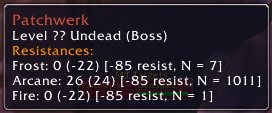
Mod requires no configuration. As you cast spells on mobs, data will be collected and stored. If you mouse over mobs their resistance information will be included in the tooltip. You will see something like this:
Resistances:
Arcane: 7 (6) [-85 resist, N = 134]
Frost: 0 (4) [-0 resist, N = 56]
For each school of magic that you have data for you'll see a line showing the information. This only shows the data for ammount of spell penetration for which you collected the most data. In the above example you have 134 samples collected with 85 spell penetration, you might also have some data with 10 spell penetration, but this is not shown here.
First two numbers show the calculated resistance of mob to this particular school of magic. First number does not take into account misses, and is the most reliable unless you're using binary spells or mob has very high resistances. In the case of Frost where you're using binary spells the second value in parenthesis is more reliable since it takes misses into account. Information in square brackets gives you some additional information such as spell penetration used collecting this information and number of samples collected. Spell penetration includes gear, talents and also buffs and debuffs such as Curse of Shadow and Eye of Moam.
To get additional information about collected data you can use the following commands:
/rt stats
displays a list of stats collected by bonus scanner
/rt resetresist
resets all data collected
/rt dumpmemory
displays memory consuption of the mod
/rt resetmemory
reset memory consumption tracking
/rt dumpresist n
display resistance data collected for there are at least n samples
/rt resistinfo mobname:moblevel
displays all information collected for this particular mob, not just the one for which you have most data as in the tooltip
/rt resistdetail hitrating:penetration:mobname:moblevel
displays partial resist distribution for this particular mob when you used a particular ammount of to hit and penetration.
Example:
/rt resistdetail 65:10:Molten Giant:62
/rt resistdetail 48:85:Patchwerk:-1
NEW:
/rt dumpresistx extrahit:n
/rt resistdetailx extrahit:hitrating:penetration:mobname:moblevel
FAQ:
How is this mod different from Glock?
They are similar in many ways. One major difference is that Glock only keeps the cummulative information about resistances. ResistTracker on the other hand can display distribution of partial resists for further analysis. It also makes clear distinction between gear penetration and level based resistances.
ResistTracker Team