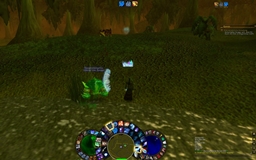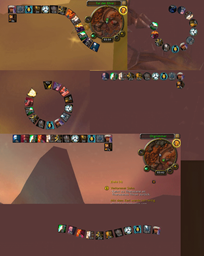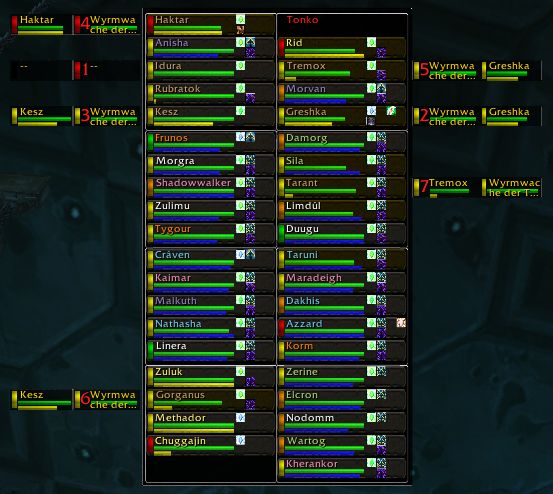
Raid View 1
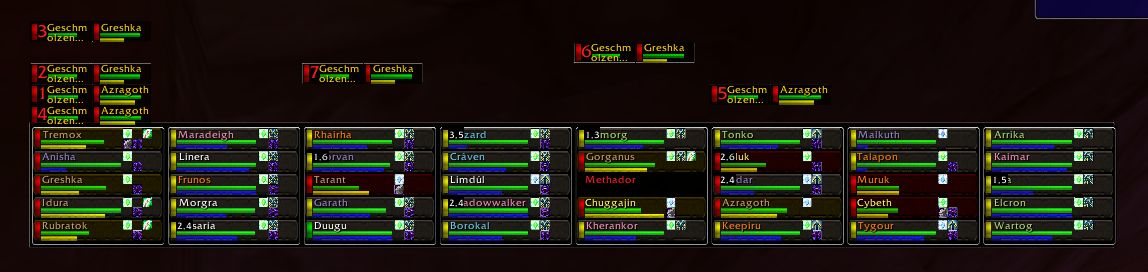
Raid View 2
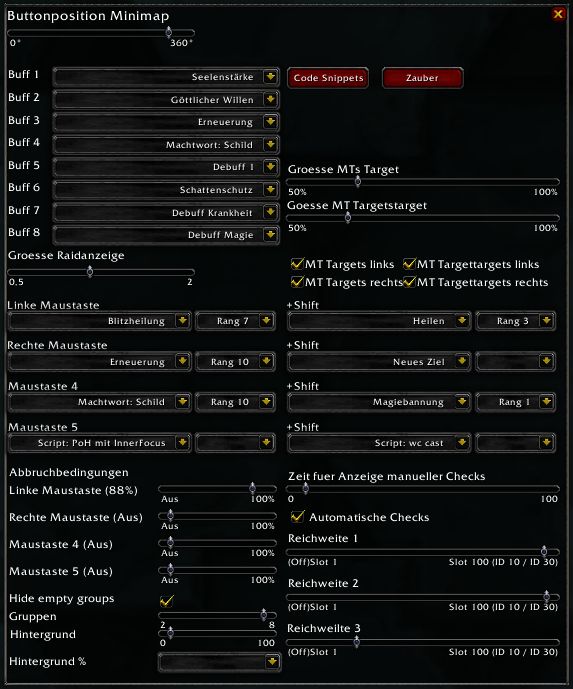
Options
Description
<font size="3">================================================================
IMPORTANT NOTE
I WILL NOT LONGER SUPPORT OR UPDATE THE ADDON VIA THIS SITE!
PLEASE SEE http://ui.worldofwar.net/ui.php?id=2976 FOR ANY FURTHER SUPPORT/NEW VERSIONS.
================================================================
</font>
SWPHeal is a raid view with a lot of options for healers (basically for priests at the moment). It shows a compact raid view with clickable buttons for each raid member. These buttons can be configured for different actions (almost every spell, target, switch pos, etc.). Additionally a range bar shows your range to everyone in the raid. There are 8 configurable buff/debuff buttons for each raid member. Your can display MT targets and their targets, and so on.
You can create lua code snippets and use these snippets as actions for mouse clicks. More details below.
<font color="red">CAUTION: I did some major changes with 1.2. If you experience any errors please report.
Many thanks to Malacom for his additional code and the code cleanup.</font>
A left click on the SWPHeal button at the minimap brings up the raid window. To show the options do a right click.
All options are saved per character.
List of available spells in action dropdown lists for mouse buttons (button "Spells")
With 1.2 the dropdown lists for all actions (mouse buttons and shift mouse buttons) are empty by default. You first have to select the desired spells via the new "Spell" button. All selected spells will be shown then in the action dropdown lists and can be assigned to mouse buttons. This method prevents that SWPHeal shows lots of spells you don't require inside the dropdown lists.
Inside the new Spells window each spell is shown only once. The highest rank for each spell is shown in yellow at the top left corner of each spell (if there is no rank the spell has none). If there is no checkbox to select it below a spell this means the spell is passive and can't be selected (makes no sense to cast a passive spell).
Range check
Basics of range checking:
There are 2 different ways to check the range for a player.
1. Interact distance (the 2 rightmost positions for the both range sliders)
With this approach SWPHeal just checks if the player is in trade range (InteractDistance 3 - 10 meters) or follow range (InteractDistance 4 - 30 meters). This procedure is very fast but can only check 10/30 meters.
2. Real range check based on a spell (all other positions fort he both range sliders)
With this approach SWPHeal checks if a player is in range of a spell. SWPHeal uses the spell that it founds at the specified Slot (a Slot is a Button on your action bar). If you set the range slider to "Slot 2" SWPHeal checks Slot 2 (Button 2). Detecting which action button is equivalent to "Slot 2" is your job - it depends on your action bars and there configuration. If you select slots with spells without any range (eg your mount) this will be useless of course. Since 1.1 the Slots are only checked with manual range checks.
Performing range checks:
To perform a manual range check set up a key for manual checks. (key settings menu - SWPHeal)
Range checking can be done automatically or manually. Automatic checks are only done for the settings interactdistance 3 and 4. All slots will be checked with manual checks only.
Remaining buff time
There's a option to show the remaining time in minutes for all buffs inside your raid view
You must set up a key to show/hide the buff times. (key settings menu - SWPHeal)
CTRL key:
If you press the ctrl key and point to a buff/debuff a tooltip this buff/debuff is shown. Amongst others you will see the remaining time fort hat buff/debuff. This time is taken from CTRaid. If CTRaid is not installed there is no remaining time displayed.
(experimental) Macro for raid members to fire a help event via ctraid channel:
The raid member who's calling for help has to execute this macro:
<font color="blue">/script SendChatMessage("Help", "CHANNEL", Nil, GetChannelName
(CT_RA_Channel));DEFAULT_CHAT_FRAME:AddMessage("Call for help via SWPHeal"); </font>
Highlights the player who is executing the macro for a few secs in your raid view.
MT targets:
The MT targets ar taken from CTRaid. Without CTRaid the MT targets are not displayed.
Code Snippets (button "Code Snippets")
Via the "Code Snippets" button you are able to create as much different lua code snippets as you want. Each of theses snippets can be assigned as an action for any mouse button - like spells.
As default there are 3 local variables available for you inside your snippet:
<font color="blue">SWPScriptPlayer</font>: name of the player your clicked on
<font color="blue">SWPScriptButton</font>: mouse button you pressed
<font color="blue">SWPScriptFrame</font>: name of the frame for the player your clicked on
Max. length for each Snippet is 10.000 chars.
NOTE: Snippets can only contain lua code. WoW macro commands like /who and vars like %t or whatever are not supported. You don't have to start your Snippets with the /script command. THE LUA CODE INSIDE A SNIPPET IS EXECUTED AS IT IS! THIS MEANS THERE'S A GOOD CHANCE TO AT LEAST PRODUCE SOME FANCY ERRORS IF YOU'RE DON'T NOW WHAT YOUR'RE DOING! I AM NOT RESPONSIBLE FOR ANYTHING YOU ARE DOING INSIDE THE SNIPPETS. :)) HANDLE THEM WITH CAUTION!!!!!
A Snippet example:
So ... what are Snippet good for? Let's see:
Until now I assigned the Prayer of Heal to my mouse button 5. This worked great ... but ... since I skilled the Inner Focus I would like to cast Inner Focus first (to save the high mana cost for PoH). With just assigning the PoH to mouse button 5 I will have to bear in mind to manual cast Inner Focus first.
Due to this I created a Snippet that casts Inner Fire if the spell has no cooldown and then casts the PoH. Then I assigned the Snippet to mouse button 5. Here's the code for the Snippet:
<font color="blue"> x=1;
while GetSpellName(x,BOOKTYPE_SPELL)~="Inner Focus" do
x=x+1;
end
local a,d=GetSpellCooldown(x, BOOKTYPE_SPELL);
if d>0 then
CastSpellByName("Prayer of Healing(Rank 4)");
else
CastSpellByName("Inner Focus");
SpellStopCasting();
CastSpellByName("Prayer of Healing(Rank 4)");
end</font>
Not pleased with this Snippet? Disappointed? Go and write your own Snippets. :)
Slash commands:
/swp raid - shows raid window
/swp options - shows the options window
Duugus SWPHeal Team