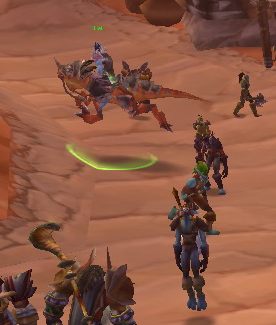
Running target
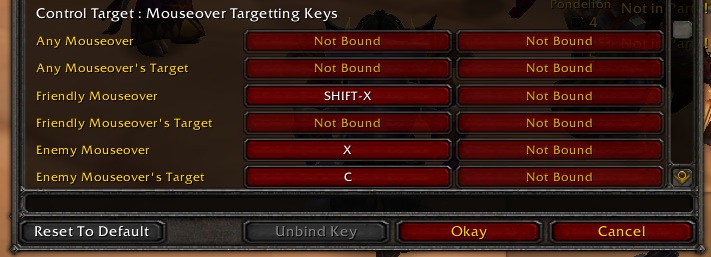
Keybinds
Description
ControlTarget gives you an easiest way to target enemies or friendly players.
While pressing control key (or any other keybind), ControlTarget automatically click any target you mouseover.
You don't need to click at a small fast-moving target, just press a key and move around mousepointer.
ControlTarget version 2.0 is somewhat bigger than original 1.0; I have completely changed the interface. You need to configure your keybind to any of six new keybinds;
"Any Mouseover"
"Any Mouseover's Target"
"Friendly Mouseover"
"Friendly Mouseover's Target"
"Enemy Mouseover"
"Enemy Mouseover's Target"
New keybinds now target your mouseover (or mouseover's target) as soon as you press the key in addition to the original behavior (It will target every target you mouseover while pressing the key).
Also you can click a player name while pressing control key (or other "charname" modifier key when you configured), ControlTarget automatically target the player for you.
If you don't have spare key for new keybinds, you can continue to use modifier keys (control/shift/alt/other combinations).
I have added slash commands for configuration.
/controltarget mouseover (modkey1) (modkey2) (modkey3)
/controltarget friendlymouseover (modkey1) (modkey2) (modkey3)
/controltarget enemymouseover (modkey1) (modkey2) (modkey3)
/controltarget mouseovertarget (modkey1) (modkey2) (modkey3)
/controltarget friendlymouseovertarget (modkey1) (modkey2) (modkey3)
/controltarget enemymouseovertarget (modkey1) (modkey2) (modkey3)
/controltarget chatname (modkey1) (modkey2) (modkey3)
Where (modkey#) is one of the following: c(ontrol) s(hift) a(lt) or off
Note that modifier keys don't kick in as an event when you press it when your mouse pointer is already on a mob; ControlTarget doesn't know if you pressed a modifier key until you move mouse pointer away from the mob.
The ControlTarget Team


Owner