
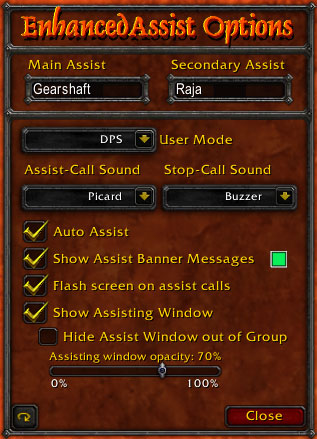
Options Window
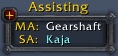
Assisting Window
Description
Usage
Before the raid starts the Raid Leader, Party Leader or Raid Assistant should assign a Main Assist and Secondary Assist to all members in the raid/party to the same assists. The preferred method for doing this is with the /commands "/ea ma %t" (requires targeting someone first) or "/ea sa gearshaft". Alternatively a chat-message could be sent like this: '%%setma Gearshaft'. All of these methods will set everyone's EnhancedAssist to Gearshaft as MA so that when Gearshaft wants to initiate everyone attacking, he can say in raid '%%assist Gearshaft on Molten Destroyer' (the targets and player name can be set with %T and %P.) By having EA report assisting calls to Raid instead of some hidden channel, other people who don't have EnhancedAssist yet are not left in the dark on what to do. By default, when an assist is called on a target, you automatically change targets to the intended target. If something terrable happens and you need everyone to stop attacking a mob, the MA or SA can call a '%%stopdps' command which will stop anyone (other than tanks) from attacking the mob so you may regain control. EnhancedAssist has 2 modes, DPS mode and Tank mode. DPS mode is standard, while Tank mode prevents automatic target switching on call, and ignores %%stopdps commands.
Healers too can take advantage of this mod. There are matching commands for healers as well. %%heal, %%setMH, %%setSH, each work just as the original assisting commands worked but only apply if you have the mode set to Healer. Healers are not affected by the %%stopDPS command, just like Tanks aren't susceptible to auto-switching targets or %%stopDPS.
Features
- Uniformly and clearly assign a main and secondary assist player.
- Keybinds to assist the main and secondary assists which can be set automatically.
- Banner message with user settable color, telling you when the assist has called a new target.
- A convenient user interface with a complete set of simple /commands.
- User selectable DPS, Tank, or Healer mode tailoring the functionality of EnhancedAssist to that of each role.
- Separate commands for healers and damage dealers.
- The ability to issue commands to specific people via whispers instead of to Raid Party or Say.
- Support for multiple channel announcement, settable with the announce channel command: '/ea annch Raid Party' or '/ea annch say raid' or any combination of raid, say, and party. Default is only Raid
- Assisting window names dynamically change color based on the status of the MA and SA. White is normal, Red is dead, Gray is offline, Light Blue is not in your raid/party.
- Optional automatic screen flashing functionality provided by the add-on "Emergency"
Summary
This mod adds an enhanced assist system featuring two different assists (main and secondary) that are quickly changed, custom assist announcement, a small window with assist information and more with everything saved.
Installation
Unzip the files in the archive to World Of Warcraft\Interface\AddOns directory. A new directory called EnhancedAssist will be created. Once unzipped, enter the game and set all desired hotkeys in the 'Key Bindings' menu. The command '/ea' will bring up the various command-line functions and their current values.
Notes
EnhancedAssist works best when all DPS classes in a raid have it installed. It was designed for use with raids but works equally well for parties.
If both a main assist and a second assist are defined and the main assist is dead or out of range (not in the zone, linkdead/logged off, etc.) then Assisting the main will fail over and attempt to assist the second.
Each assist can be configured to announce a successful assist into a selected channel (Party, Raid or Say) with the /ea annch command, using a customized text string set using the /ea anntext command. This text string can contain variables $MA, $SA, $P and $T that get replaced with the current Main Assist, Second Assist and Assisted target respectively. For example:
/ea anntext Assisting $MA on -= $T =-
/ea annch RAID
would turn on announcing for main assisting, set the text to something like 'Assisting SatchsUncle on -= Scarshield Warlock =-' and make it go to the raid channel.
The mod monitors party, raid, say and whisper channels for the special commands '%%SETMA' and '%%SETSA'. These commands followed by a name will auto-set who the main/second assists are. For example, sending: '%%SETMA SatchsUncle' in the /raid channel would set the main-assist of anyone using this mod to SatchsUncle. This is useful at the start of a raid to set everyone's assists properly, or for sending to different people when strategically splitting between multiple MAs.
The assist popup window can be used to quickly set main and second assists. Target the player and left-click the appropriate area on the popup window to set that person. Right-clicking the window allows it to be moved around. the command '/ea trans ' where is from 0.0 to 1.0 sets the popup's transparency; 0.0 is fully transparent, 1.0 is fully visible.
Credits
Coded by Gearshaft
Original Concept by Keldrin
Tested and developed with the help of The Dark Alliance horde guild of Zul'jin.
EnhancedAssist Team
