


V2.0
Description
A tool that merges auctioneer data files.
Note: The data files are stored in your "Saved Variables" directory, not in your addon directory.
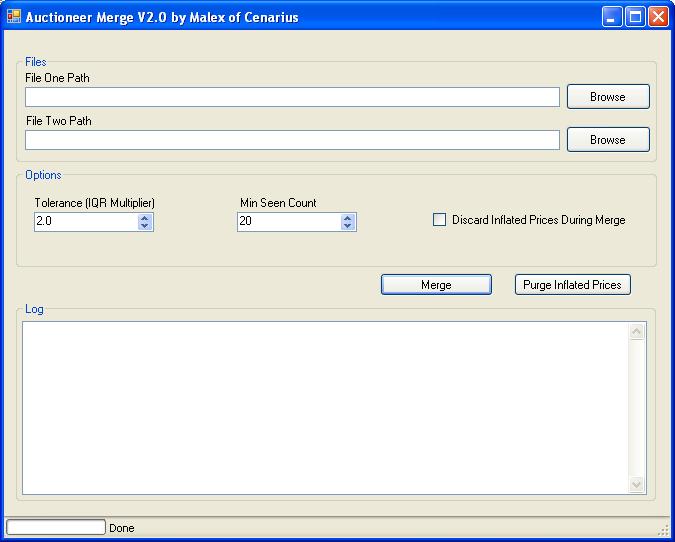
Usage: Use the two browse buttons to select the two Auctioneer.lua files you want to merge. The second file will be merged into the first one. Press the 'Merge' button. When it is complete, the progress bar will show 100%. The merged file will then be called Auctioneer.merged in the directory of the executable.
If you want to remove inflated prices from a data file, use the purge button. Only one file is purged and comes from the first file path. When the purge operation is complete, the modified file will be saved in the directory of the executable and called Auctioneer.purged. The operation also removes prices that are too below the median value for the historical buyouts. You can control how the "outliers" are rejected using the tolerance and min seen count controls. The min seen count means that if an item has not been seen that many times, it will not be considered during the purge operation. The tolerance controls how far out a price can go from the median value before it is rejected as an outlier. If the tolerance is zero, more items will be discarded. You will probably have to experiment with this value until you get the results you want. A file called LogFile.txt will show you what items were discarded during the operation.
If you want to discard inflated prices during the merge operation, select the checkbox and it will apply the purge algorithm to each buyout price is the second file's data section before adding it to the first file.
I didn't put much effort at making this look pretty, so if anybody is interested in making it look better or adding something, go ahead and then send me the project. You can reach me at malex-cenarius@hotmail.com.
If there are any bugs or your files are not merging correctly, you can send me email and I will fix it. Also you can post suggestions for features here or send them to my email.
Note that merging a file with itself will make all your item "seen count" values double. If 100 people all scanned the AH at the same time and saw some single item and you then merged those 100 files, your tooltip would then show "seen 100 times", when it should really say seen 1 times.
The Auctioneer Merge Team

