ProfitForever
- By
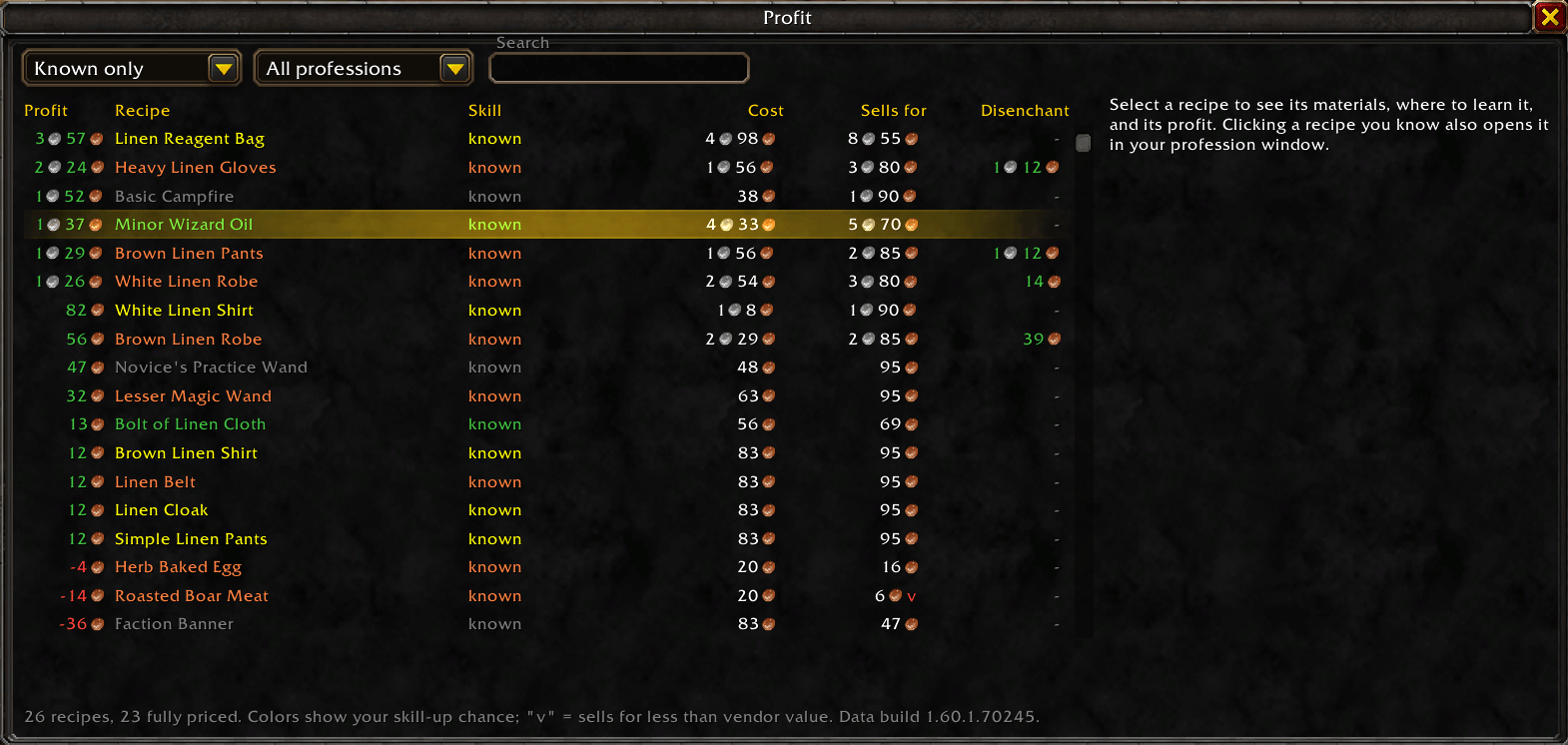
Profit Menu Screenshot
Description
Profit
Profit shows which of your profession crafts actually make gold. It combines Auctionator's auction house prices with recipe data from WoW Forever to show, for every recipe:
- Material cost, using auction prices, vendor prices for vendor-bought materials like thread, dye and vials, or the crafting cost of materials you can make yourself (like bolts of cloth) when that's cheaper
- What it sells for after the auction house cut, and a warning when a vendor would pay more
- Profit per craft
- Vendor flips: rank crafts by what a vendor pays instead of the auction house, or by whichever pays more
- Skill color at your current level (grey recipes are included, since they can still be profitable)
- Where to learn it if you don't know it yet: trainer (with the skill needed), pattern or recipe item (with its vendor or auction price), or both
- Disenchant profit: what you'd make crafting the item to disenchant instead of selling it
Disenchanting
- Item tooltips show the estimated disenchant value of green, blue and epic weapons and armor, based on the auction prices of the materials. Hold Shift to see each material with its chance and price.
- Disenchant from AH (enchanters only): a list of gear on the auction house that's worth more disenchanted than it costs, leaving out items above your Enchanting skill. Click an item with the auction house open to search for it.
- Recipe details show what crafted gear disenchants into, and say when disenchanting beats selling.
How to use
- Install Auctionator (required) and run a scan at the auction house.
- Open each of your profession windows once so Profit knows your skill and recipes.
- Type /prof, or click the minimap button.
In the window you can filter to recipes you know, recipes you know plus ones a trainer teaches at your skill, recipes you can learn now, all recipes, or your favorites; pick one profession or your main professions; choose whether to sell on the auction house, to a vendor, or wherever pays more; search; and sort by any column. Click a recipe for its full breakdown. If you know it, the recipe also opens in your profession window. Click the star to the left of a recipe to add it to your favorites.
Commands
/prof: open the window/prof top [count] [profession]: most profitable crafts, in chat/prof <recipe>: breakdown of one recipe/prof minimap: show or hide the minimap button/prof tooltip: show or hide disenchant values in item tooltips/prof export: share what you've recorded (see below)/prof changelog: what's new in each update/prof debug: details to include in a bug report
Help fill in the data
Some information isn't in the game files, like the skill needed to learn trainer recipes, which vendors sell what, and what disenchanting gives. Profit records this automatically when you open trainer and merchant windows and when you disenchant. When the data is missing, Profit says so instead of guessing. If a disenchant gives something Profit didn't expect, a popup asks you to share it. To help everyone, type /prof export, copy the text, and post it at github.com/ExcEssIv3/profit/issues.
Notes
- Built for the WoW Forever beta. Expect rough edges, and please report issues.
- English clients only for now.
- Faction auction houses only (5% cut).
- Disenchant results use the Classic loot tables; WoW Forever may differ, which is why Profit records what your disenchants actually give.
ProfitForever Team