ProfileSwitcher
- By
Description
ProfileSwitcher
Manage your World of Warcraft AddOn profiles with ease!
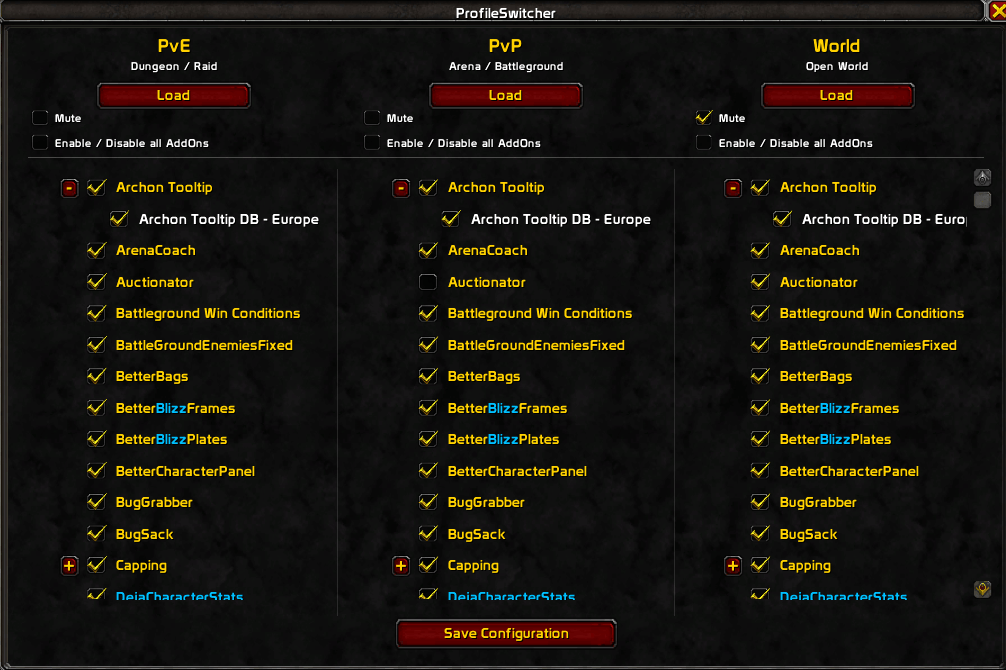
ProfileSwitcher helps you manage your AddOn configurations for different types of gameplay. Create and maintain three separate profiles — PvE, PvP, and World — and switch between them manually or through automatic profile detection, or mute them to disable automatic switch prompts for individual profiles.
Features
- Three separate profiles: PvE, PvP, and World.
- Automatic profile detection: Detects the current content type using zone and instance information.
- Manual profile switching: Load any profile using a slash command or the configuration window.
- Individual AddOn settings: Choose which AddOns should be enabled in each profile.
- Grouped AddOns: View AddOn groups and their child AddOns in a hierarchical list.
- Collapsible AddOn groups: Expand or collapse groups to keep the configuration window organized.
- Automatic profile switch prompts: Get a confirmation prompt when entering a different content type and the target profile's AddOn settings do not match the current configuration.
- Profile-specific mute option: Disable automatic switch prompts for individual profiles.
- New AddOn detection: Automatically detects newly installed AddOns when the game starts or reloads.
- New AddOn notifications: Displays a custom notification window listing newly detected AddOns and offers to open the profile configuration.
- New AddOn badges: Newly detected AddOns are highlighted with a blue "- New" label in the configuration window, displayed in the respective client language.
- Reinstallation detection: Removed AddOns can be detected as new when reinstalled. The game must be restarted after removing an AddOn for it to be detected as new upon reinstallation.
- Saved settings: Profile configurations and relevant settings are saved per character.
- Multilingual interface: Supports German, English, French, Spanish, Russian, and Chinese.
Profiles
- PvE – For dungeons, raids, and other PvE content.
- PvP – For arenas, battlegrounds, and other PvP content.
- World – For open-world gameplay.
Each profile has its own AddOn configuration and mute setting.
Slash Commands
Use the following commands to control ProfileSwitcher:
| Command | Description |
|---|---|
/ps |
Displays the available commands. |
/ps status |
Displays the current zone, zone type, active profile, and last recorded zone. |
/ps pve |
Loads the PvE profile. |
/ps pvp |
Loads the PvP profile. |
/ps world |
Loads the World profile. |
/ps config |
Opens the configuration window. |
How to Use
-
Enter
/ps configto open the configuration window. -
Select the AddOns you want enabled in each profile.
-
Expand or collapse AddOn groups to navigate the list more easily.
-
Configure the mute option for each profile if you do not want automatic switch prompts for that profile.
-
Click Save to save your configuration.
-
Click Load above a profile to apply its AddOn configuration.
Automatic Profile Switching
- ProfileSwitcher uses zone and instance information to identify whether you are in PvE, PvP, or the open world.
- When the detected content type changes, ProfileSwitcher checks whether the corresponding profile's AddOn settings match the current configuration.
- If the settings differ, a confirmation prompt lets you choose whether to load the target profile.
- If the target profile is muted, no confirmation prompt is shown for that profile.
- If the target profile's AddOn settings already match the current configuration, no prompt is necessary.
- You can always switch profiles manually using slash commands or the configuration window.
Applying a profile changes the enabled state of your AddOns and reloads the user interface so the changes can take effect.
New AddOn Detection
- Newly installed AddOns are detected when the game starts or reloads.
- A custom notification window lists newly detected AddOns and offers to open the profile configuration.
- Newly detected AddOns receive a blue "- New" badge in the configuration window.
- The badge uses the appropriate translation for the WoW client language and disappears after the next reload or restart.
- AddOns removed and later reinstalled can be detected as new. Restart the game after removing an AddOn so the removal is reflected in the saved detection list.
Localization
ProfileSwitcher supports the following languages:
- German
- English
- French
- Spanish
- Russian
- Chinese
The interface automatically uses the appropriate language for your WoW client when a translation is available. Unsupported locales fall back to English.
Important Notes
- Profile settings are stored per character.
- ProfileSwitcher manages AddOn enabled states according to your selected profile.
- Applying a profile requires a user interface reload for the changes to take effect.
- Automatic switching prompts depend on changes in the detected content type, the target profile's mute setting, and whether the target profile's AddOn settings differ from the current configuration.
Feedback and Support
Found a bug or have a suggestion? Please leave feedback on the CurseForge project page.
Thank you for using ProfileSwitcher!
ProfileSwitcher Team