ProfessionsForever
- By
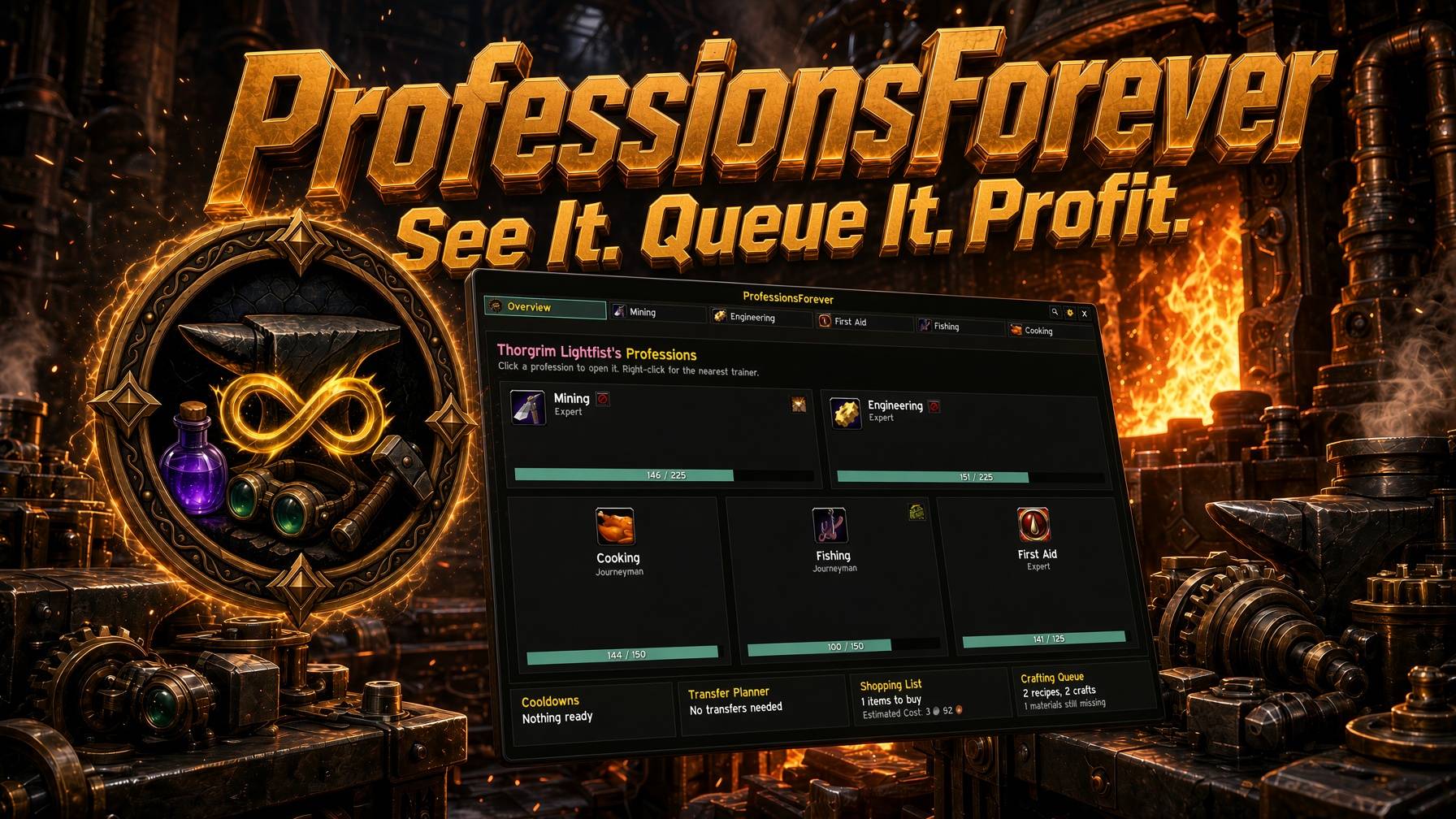
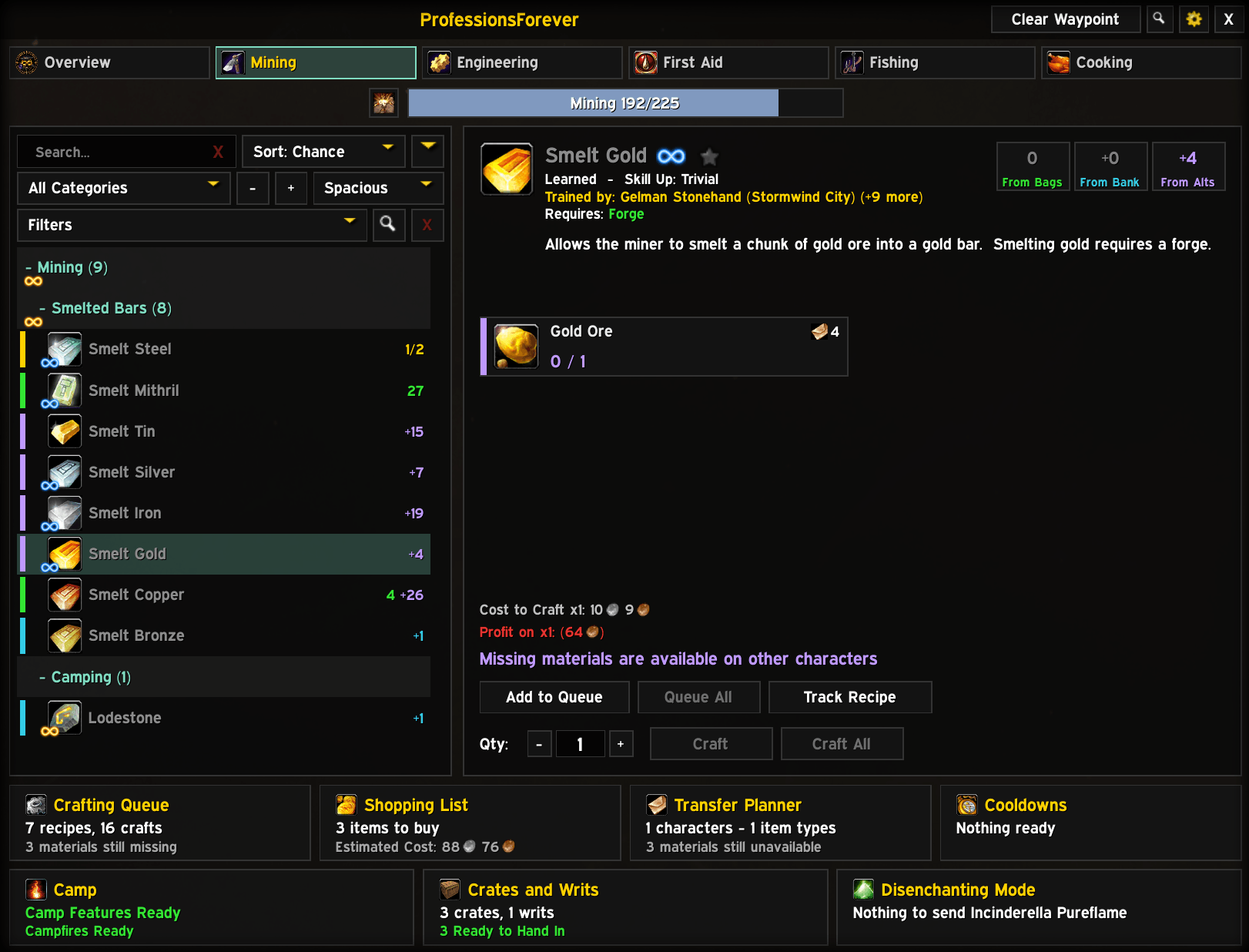
Sort recipes by profit, see what is craftable at a glance, and check cost and profit per craft with Auctionator. Reagent cards, bag, bank and alt counts, one-click queueing and a live summary of your queue, cooldowns, transfers and shopping list.
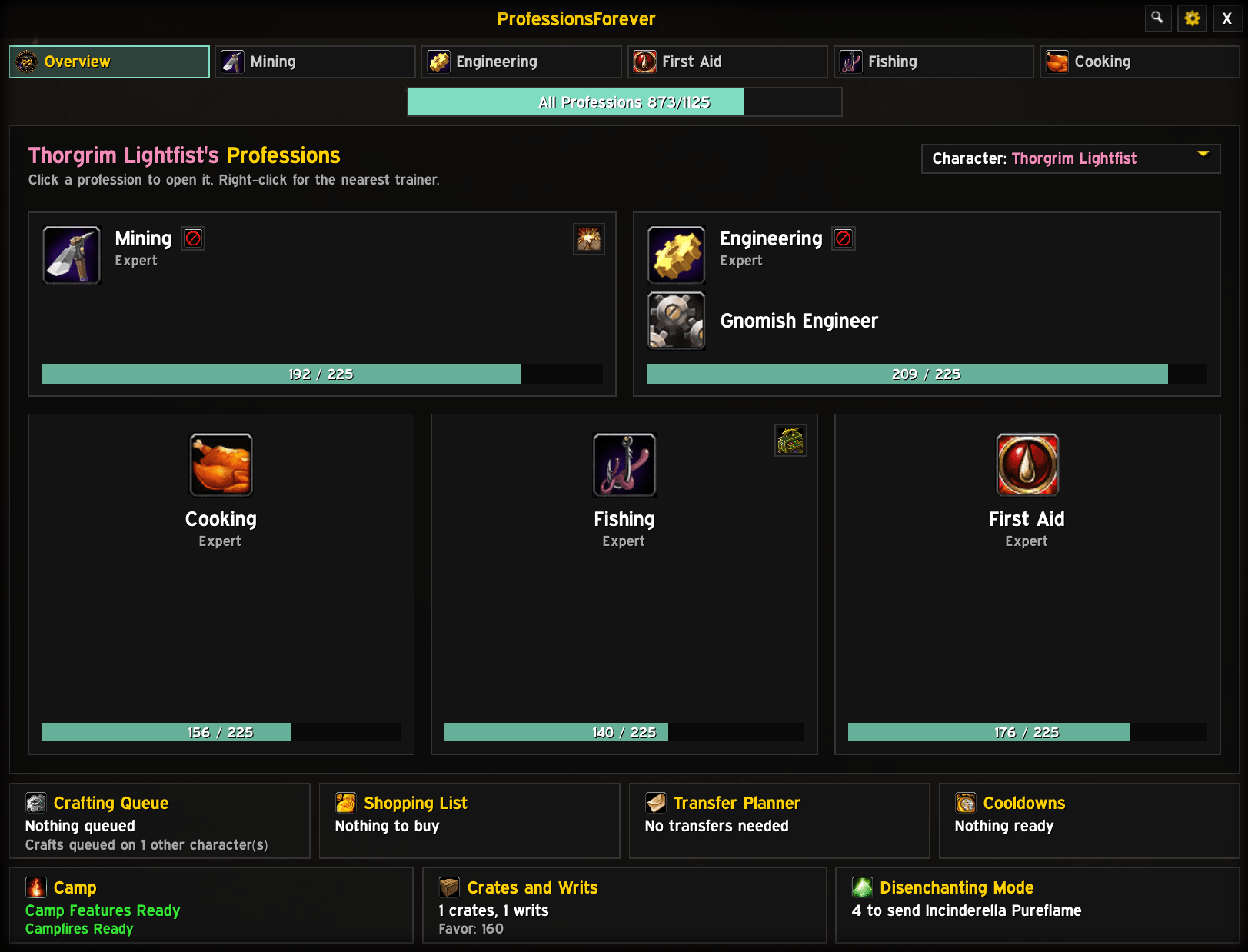
A card for every profession you know, with its rank and skill bar. Click to open, right-click for a trainer, or pick another character to browse their professions.
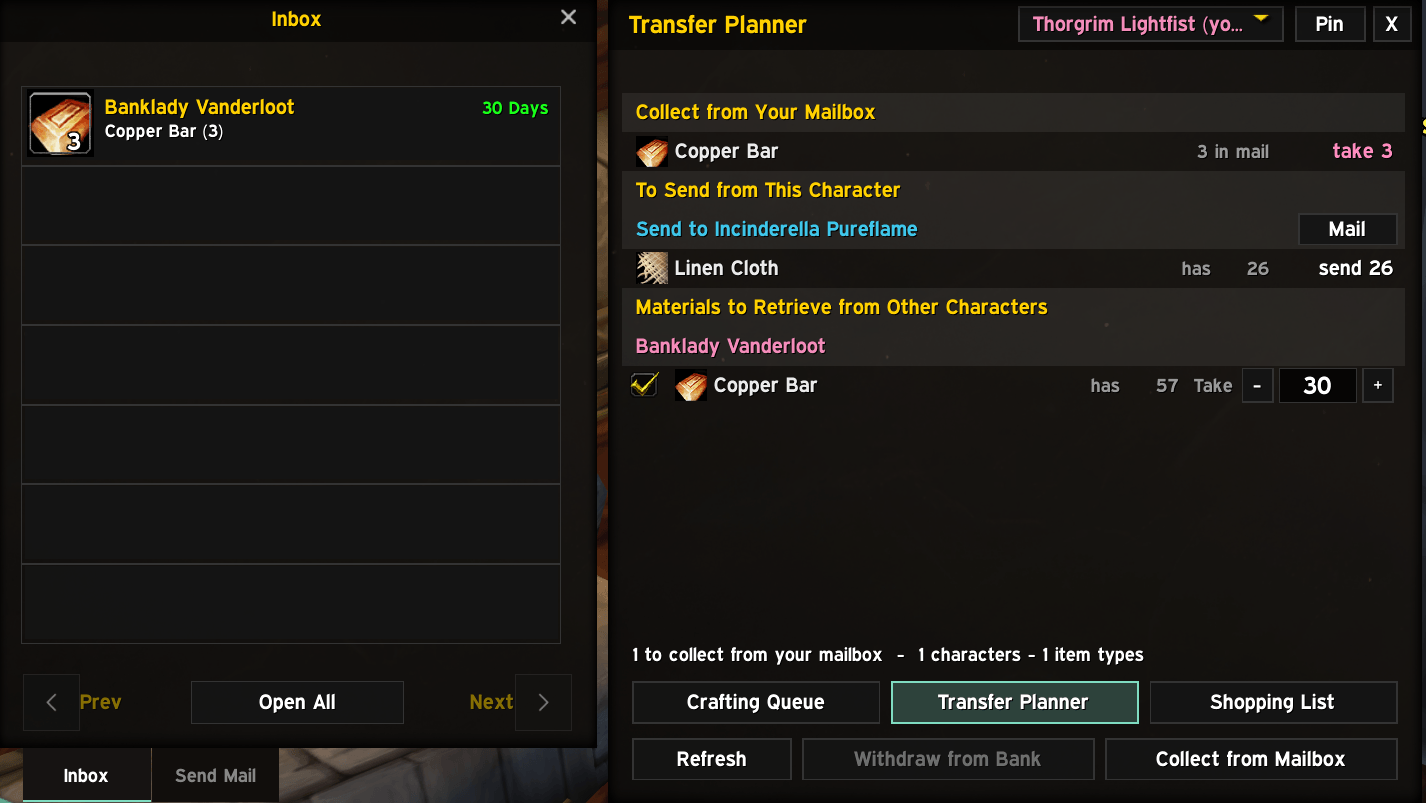
What each character should mail for your queues, with Mail and Collect from Mailbox buttons. It opens at the mailbox when there's something to do, and closes with it.
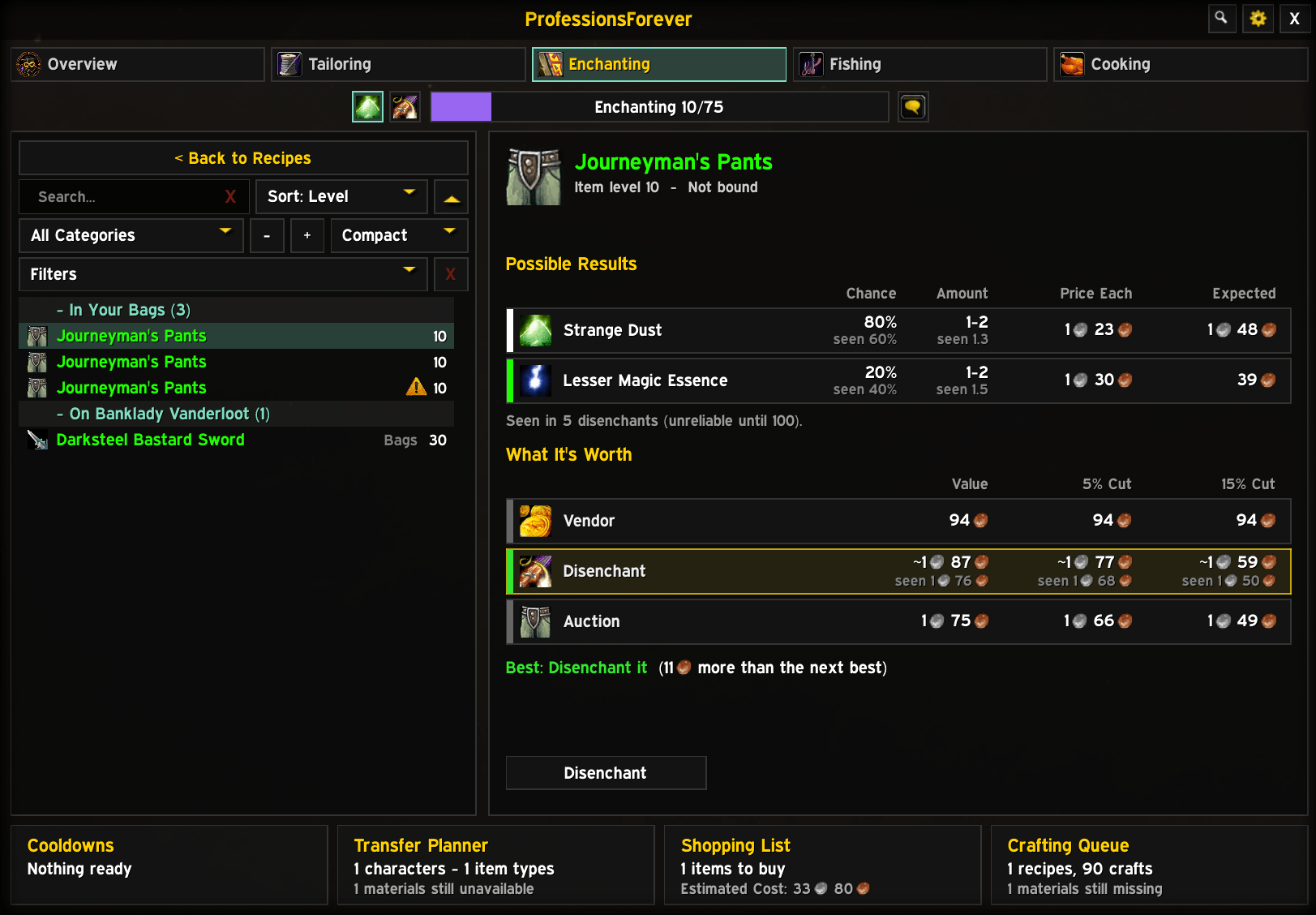
Every piece of gear you could disenchant, in your bags, bank and on your alts. See what each might give and whether it's worth more vendored, disenchanted or on the auction house.
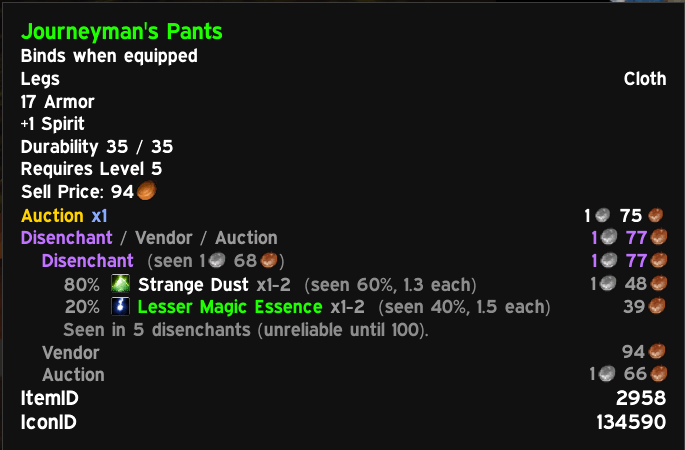
Weapons and armour tell you whether to disenchant, vendor or auction them, with every result and its value on Shift.
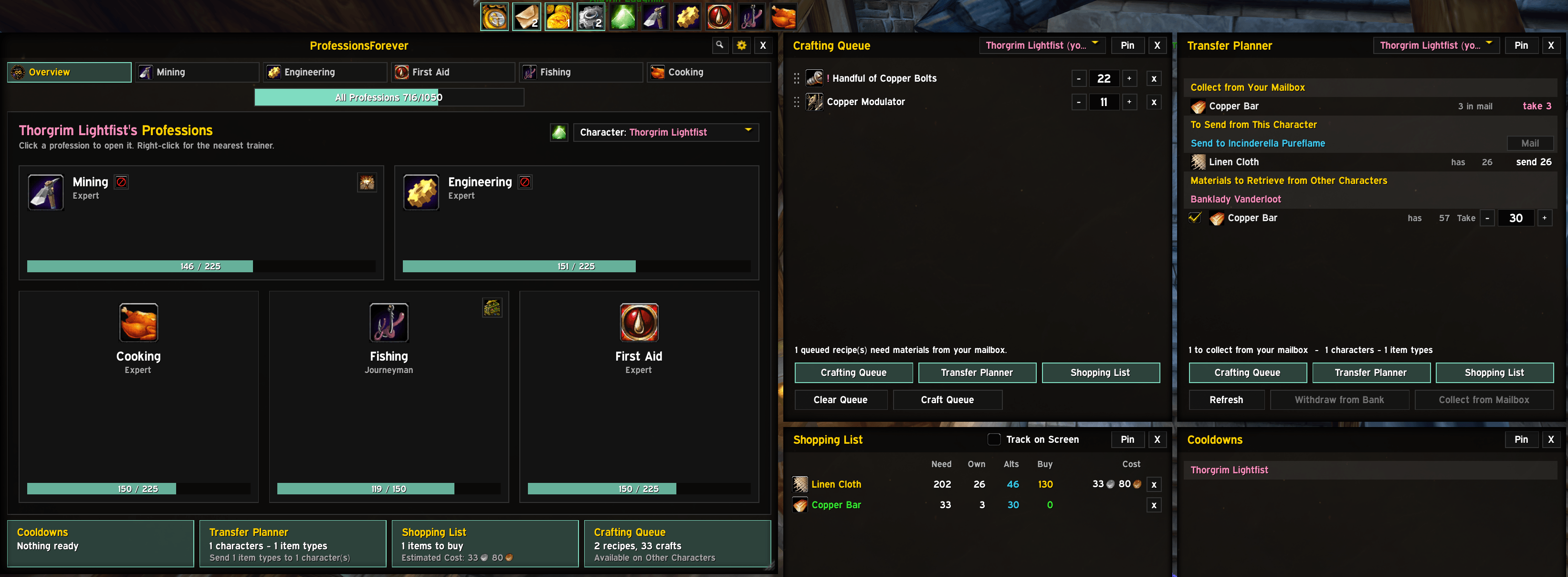
A launcher bar opens your windows and professions without the main window. Side windows dock neatly and always stay on screen.
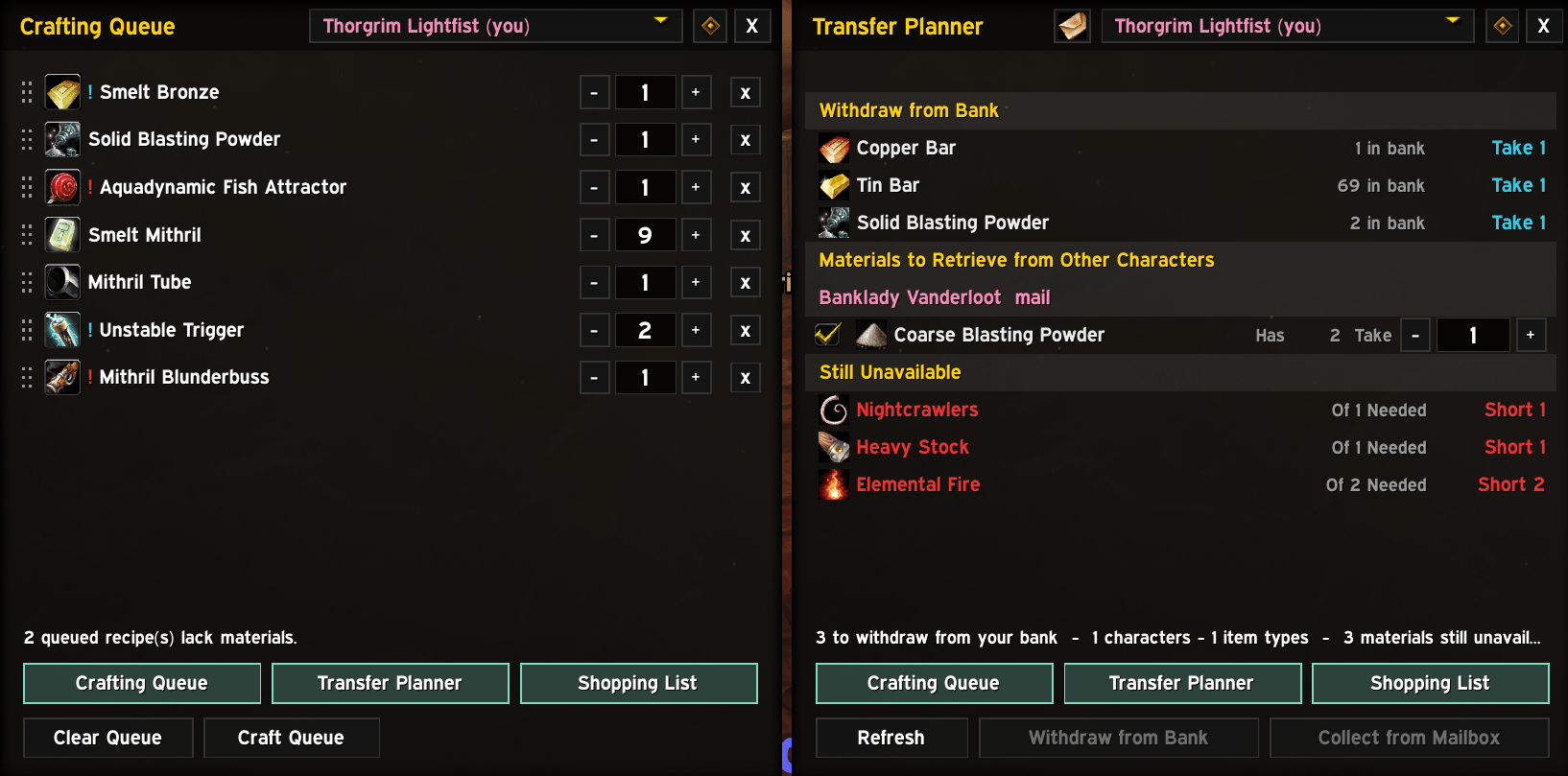
Sub-crafts are queued first, rows show what's missing, and the shopping list works out what to buy across all your characters of the same faction.
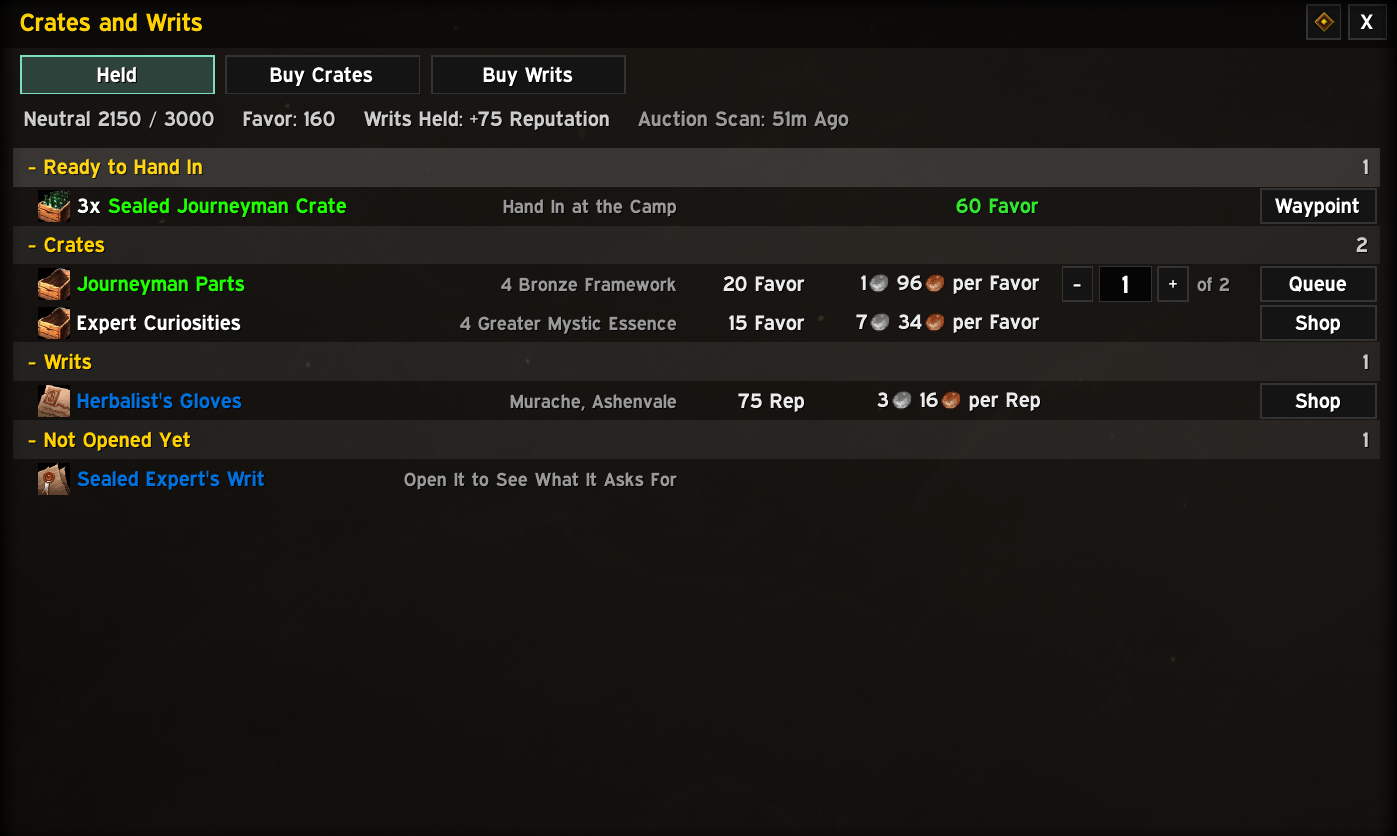
Struggling to figure out the the cheapest way to get Rep and Favor? Not anymore!
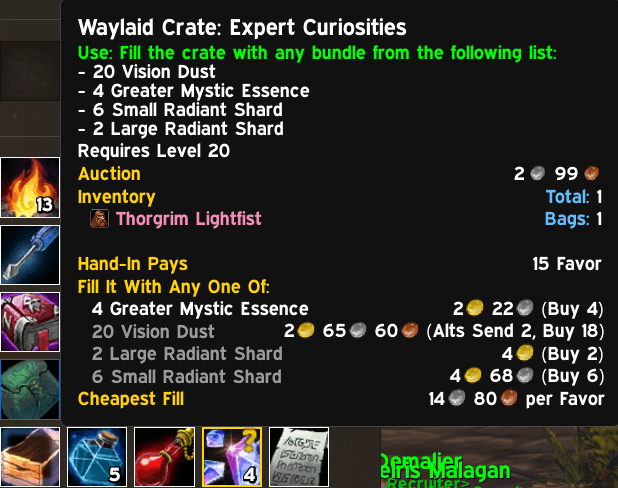
All the info you need to make informed decisions!
Description
The professions window WoW: Forever deserves. It knows what's in your bags, your bank, your mailbox and on every one of your alts, so it can tell you what you can craft right now, what you're short of, who should mail what to whom, and where to go to get the rest.
Queue up crafts across all your professions, let the shopping list fill itself, decide what's worth disenchanting, and get a waypoint to the vendor, trainer or banker you need, all from one window.
Built for WoW: Forever only. Website, with every screenshot full size: https://professionsforever.github.io/
Why ProfessionsForever
- Knows your whole account: your bags, your bank, your mailbox and every one of your alts, so every number reflects what you really own.
- A smarter crafting queue: line up crafts across professions and craft them in one go. The bits a recipe needs get queued first.
- A shopping list that keeps itself: whatever your queues are short of goes on the list by itself. You never have to work out what to buy again.
- Who mails what to whom: the Transfer Planner knows where everything is and what each character should send. At the mailbox it's one click.
- Dust or gold? Disenchanting Mode and tooltip advice tell you whether a piece is worth more vendored, disenchanted or on the auction house.
- Where to go next: waypoints to the vendor, trainer or banker you need, with locations built in. No Questie needed.
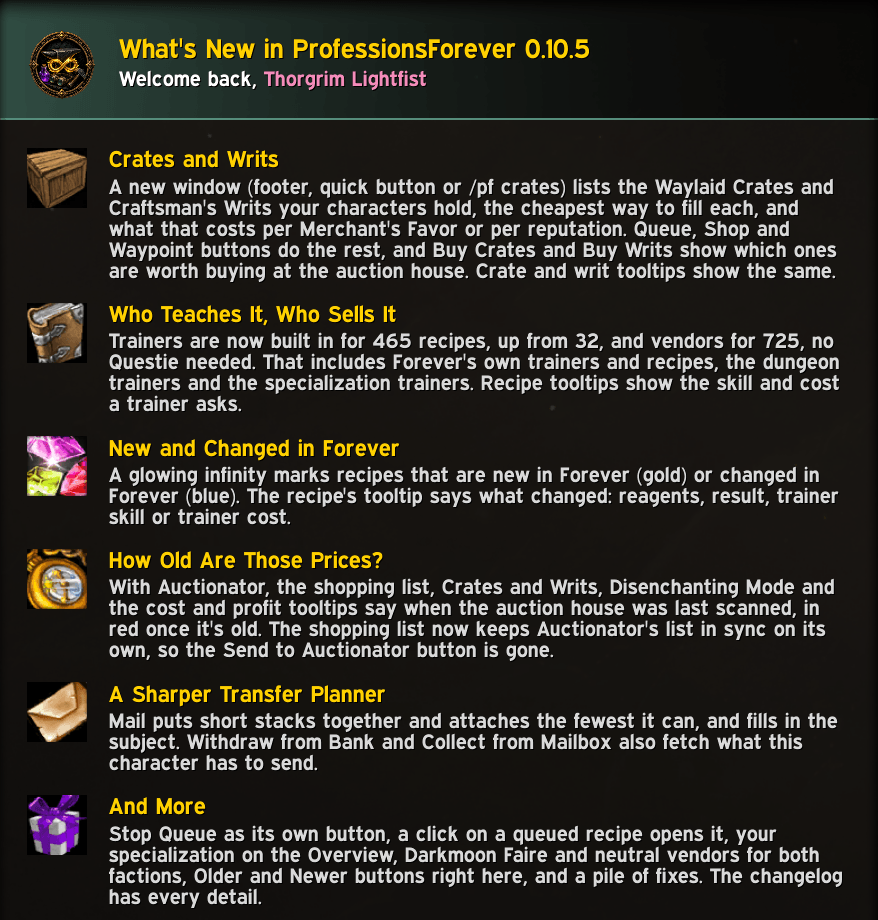
New in 0.10.5
- Crates and Writs: a new window (footer, quick button or
/pf crates) lists the Waylaid Crates and Craftsman's Writs your characters hold, the cheapest way to fill each, and what that costs per Merchant's Favor or per reputation. Buy Crates and Buy Writs show which ones are worth buying at the auction house. - Who teaches it, who sells it: trainers built in for 465 recipes, up from 32, and vendors for 725, no Questie needed. Forever's own trainers and recipes, the dungeon trainers and the specialization trainers included.
- New and changed in Forever: a glowing infinity marks recipes that are new in Forever (gold) or changed (blue), and the tooltip says what changed.
- How old are those prices? With Auctionator, the addon says when the auction house was last scanned, in red once it's old, and keeps Auctionator's shopping list in sync on its own.
- And more: a sharper Transfer Planner at the mailbox, Stop Queue as its own button, your specialization on the Overview, Darkmoon Faire and neutral vendors for both factions, and fixes.
Features
 Overview
Every profession you know on one page, at a glance. Your starting point.
- A card per profession, Cooking, First Aid and Fishing included, with its rank and skill bar.
- Click to open it, right-click for a waypoint to the nearest trainer, or drag it onto an action bar.
- Specializations: a Blacksmithing, Leatherworking or Engineering card shows yours, with its icon and name.
- Your alts too: pick another character to browse their professions and queue crafts for them.
 Recipe browser
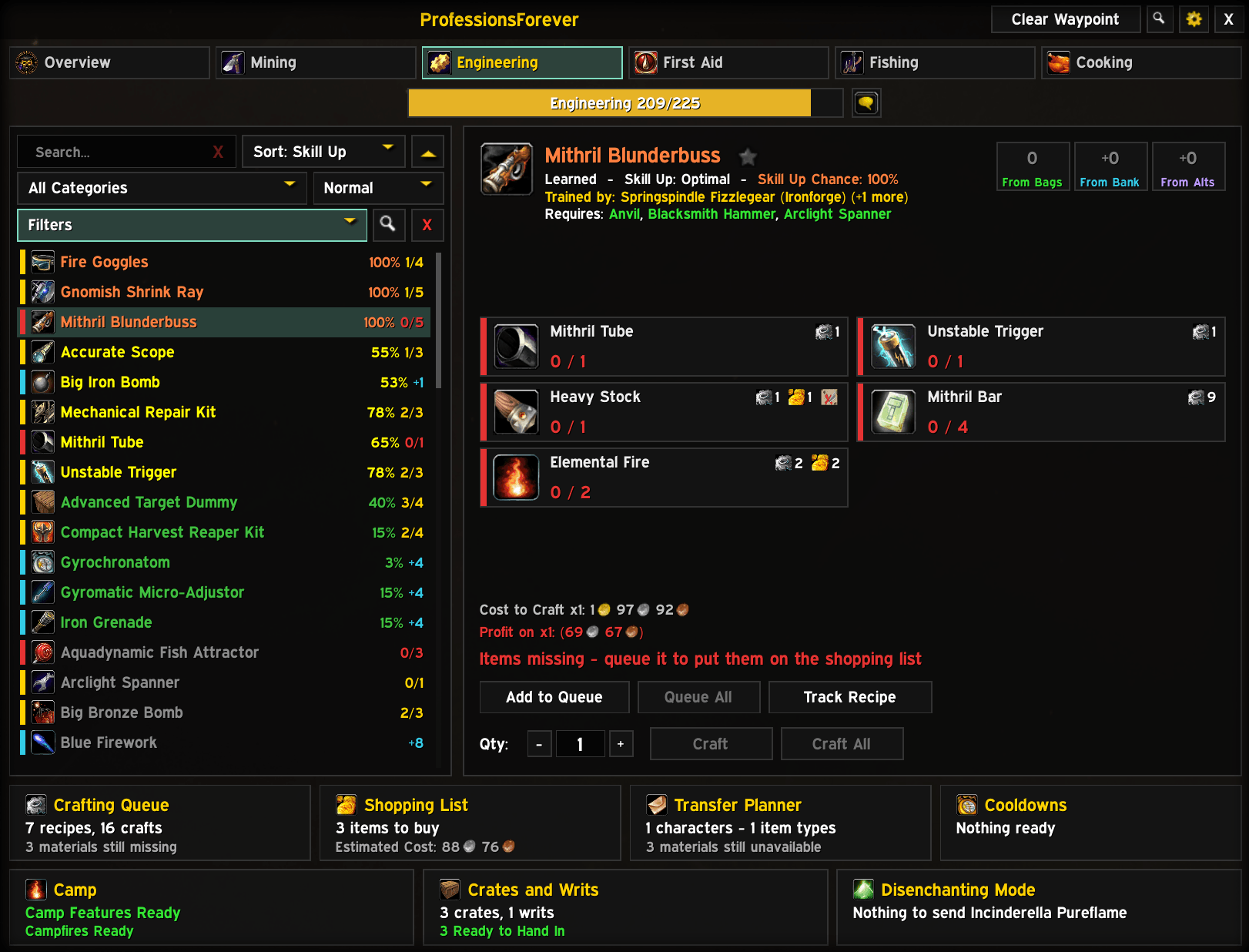
Find the recipe you're after and see straight away whether you can make it.
- Search by recipe name or reagent; sort by name, skill up difficulty, skill up chance, craftable amount or profit.
- Filter by learned, has materials, skill-up colour or favorites, with categories you can collapse.
- Colour-coded by skill up difficulty, with the skill up chance on each recipe and a stripe for whether the materials are in your bags, bank, partly there or missing. A glowing infinity marks recipes that are new (gold) or changed (blue) in Forever.
- Unlearned recipes say where they come from and what skill they need. Ctrl-click to preview gear in the dressing room.
- New or changed in Forever: the recipe's tooltip says which, and what changed: reagents, result, trainer skill or trainer cost. Recipes with a trainer show the skill and cost the trainer asks.
 Reagent cards
Everything about a recipe's materials, without opening your bags.
- Have / need for every reagent, plus what's in your bank, your mailbox and on your alts, and what your queue and shopping list already want.
- Craftable counts from your bags, with your bank, and with your alts.
- Tools and stations you need, and whether you have them (a better Enchanting rod counts).
 Crafting queue
Line up everything you want to make, across professions, and craft it in one go.
- Queue any recipe with its own amount, then click Craft Queue. Between recipes, a click on the game world crafts the next one. Click a queued recipe to open it in the main window.
- Sub-crafts first: reagents you can make yourself are queued ahead of the recipe, sized to what you're short of. Short on materials? It holds back the early steps so the final crafts aren't starved.
- At a glance: rows are marked red when something is missing, blue when it's in the bank, and pink when it's waiting in the mailbox.
- Plan for your alts: edit another character's queue from the character picker. A reagent another character is making is named on the row, and the mark turns yellow when they make all of it.
- Queue Needed: one click queues exactly the crafts your queues still need of what a recipe makes, on your own professions or an alt's.
- Enchants too: queue an enchant to plan and shop for its materials; each one you apply comes off the queue.
 Shopping list
You never have to work out what to buy again.
- Fills itself from your queues and follows them as they change, shared by your characters of the same faction (or one list per character).
- Needed, owned, from alts and still to buy, a click to search the auction house, and plain-text export.
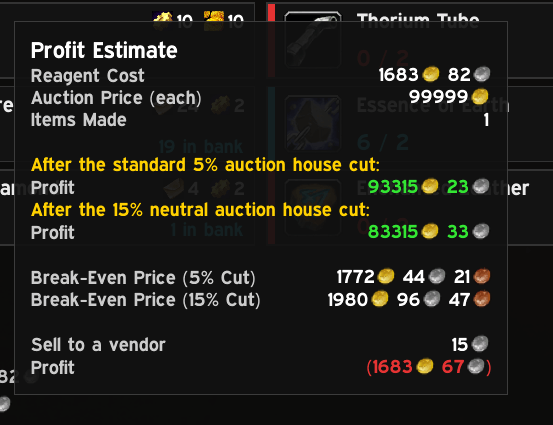
- With Auctionator: unit prices, costs, an estimated total, and an Auctionator shopping list that always holds what is still to buy. Crafted reagents cost whichever is cheaper, buying them or making them.
- On item tooltips: how many are on the list, how many your queues need and how many you still have to buy, without opening the list. Made by Queues says which of your characters is crafting it, and Crafts Into on ore and other raw materials says what your queues turn them into.
 Alts, mail and the Transfer Planner
Your materials are spread over five characters? The addon knows where everything is.
- Every character's bags, bank and mailbox, from Syndicator when it's installed, or recorded as you play.
- The Transfer Planner lists what each character should send for your queues. At the mailbox, Mail attaches exactly the right amount (splitting stacks for you) and Collect from Mailbox takes what your queue needs.
- It shows up when you need it: it opens at the mailbox or bank when there's something to do, docks beside them, and closes with them.
- Your call: choose per character and per material who supplies what, or let the planner decide.
- Manual Transfers: send any item or gold to another character, or ask one to send it to you, apart from any queue. Drop a stack from your bags on the window to pick it.
 Disenchanting
Stop guessing whether a green is worth more as dust or as gold.
- Disenchanting Mode lists every piece of gear you could disenchant, in your bags, your bank and on your alts, with search, sort, groups and filters (quality, bank items, set pieces, only what's worth it).
- What it's worth: possible results with their chances, and the value vendored, disenchanted and on the auction house, with the best choice highlighted. Auction only wins when it beats the others by more than the listing deposit.
- Tooltip advice on every weapon and armour piece, plus your own recorded results next to the expected odds.
- No Enchanting here? See what to send your main enchanter, or ask an alt to mail you their gear.
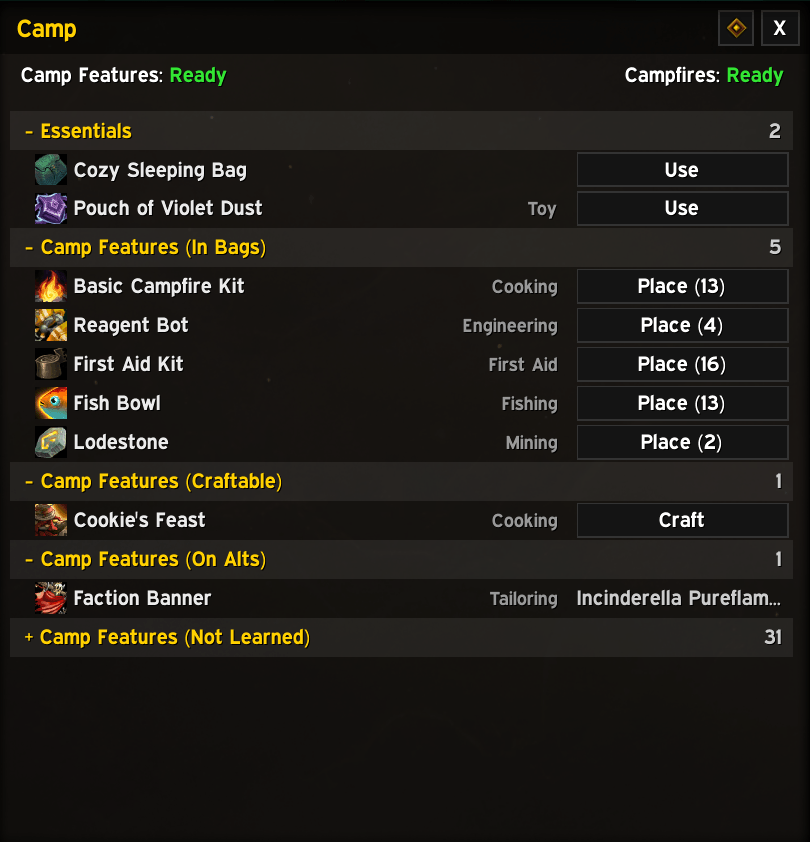
 Camp
Forever's camp features, all in one window.
- Everything you could put down: the tent, chair, campfire kits and every profession's camp feature, in your bags (with a Place button), craftable, on your alts, or not learned yet with the skill it needs.
- Essentials at the top: the Cozy Sleeping Bag and the Pouch of Violet Dust, with a Use button that counts down their cooldown.
- Cooldowns at a glance: the camp feature and campfire cooldowns at the top of the window, on the footer cell and on the quick button.
 Crates and Writs
Which Waylaid Crates and Craftsman's Writs are worth doing, and the cheapest way to do each.
- Ranked by cost per point: Merchant's Favor for crates, reputation for writs.
- Cheapest fill: each crate's cheapest fill, and whether it comes from your stock, your alts, crafting or buying. What you already hold counts at its full price, since you could sell it instead, the crate itself included.
- One click to act: queue the crafts, put what's missing on the shopping list, or set a waypoint to the customer or the camp.
- Buy Crates and Buy Writs: what a crate or a writ from the auction house would cost you once filled, with a button to put it on the shopping list.
- Performance Bonus counted, and a crate is marked for a Forged Delivery Receipt only when that beats your cheapest writ.
 One-Click Fishing
One key does the lot.
- Press to cast, press to catch: the key picks the bobber for you, and never a vendor or NPC standing nearby.
- Gets you ready first: puts on your best pole, the strongest lure you can use and an equipment set of your choice.
- Swaps back: your normal gear goes back on when you mount, after a while without casting or when combat ends, or with the Swap Back key or
/pf swapback. - Louder bites: sound effects go up while your line is out, and your settings come back afterwards.
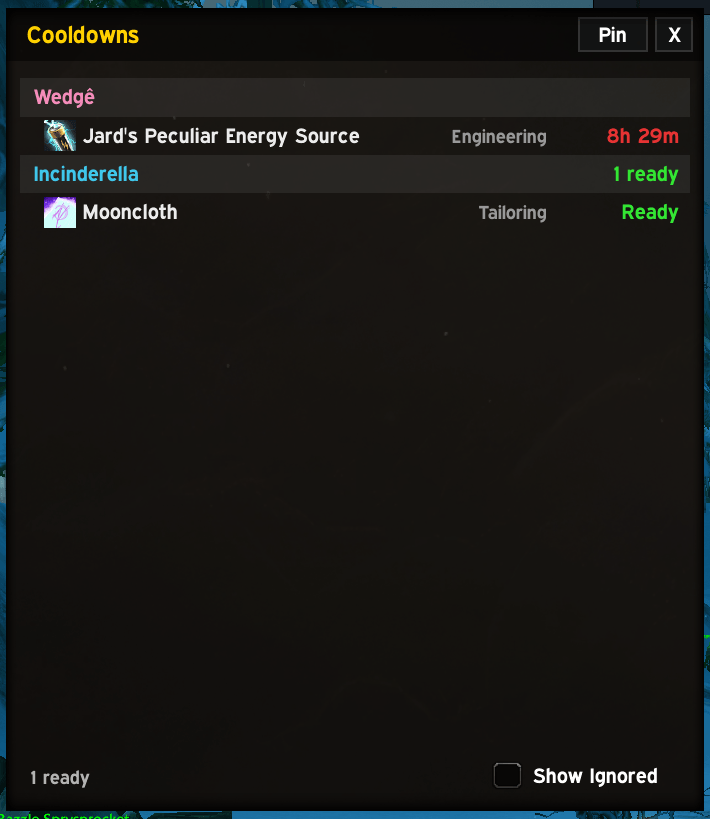
 Cooldowns
- Transmutes, Mooncloth and every other cooldown for all your characters in one window, ready ones first.
- A reminder at login of what's ready, and the count on the minimap button.
 Quick buttons, key bindings, Recipe Search and more
- Quick buttons: a little bar for your windows and professions, usable without the main window, each with a count of what's waiting. Drag it anywhere, in rows or columns growing from any corner.
- Key bindings: a key for every quick button and for each of your professions. Hover a button and press a key to bind it (
/pf bind), or use the game's Key Bindings. - Recipe Search: any recipe in the game, by name or by reagent, and which of your characters know it.
- Skill Up Route with SkillUp Forever: your levelling route, step by step.
- Tidy windows: side windows share a row of buttons, dock beside the main window (or the mailbox or bank), and always stay on screen.
 Navigation
- Waypoints through Polestar or TomTom to vendors, trainers and bankers, with trainer and vendor locations built in, no Questie needed.
- Built in for hundreds of recipes: who teaches it and who sells it, the trainers, vendors and recipes added in Forever included.
- Every trainer: a recipe's tooltip lists every trainer of your faction who teaches it, nearest first, and the waypoint goes to the nearest.
- It learns: trainers, vendors and bankers you visit are remembered, so it gets better as you play.
 Look and feel
- Five skins: Modern Dark, Blackout, Classic and Minimal, plus EllesmereUI when it's installed.
- Make it yours: font, size, scale, opacity and accent colour. Your Professions keybind and the micro-menu button open this window.
- Tooltips your way: switch each line the addon adds on or off and drag the blocks into any order, with a live preview beside the options. The recipe list's tooltip can dock beside the window, so it never covers the recipe panel.
Installation
- Install from CurseForge: search for ProfessionsForever in the CurseForge app, or use the Install button on this page. The app installs and updates it for you.
- Or install by hand: download the zip from the Files tab or GitHub Releases and put the
ProfessionsForeverfolder inWorld of Warcraft/<client>/Interface/AddOns/. - Start the game: log in, or type
/reloadif you're already playing. Open your professions as usual, or type/pf.
Usage
| What | How |
|---|---|
| Open or close the window | Professions keybind, /pf, the minimap button, or the micro-menu Professions button |
| Open a profession | Its tab, its Overview card, or its quick button |
| Queue a recipe | Add to Queue in the recipe panel |
| Shop for missing reagents | Queue the recipe: the shopping list follows the queue |
| Place a camp feature | Place in the Camp window (/pf camp) |
| Fish | Bind the One-Click Fishing key under Options, One-Click Fishing, then press it to cast and again to catch |
| Bind a quick button | /pf bind, hover the button and press a key |
| Get a waypoint | Right-click a reagent card, profession card or the From bank tile |
| Scale the window | Ctrl + mouse wheel on the title bar |
Optional integrations
| Addon | What it adds |
|---|---|
| Auctionator | Prices, costs, profit, disenchant values, an Auctionator shopping list kept in sync, and how old the last scan and each price are |
| Syndicator | Your bank and your other characters' bags, bank and mail |
| Questie / QuestieDB | More vendor, trainer and banker locations |
| Polestar or TomTom | Waypoints and the arrow (Polestar also prints multi-step routes) |
| SkillUp Forever | The Skill Up Route window, footer cell and quick button |
| EllesmereUI | An EllesmereUI skin, and docking beside its bank window |
Everything is optional. Features that need a missing addon simply don't show, and each addon has its own page under Options, Integrations.
Slash commands
| Command | What it does |
|---|---|
/pf |
Open or close the window |
/pf queue, /pf shop, /pf transfer, /pf cd, /pf camp |
Crafting queue, shopping list, Transfer Planner, cooldowns, Camp |
/pf crates |
Crates and Writs |
/pf track shop |
Track the shopping list on screen |
/pf recipe, /pf reagent |
Recipe Search by name or by reagent |
/pf de |
Disenchanting Mode |
/pf route |
Skill Up Route (with SkillUp Forever) |
/pf bind |
Bind keys by hovering the quick buttons |
/pf swapback |
Put your normal gear back on after fishing |
/pf whatsnew |
What's new in this version |
/pf options |
Settings |
/pf reset |
Reset the window's position and size |
/pf clearway |
Remove the waypoint |
/pf help |
List the commands |
Settings
Options are sorted into categories: General (main window, shopping list, Alt Inventory, notifications), Appearance, Quick Buttons (buttons and key bindings), Disenchanting, Tooltips (a page for each part of the tooltip, with a live preview), One-Click Fishing, Integrations (a page per supported addon) and About. Every category has its own reset.
Notes and limits
- The game only gives recipe details for a profession while it's open, so open each profession once before its recipes are known.
- The game only lets an addon start a craft from a click, so the queue waits for you to click the game world between recipes.
- Where an unlearned recipe comes from is only known from the built-in data, Questie and the trainers you visit.
- Vendor and trainer locations come from community data and may not be right everywhere. Let us know when one is off.
Support
- Website: https://professionsforever.github.io/
- Discord: https://discord.gg/Ay4E5GEhA2
- Bug reports and ideas: https://github.com/ProfessionsForever/Professions_Forever/issues
- Email: professionsforever@gmail.com
- Like it? https://ko-fi.com/professionsforever
License
ProfessionsForever is free software under the GNU General Public License, version 3. The source is on GitHub: https://github.com/ProfessionsForever/Professions_Forever
Trainer, vendor and banker locations and the disenchant odds come from the cmangos classic-db project (GPL-3.0); the trainers added in Forever from ForeverTDB (GPL-2.0 or later); recipe vendors, drops and quest rewards from forever-db (GPL-3.0) and QuestieDB, whose data will be removed on request; recipe and item data from the wago.tools tables for WoW: Forever. World of Warcraft is a trademark of Blizzard Entertainment.
ProfessionsForever Team