Professions Skill Buddy
- By
PSB-Screenshot1.JPG
PSB-Screenshot2.JPG
PSB-Screenshot3.JPG
PSB-Screenshot4.JPG
Description
Professions Skill Buddy
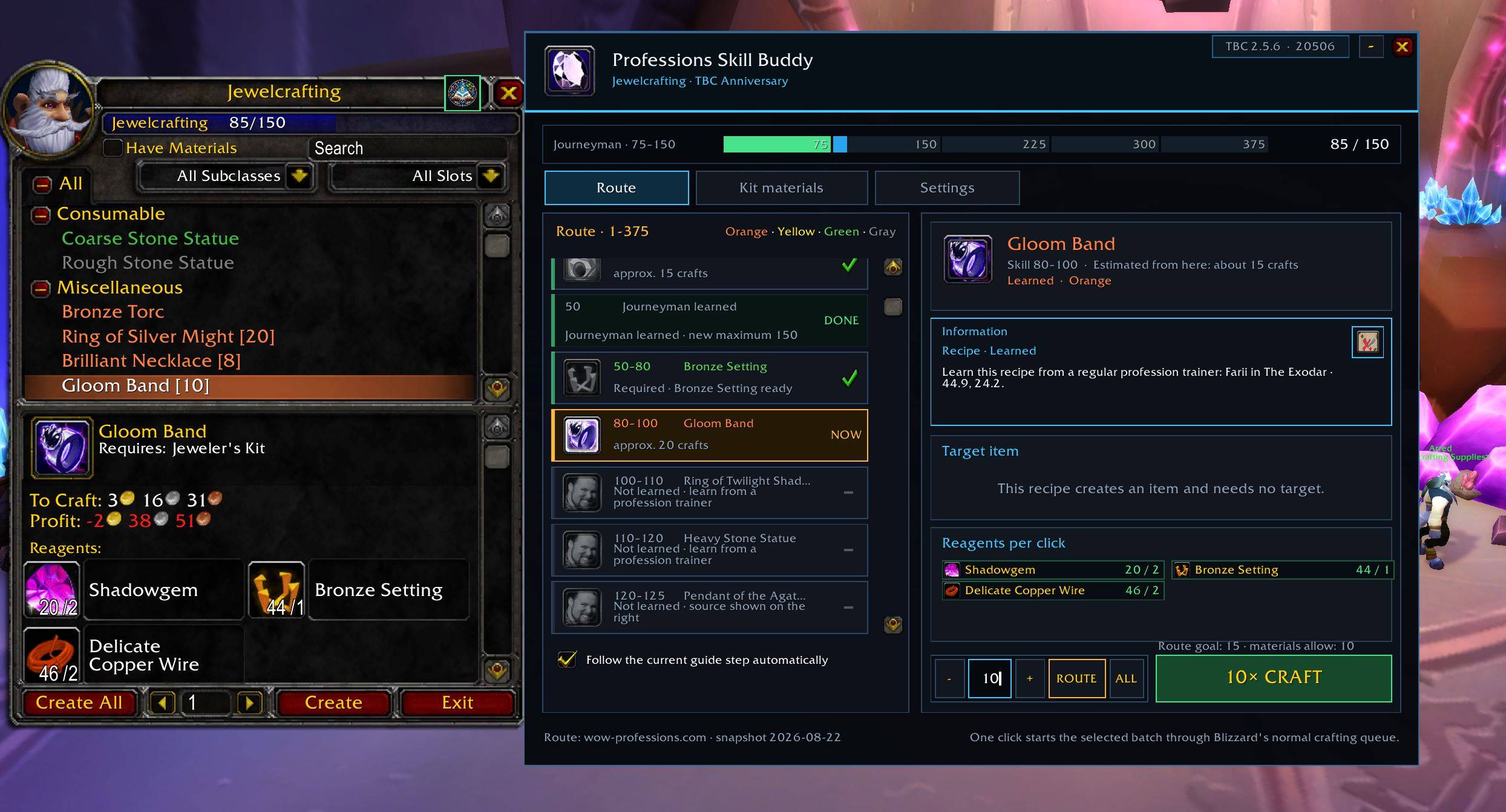
Professions Skill Buddy is an in-game profession leveling companion for World of Warcraft Classic: Burning Crusade Anniversary. It turns long 1–375 profession routes into clear steps and shows what to craft, gather, learn, or obtain next.
Supported Professions
The addon includes guided routes for all 13 TBC professions:
- Alchemy
- Blacksmithing
- Enchanting
- Engineering
- Herbalism
- Jewelcrafting
- Leatherworking
- Mining
- Skinning
- Tailoring
- Cooking
- First Aid
- Fishing
Crafting professions use recipe-based steps. Herbalism, Mining, Skinning, and Fishing provide informational skill brackets, resources, and recommended zones without automating movement or gathering.
Features
- Guided profession routes from skill 1 to 375
- Automatic selection of the matching guide when a profession window is opened
- Clear highlighting of the current route step
- Green completion checkmarks for finished steps
- Orange, yellow, green, and gray recipe difficulty colors
- Trainer, vendor, book, quest, reputation, and Auction House guidance
- Faction-specific trainer and vendor information
- NPC names, locations, zones, coordinates, and supported waypoint actions
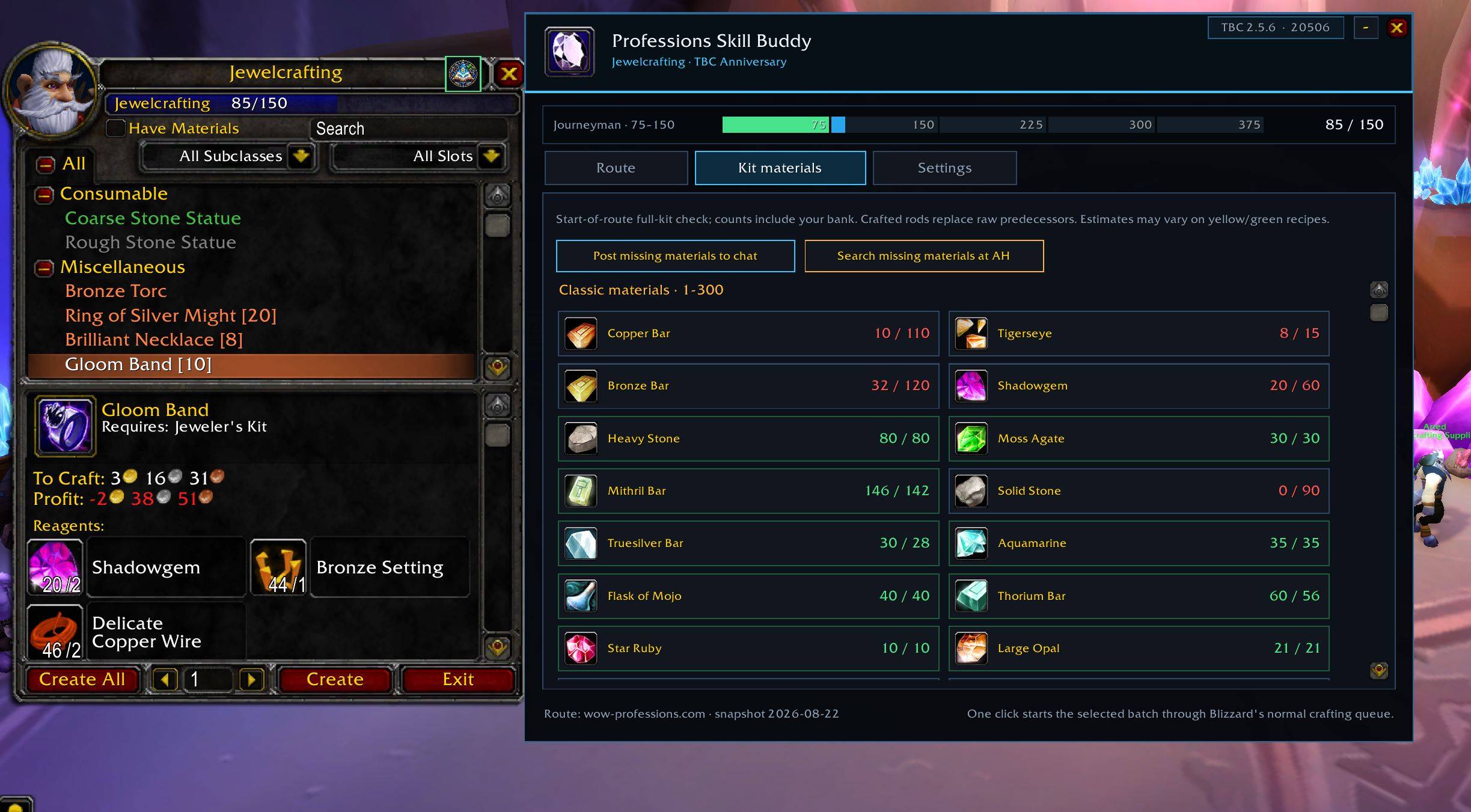
- Material kit totals with chat and Auction House helpers
- Live recipe, spell, item, reagent, and profession information from the game client
- Recipe and enchantment-effect tooltips
- Adjustable window size and font size
- A minimizable interface that closes with the Blizzard profession window
- No required external libraries
Dependency-Aware Route Progress
Some profession steps create tools or components that are required later.
Professions Skill Buddy does not mark these steps complete only because another recipe increased your profession skill.
Examples include:
- Runed Enchanting rods
- Permanent Engineering tools
- Grinding Stones used by later Blacksmithing recipes
- Bolts of cloth and other prepared profession components
Reusable tools must remain in a usable bag. Prepared component batches are remembered per character until their final route consumer, even after those components have been used.
A red REQUIRED marker clearly identifies an unfinished mandatory step.
Recipe and Rank Information
The fixed information panel is reserved for profession guidance. Depending on the selected step, it can show:
- Where a recipe is learned
- Whether a profession trainer is required
- The appropriate faction-specific NPC
- City, settlement, zone, and coordinates
- Vendor or limited-stock information
- Auction House availability
- Required reputation
- Book or quest sources
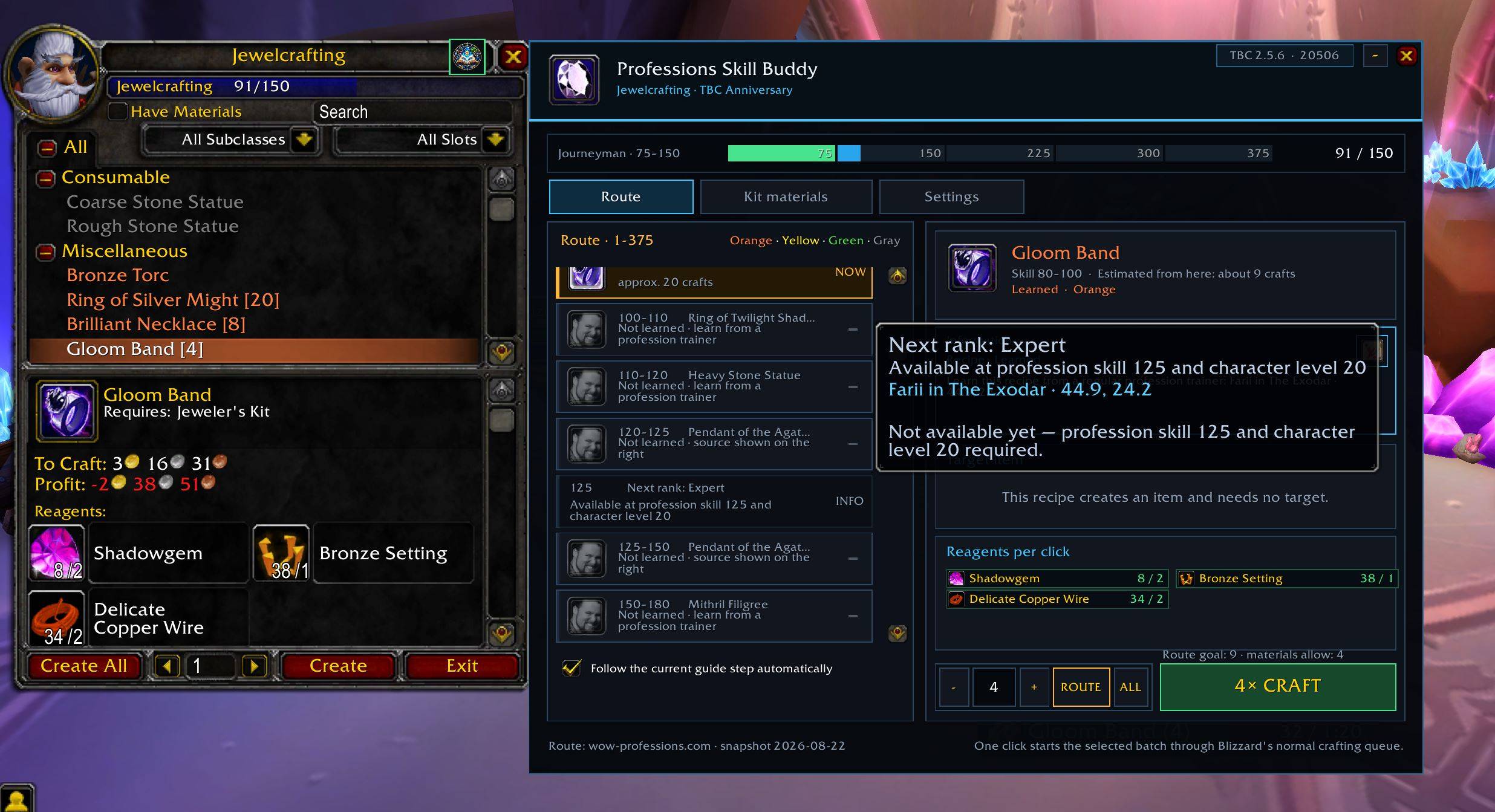
- When the next profession rank becomes available
Target-item and confirmation messages do not replace this recipe and profession information.
Enchanting Workflow
For Enchanting, the addon provides an explicit target picker.
Compatible items from your bags are listed first, followed by compatible equipped items. The addon never automatically chooses worn equipment. You must select or drag the exact item you want to enchant.
Existing enchantments are identified before the attempt. When the optional confirmation setting is enabled, the addon can handle only the exact binding or enchant-replacement prompt caused by the player's own click for the explicitly selected target.
When the option is disabled, Blizzard's confirmation dialogs remain manual.
Single-Attempt Crafting
Every craft or enchant requires a new physical click from the player.
The addon:
- Starts only one craft or enchant per click
- Does not use unattended repetition
- Does not queue automatic crafting
- Does not automate movement or gathering
- Does not use a “Create All” action
- Respects Blizzard's protected-action and combat restrictions
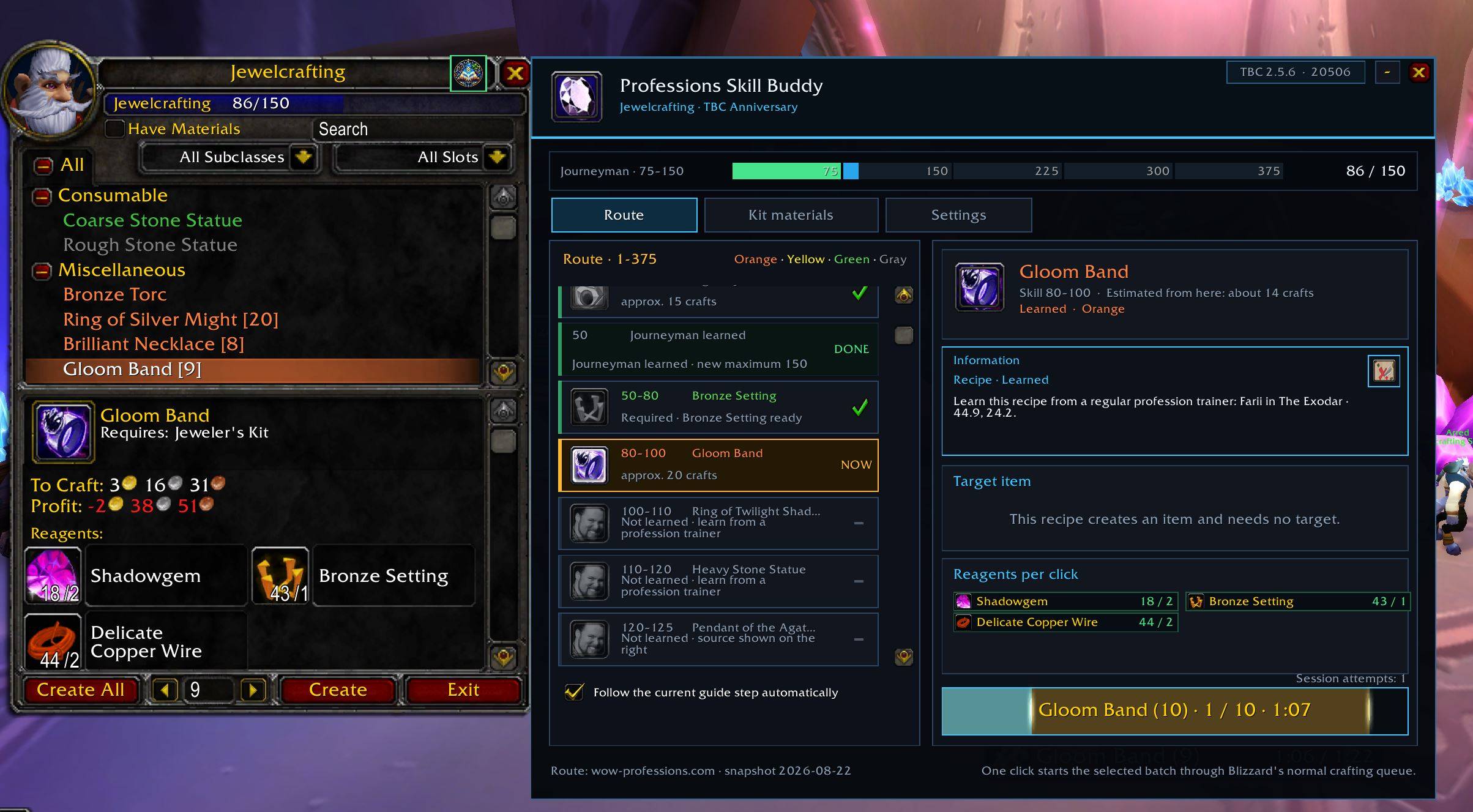
- Displays the active cast as progress inside the action button
How to Use
- Open a profession window.
- Open Professions Skill Buddy from the profession interface if it is not already visible.
- Follow the highlighted NOW step.
- Read the information panel for recipe, trainer, vendor, book, quest, or rank instructions.
- Check the required reagents.
- For Enchanting, click the target field and choose the exact item.
- Click the action button once to perform one crafting or enchanting attempt.
- Use Kit Materials to review estimated material totals or prepare Auction House searches.
The guide can also be opened or closed with /psb.
Localization
The runtime interface supports all current WoW client locales:
enUS, deDE, frFR, esES, esMX, itIT, ptBR, ruRU, koKR, zhCN, and zhTW.
Profession, recipe, spell, item, and map names are requested from the installed game client whenever the API provides them.
Compatibility
- Game: World of Warcraft Classic: Burning Crusade Anniversary
- Client version: 2.5.6
- Interface version: 20506
- Profession range: 1–375
Other Classic branches and Retail are not currently supported unless explicitly listed on a future file.
Route Data and Limitations
The included routes are a maintained snapshot based on TBC Classic profession leveling information.
Craft and material counts are estimates. Yellow and green recipes, player faction, reputation, recipe availability, server economy, and client changes can affect the actual number of crafts or materials required.
Live game-client data takes priority whenever it is available. The addon does not download or scrape route information while the game is running.
Feedback and Bug Reports
When reporting an incorrect step, please include:
- Profession and current skill
- Character level and faction
- Client language
- Recipe or route-step name
- Exact in-game error message, if applicable
After installing an update, use /reload to ensure all route and localization files are loaded.
Credits and Disclaimer
Route-planning reference: wow-professions.com TBC Classic profession guides
World of Warcraft and Blizzard Entertainment are trademarks or registered trademarks of Blizzard Entertainment, Inc.
Professions Skill Buddy is an independent community project and is not affiliated with or endorsed by Blizzard Entertainment or wow-professions.com.
Professions Skill Buddy Team