ProChat
- By
Advanced LFG filter and anti-spam assistant for WoW 3.3.5a. Features multi-dungeon selection, integrated Active Raids monitor, OR-logic search, and bilingual support (EN/ES).
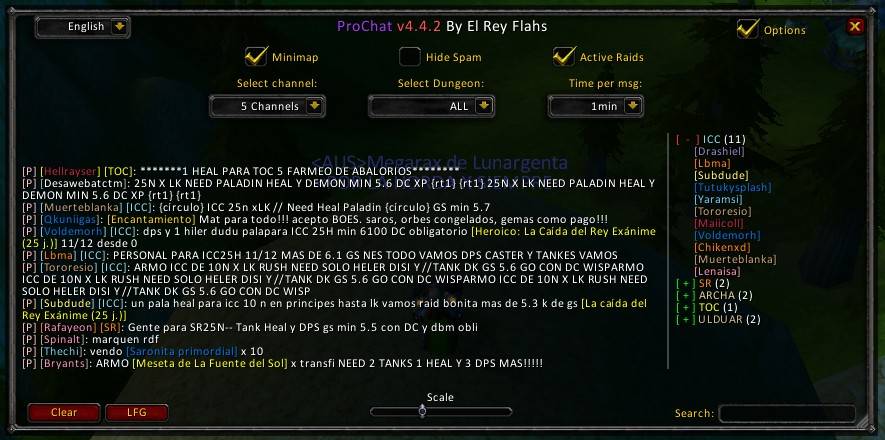
ProChat-english.jpg
Description
ProChat v4.4.3 - World of Warcraft 3.3.5a
ProChat is a high-performance chat filtering and raid monitoring assistant specifically designed for 3.3.5a (WotLK) servers. This version introduces a completely overhauled architecture, transforming the addon into a unified, bilingual, and dynamic power-tool for finding raids.
🚀 What's New in v4.4.3
- Unified "Active Raids" Window: The former Raid Leader monitor has been renamed to Active Raids and is now docked to the main interface. This creates a single, professional workspace where you can see messages and active leaders side-by-side.
- Dungeon Multi-Selection: Break free from single-category filtering. You can now select multiple dungeons at once from the filter list (e.g., monitor ICC, RS, and TOC simultaneously).
- Advanced Search Engine (OR Logic): The search bar now supports multiple keywords. Entering "ICC TOC" will display any message or raid leader containing either term, giving you maximum flexibility.
- Live Bilingual Support (EN/ES): ProChat features native localization. It automatically detects your client language and includes a Live Switcher in the title bar to change the entire UI on the fly without needing a
/reload. - Optimized Interface: We've moved control elements like the Language Selector and Options to the title bar. This maximizes vertical space, allowing you to read more chat lines at a glance.
🛠️ Core Functionality
- Visual Recognition: Messages are enhanced with official Class Colors and color-coded Dungeon Tags for instant identification of roles and raids.
- Smart Anti-Spam: Advanced cooldown system to eliminate repetitive noise from the same players.
- Hide Grays Mode: A specialized filter that hides messages not containing recruitment keywords, keeping your window focused strictly on LFG/LFM content.
- Full Channel Support: Monitor LookingForGroup, Trade, General, Guild, Say, and Yell all in one place.
🛠️ Installation
- Download the ProChat.zip file.
- Extract the ProChat folder into your WoW directory:
Interface\AddOns\. - Note: If you are coming from an older version, please use the command
/pc resetin-game to synchronize the new database and window docking.
⌨️ Commands
- /pc or /prochat: Toggle the main dashboard.
- /pc reset: Reset window positions, docking, and language settings to default.
Developed with passion for the 3.3.5 community.
ProChat Team