


Priority Marker Icons
- By
PMIMAKR.png
PMI1
PMIoptions2
Description
# Priority Marker Icons
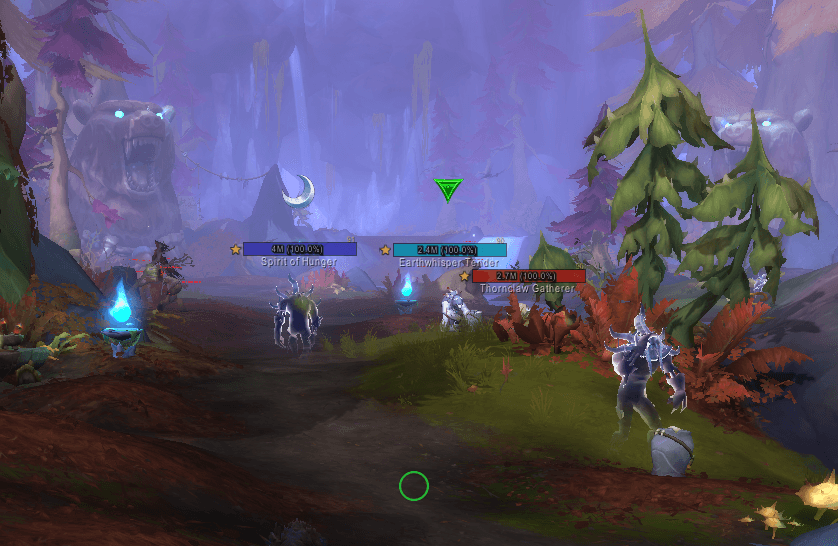
Priority Marker Icons (PMI) is a lightweight World of Warcraft Retail addon designed to make important dungeon enemies easier to identify and prioritize.
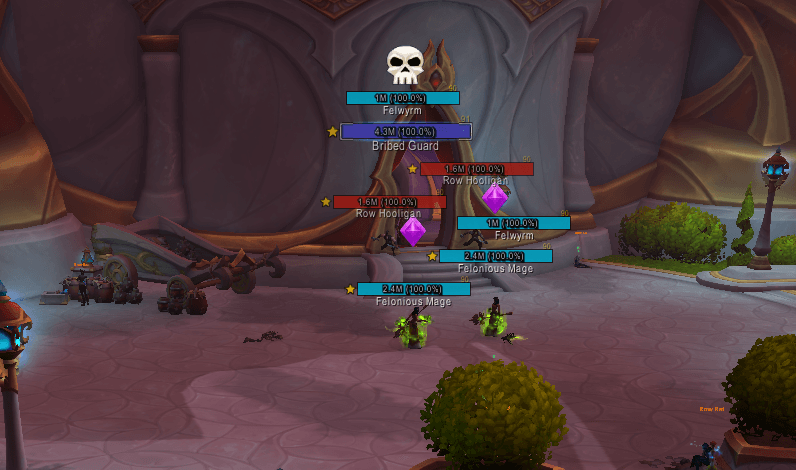
PMI automatically displays clear, recognizable icons above the nameplates of priority enemies, dangerous casters, summons, and totems. No mouseover actions, target changes, macros, or additional combat keybinds are required.
Unlike traditional auto-marking addons, PMI does not assign or modify Blizzard raid target markers. All icons are rendered locally and are visible only to the player running the addon, so they cannot interfere with party or raid marker assignments.
## Features
- Automatically highlights configured enemies when their nameplates appear
- Uses familiar Skull, Cross, Diamond, Moon, Square, Star, Circle, and Triangle icons
- Allows each configured NPC marker to be enabled or disabled individually
- Allows any configured NPC to use any of the eight available marker icons
- Includes 156 configured NPCs across eight supported dungeons
- Includes NPC search and enabled, disabled, and marker filters
- Supports multi-selection and bulk marker assignment
- Displays live summaries of enabled, visible, and selected NPCs
- Displays marker usage totals and duplicate-marker notices
- Includes individual dungeon reset controls
- Imports and exports individual dungeon configurations
- Uses recognizable dungeon codes in exported strings
- Shares dungeon configurations through clickable in-game chat links
- Requires confirmation before importing marks from a shared link
- Does not replace settings belonging to other dungeons during an import
- No targeting, mouseover, macros, or extra key presses required
- Does not consume or overwrite Blizzard raid target markers
- Detects the active dungeon before Mythic+ begins
- Loads only the NPC folder required for the current dungeon
- Preserves the detected dungeon if identity information becomes secret
- Includes persistent settings for icon size, position, opacity, and visibility
- Supports combat-only and supported-dungeon-only modes
- Allows individual dungeon databases to be enabled or disabled
- Includes a draggable PMI minimap button for opening the options
- Includes test, status, inspection, and debug tools
- Lightweight and dependency-free
- Does not collect data or communicate with external services
## Supported Dungeons
- Den of Nalorakk
- King's Rest
- Murder Row
- The Blinding Vale
- Voidscar Arena
- Altar of Fangs
- Ruby Life Pools
- Temple of Sethraliss
## Mythic+ Support
PMI detects and caches the current dungeon when the player enters the instance, before the Mythic+ challenge begins.
When Mythic+ starts, the addon continues using the cached dungeon folder even if NPC names, GUIDs, or other identity information become unavailable to addon code. The cache is cleared after leaving the instance or entering a different dungeon.
This allows PMI to check only the database and texture folder required for the current dungeon.
## NPC Configuration
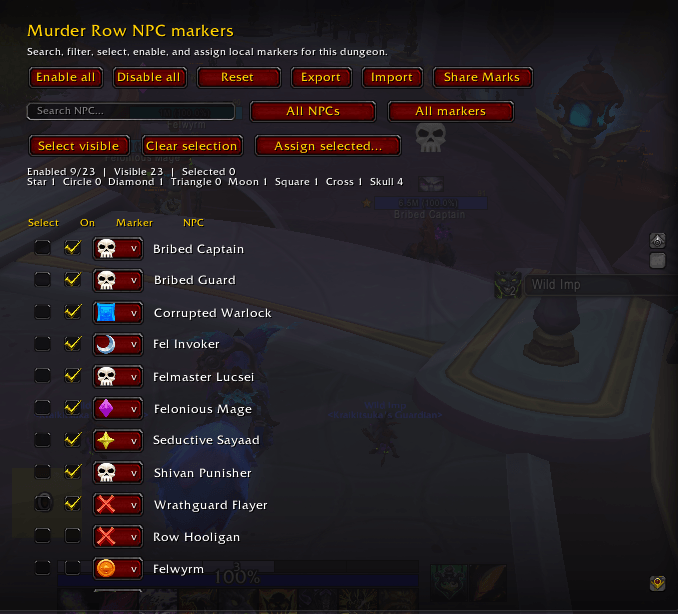
Every supported dungeon has its own NPC configuration page.
For each configured NPC, players can:
- Enable or disable its marker
- Choose any of the eight standard marker icons
- Search for the NPC by name
- Filter NPCs by enabled or disabled status
- Filter NPCs by their assigned marker
- Select multiple NPCs
- Assign one marker to multiple selected NPCs
- Reset the dungeon to its default configuration
Changes are applied immediately and saved account-wide.
Some additional NPCs are included but disabled by default, allowing players to decide whether those enemies should receive a marker.
## Import, Export, and Share Marks
Each dungeon configuration can be exported individually using a compact, clipboard-safe string.
Exported strings include a recognizable dungeon code:
- `KR` — King's Rest
- `DN` — Den of Nalorakk
- `MR` — Murder Row
- `BV` — The Blinding Vale
- `VA` — Voidscar Arena
- `AF` — Altar of Fangs
- `RL` — Ruby Life Pools
- `TS` — Temple of Sethraliss
PMI automatically detects which dungeon belongs to an imported string. Importing replaces only that dungeon's configuration and does not modify settings for other dungeons.
The `Share Marks` button prepares a message that can be sent through the normal World of Warcraft chat. Players with PMI installed will see a clickable link such as:
`[PMI: Marks for King's Rest]`
Clicking the link displays the dungeon name and asks for confirmation before importing the shared configuration.
Shared configurations include:
- The dungeon enabled or disabled state
- Individual NPC enabled or disabled states
- The marker assigned to every NPC
## Configuration
Click the draggable `PMI` minimap button or enter `/pmi options` to open the settings panel.
Available settings include:
- Enable or disable automatic icons
- Show icons only in supported dungeons
- Show icons only during combat
- Change icon size
- Change vertical position
- Change icon opacity
- Enable or disable individual dungeon databases
- Enable or disable markers for individual NPCs
- Change the marker assigned to individual NPCs
- Search and filter NPC lists
- Assign markers to multiple selected NPCs
- Import, export, or share individual dungeon configurations
- Reset an individual dungeon
- Show or hide the minimap button
- Enable diagnostic messages
- Restore default settings
Settings, individual NPC configurations, and the minimap button position are saved account-wide.
## Commands
- `/pmi` or `/prioritymarkericons` — Displays addon instructions
- `/pmi options` — Opens the addon settings
- `/pmi test` — Displays all marker icons above visible nameplates
- `/pmi status` — Reports the active instance, cached folder, map, and settings
- `/pmi inspect` — Reports available information about the mouseover unit
- `/pmi size 36` — Changes icon size
- `/pmi offset 6` — Changes the vertical position
- `/pmi alpha 1` — Changes icon opacity
- `/pmi dungeononly` — Toggles supported-dungeon-only mode
- `/pmi combatonly` — Toggles combat-only mode
- `/pmi minimap` — Shows or hides the minimap button
- `/pmi debug` — Toggles diagnostic messages
- `/pmi export KR` — Exports the configuration for King's Rest
- `/pmi import` — Opens the dungeon import dialog
- `/pmi share KR` — Prepares a King's Rest configuration message for the chat
- `/pmi reset` — Restores default settings
The legacy `/am` and `/automarker` aliases are also supported.
## Important Information
The icons displayed by Priority Marker Icons are local. Other party members will not see the nameplate icons unless they also have the addon installed.
Players must have PMI installed to convert shared configuration messages into clickable links and import their contents.
The included NPC database currently uses English NPC names and is intended for the English World of Warcraft client.
NPCs that share the same name also share the same marker configuration because NPC IDs may become unavailable to addon code during Mythic+.
Enemy nameplates must be enabled for the icons to appear.
Priority Marker Icons Team
