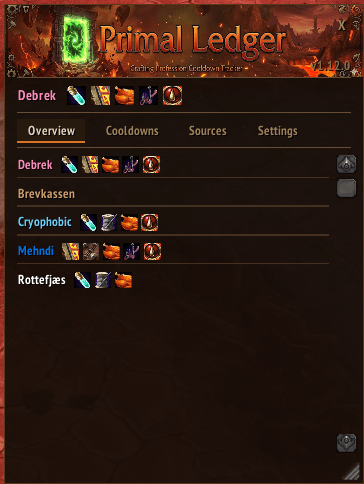
1.png
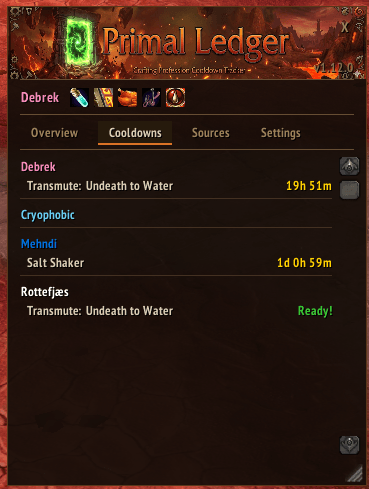
2.png
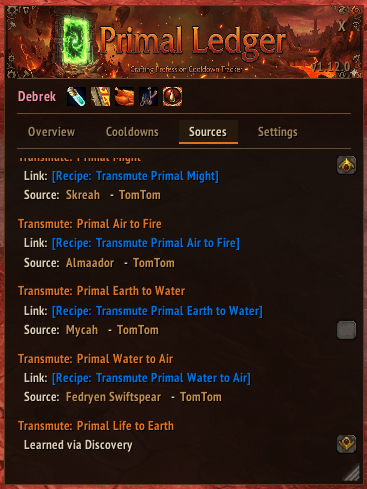
3.png
4.png
5.png
Description
A World of Warcraft TBC Anniversary addon that tracks Alchemy, Tailoring, Leatherworking, Enchanting, and Jewelcrafting cooldowns across all your characters.
- Account-wide tracking - Track cooldowns across all your characters
- Auto-detection - Automatically detects professions on login; known crafts are discovered when you open the profession window, and active cooldowns are kept up-to-date via spell polling
- Minimap button - Click to toggle the cooldown window
- ESC to close - Press Escape to close the window
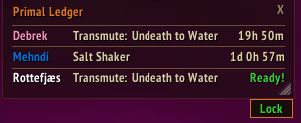
- Click to craft - Left-click "Ready!" to open profession window and select the recipe, right-click to just open the profession window — works in both the main window and the tracker
- Tracker UI scale - Adjustable scale slider (50%-200%) for the tracker window
- Cooldown tracker window - Overlay with live countdowns, profession icons, draggable and resizable with saved position/size
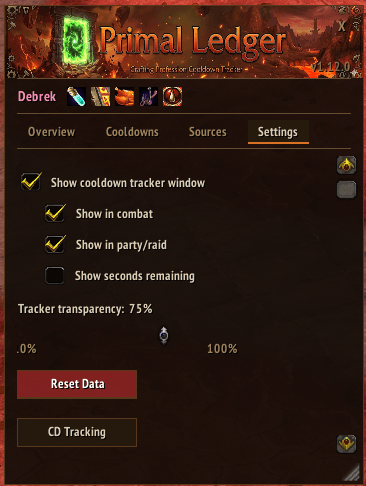
- Tracker transparency - Adjustable opacity slider (0%-100%) for the tracker window background (text stays readable)
- Custom tracker title - Set a custom title or hide it entirely
- Group shared cooldowns - Optionally group all alchemy transmutes into a single "Transmutes" row per character in the tracker
- Lock/Unlock tracker - Hover to reveal a lock button; locked tracker hides the close button, resize grip, and prevents dragging
- Tracker visibility options - Reliably toggle visibility in combat and in party/raid
- Current character first - Your logged-in character always appears at the top of the list
- Per-profession sync - Opening a profession window refreshes cooldown data for that profession only
- Sources tab - View recipe/pattern sources with clickable item links, vendor targeting, and TomTom waypoints — grouped by profession in collapsible accordion sections
- Show seconds - Optional setting to display seconds remaining on cooldown timers
- Settings tab - Toggle tracker window, select display mode, reset all data, open CD Tracking
- CD Tracking - Enable or disable tracking for individual cooldown crafts (standalone window from Settings)
- Craft export - Export your recipe list from any profession window, with per-craft selection, formatted for Discord
| Craft | Cooldown |
|---|---|
| Shadowcloth | 92 hours |
| Spellcloth | 92 hours |
| Primal Mooncloth | 92 hours |
| Craft | Cooldown |
|---|---|
| Salt Shaker | 2d 23h |
| Craft | Cooldown |
|---|---|
| Transmute: Primal Might | 20 hours |
| Transmute: Undeath to Water | 24 hours |
| Transmute: Primal Mana to Fire | 20 hours |
| Transmute: Primal Shadow to Water | 20 hours |
| Transmute: Primal Air to Fire | 20 hours |
| Transmute: Primal Water to Shadow | 20 hours |
| Transmute: Primal Earth to Water | 20 hours |
| Transmute: Primal Water to Air | 20 hours |
| Transmute: Primal Life to Earth | 20 hours |
| Transmute: Earthstorm Diamond | 20 hours |
| Transmute: Skyfire Diamond | 20 hours |
| Craft | Cooldown |
|---|---|
| Void Sphere | 48 hours |
| Craft | Cooldown |
|---|---|
| Brilliant Glass | 20 hours |
- Download the latest release from the Releases page
- Extract the
PrimalLedgerfolder to your WoW AddOns directory:World of Warcraft/_anniversary_/Interface/AddOns/ - Restart WoW or type
/reload
- Open the window: Click the minimap button or type
/pl - Close the window: Click the X button or press Escape
- Update cooldowns: Open your profession window (Alchemy/Tailoring/Enchanting/Jewelcrafting) to sync cooldown data
- Quick craft:
- Left-click "Ready!" to open the profession window and select the recipe
- Right-click "Ready!" to open the profession window
- Sources tab:
- View where to obtain patterns/recipes for tailoring, leatherworking, alchemy, enchanting, and jewelcrafting cooldown crafts
- Shift-click item links to paste them in chat
- Click vendor name to target the NPC
- Click TomTom to set a waypoint (requires TomTom addon)
- Settings tab: Toggle tracker window, show seconds, group shared cooldowns, custom tracker title, adjust transparency, tracker UI scale, configure visibility options, reset all tracked data, open CD Tracking
- CD Tracking: Click "CD Tracking" in Settings to open a window where you can enable/disable individual cooldown crafts
- Export crafts: Open any profession window, click Export, select which crafts to include, then export as Discord-formatted text
| Command | Description |
|---|---|
/pl |
Toggle the cooldown window |
/primalledger |
Toggle the cooldown window |
/pl reset |
Reset all tracked data |
/pl remove |
Remove current character from tracking |
The Primal Ledger Team