Price Scanner Forever
- By
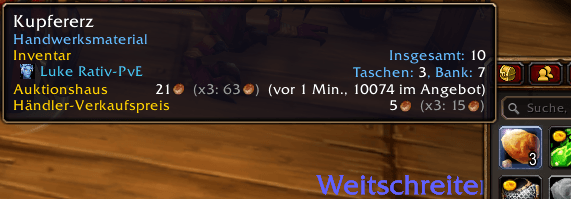
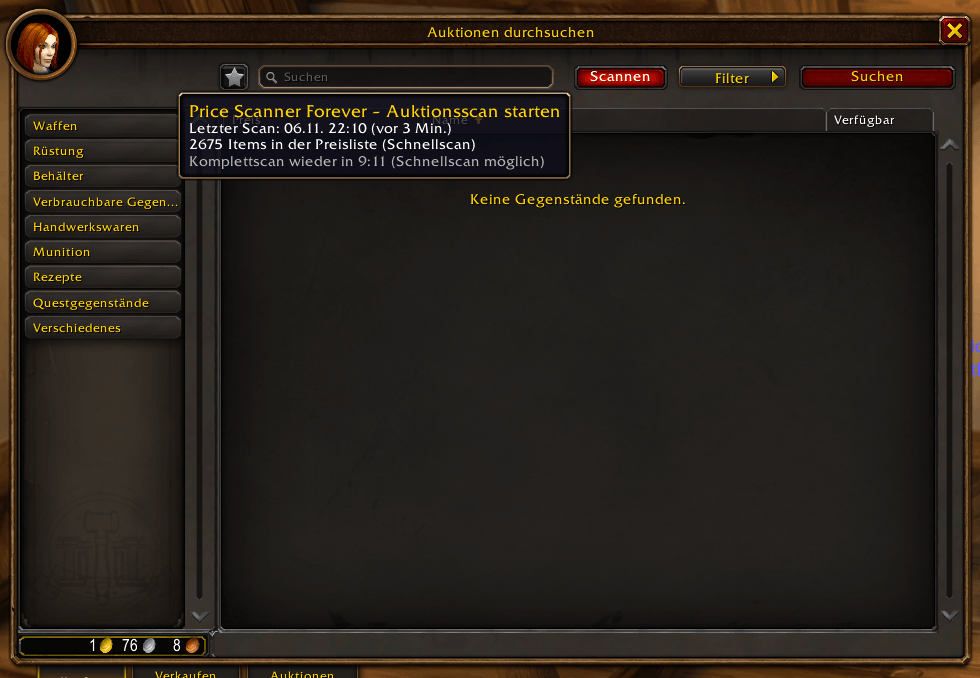
Shows auction house, vendor buy and vendor sell prices in every item tooltip, with a Scan button at the auction house.
Description
Price Scanner

See what an item is worth when you hover over it: auction house price, vendor buy price and vendor sell price, all in the tooltip.
- Opening a vendor window saves its prices automatically.
- A Scan button at the auction house saves the current market price of every item and shows when you last scanned.
- Items without a price say "Not scanned", and the overview lists which tradeable items are still missing.
How it works
- Vendors: talk to any merchant. Price Scanner saves what each item costs there, plus where and when.
- Auction house: press Scan in the small panel next to the auction house window. It saves the lowest buyout per item and how many are listed.
- Tooltips: hover over any item to see the saved prices and how old they are, e.g. "50c (2 h ago, 140 listed)".
| Scan type | When | What it reads |
|---|---|---|
| Full scan | once every 15 minutes (game limit) | every auction |
| Quick scan | any time, used automatically during the wait | lowest price per item from the search list |
Features
- AH price with age, quantity and an "old" mark after a set number of hours. Optionally shows the last few scans.
- "Not listed at last scan" when an item has disappeared from the auction house.
- Vendor buy price with vendor name, zone and date. The cheaper vendor wins.
- Vendor sell price, with the total for the whole stack in your bags.
- Overview window: last scan, full scan cooldown, coverage ("X of Y tradeable items scanned") and the list of items without a price.
- Prices are kept separately for each realm and faction. Your normal AH searches are saved too (can be turned off).
Controls
- Minimap button: left-click opens the overview, right-click opens the options.
- Options: Esc > Options > AddOns > Price Scanner. Turn vendor saving, quick/full scan and every tooltip line on or off, set the age warning and history length, or delete data.
- No chat commands.
Notes
- Made for WoW: Forever. Beta: please report problems in the comments.
- The scan only starts when you click it. Price Scanner never buys, sells or posts anything.
- The list of tradeable items (for coverage) comes from the Forever game data and contains item IDs only.
Price Scanner (Deutsch)
Sieh beim Drüberfahren, was ein Item wert ist: Auktionspreis, Händler-Kaufpreis und Händler-Verkaufspreis direkt im Tooltip.
- Beim Öffnen eines Händlers werden seine Preise automatisch gespeichert.
- Ein Scannen-Knopf im Auktionshaus speichert den aktuellen Marktpreis jedes Items und zeigt, wann du zuletzt gescannt hast.
- Items ohne Preis zeigen „Nicht gescannt“, und die Übersicht listet, welche handelbaren Items noch fehlen.
So funktioniert's
- Händler: sprich einen Händler an. Price Scanner speichert, was jedes Item dort kostet, dazu wo und wann.
- Auktionshaus: drück Scannen im kleinen Fenster neben dem Auktionshaus. Gespeichert werden der niedrigste Sofortkaufpreis pro Item und die Anzahl im Angebot.
- Tooltips: fahr mit der Maus über ein Item und sieh die gespeicherten Preise und ihr Alter, z. B. „50c (vor 2 Std., 140 im Angebot)“.
| Scan-Art | Wann | Was gelesen wird |
|---|---|---|
| Komplettscan | einmal alle 15 Minuten (Spielgrenze) | jede Auktion |
| Schnellscan | jederzeit, in der Wartezeit automatisch | niedrigster Preis pro Item aus der Suchliste |
Funktionen
- Auktionspreis mit Alter, Anzahl und „alt“-Markierung nach einstellbaren Stunden. Auf Wunsch die letzten Scans.
- „Beim letzten Scan nicht im Angebot“, wenn ein Item aus dem Auktionshaus verschwunden ist.
- Händler-Kaufpreis mit Händlername, Gebiet und Datum. Der günstigere Händler gewinnt.
- Händler-Verkaufspreis, dazu der Wert des ganzen Stapels in deinen Taschen.
- Übersichtsfenster: letzter Scan, Wartezeit für den Komplettscan, Abdeckung („X von Y handelbaren Items gescannt“) und die Liste der Items ohne Preis.
- Preise werden pro Realm und Fraktion getrennt gespeichert. Deine normalen Auktionshaus-Suchen werden mitgespeichert (abschaltbar).
Bedienung
- Minimap-Knopf: Linksklick öffnet die Übersicht, Rechtsklick die Optionen.
- Optionen: Esc > Optionen > AddOns > Price Scanner. Händlerpreise, Schnell-/Komplettscan und jede Tooltip-Zeile ein- oder ausschalten, Alterswarnung und Verlauf einstellen oder Daten löschen.
- Keine Chatbefehle.
Hinweise
- Gemacht für WoW: Forever. Beta: Probleme bitte in die Kommentare schreiben.
- Der Scan startet nur, wenn du klickst. Price Scanner kauft, verkauft und erstellt nie etwas von selbst.
- Die Liste der handelbaren Items (für die Abdeckung) stammt aus den Forever-Spieldaten und enthält nur Item-IDs.
Price Scanner Forever Team