Pre-AFK Alert
- By
Stop getting marked Absent! Pre-AFK Alert gives you customizable sound and visual warnings before your character goes Away From Keyboard. Perfect for alt-tabbed players who want to avoid missing queues or getting logged out.
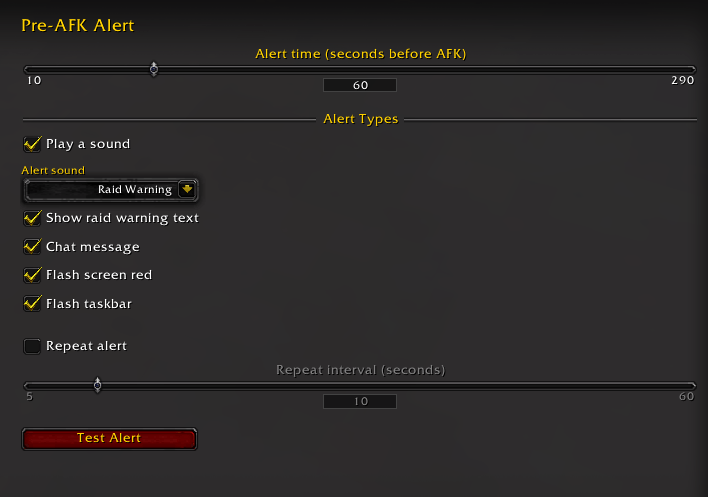
Configure AFK warnings with sounds, raid alerts, chat messages, screen flashes, and repeat notifications.

Get a clear on-screen warning before your World of Warcraft character goes AFK.
Description
Never miss your AFK warning again. Pre-AFK Alert is a lightweight World of Warcraft addon that warns you before the game marks your character AFK (Away From Keyboard).
Whether you alt-tab to browse, watch a video, answer a message, or step away for a moment, Pre-AFK Alert gives you a clear reminder to return before you become AFK. It is simple to set up, easy on your UI, and works entirely in the background until you need it.
Features
- Choose exactly how many seconds before the five-minute AFK timeout you want to be warned.
- Select a built-in alert sound, including Raid Warning, Ready Check, Whisper, Gnomish Alarm, and Gong.
- Add more sound choices with the optional SharedMedia: AlertMediaPack addon.
- Combine audible alerts with on-screen raid-warning text, a chat message, a red screen flash, and taskbar flashing.
- Enable repeat alerts at your preferred interval while you remain inactive.
- Use Test Alert to hear and see your current configuration immediately.
- Lightweight, with no unnecessary windows or gameplay changes.
- Localized for English, French, German, Spanish, Portuguese, Russian, Simplified Chinese, Traditional Chinese, Korean, and Italian.
Optional SharedMedia sound pack support
Install SharedMedia: AlertMediaPack to unlock its curated alert sounds directly in Pre-AFK Alert's sound dropdown. Both addons must be enabled; no extra setup is required.
Pre-AFK Alert continues to work normally without the sound pack, using its built-in WoW sounds.
Quick start
- Install Pre-AFK Alert and enable it in the character-selection AddOns list.
- Type
/preafkor/paain chat. - Set how early you want the warning, choose your alert methods and press Test Alert.
Commands
/preafkor/paa- Open the options panel./preafk test- Preview all enabled alerts./preafk reset- Reset the inactivity timer.
Compatibility
Pre-AFK Alert supports World of Warcraft Retail and the supported Classic-family clients. The addon uses standard WoW audio and UI APIs, so it stays focused on one job: giving you enough notice to get back before AFK status interrupts your session.
Pre-AFK Alert Team

Owner