pp_screenshot-1.webp
Description
PotPolice
Your consumables one click away, with buff timers and low stock warnings.
Raid night starts, you reach for your flask, and it is buried three bags deep behind quest items. PotPolice puts the consumables you actually use on a single bar: click an icon to use it, see at a glance which buffs are running, and get told before you run out.
What it does
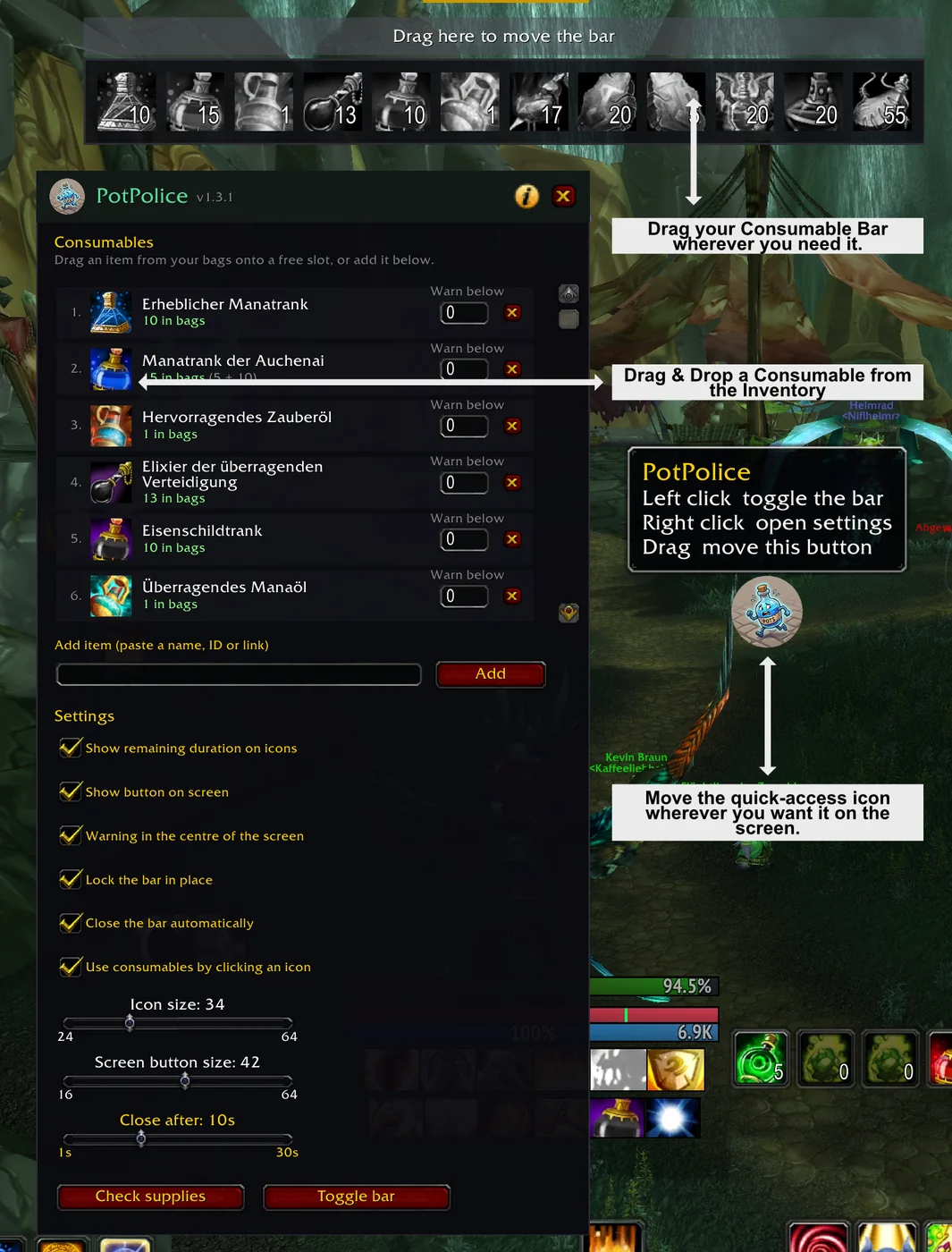
One bar for what you drink. Pick up to 12 consumables and put them on a bar that slides in when you need it and out when you don't. Potions, elixirs, flasks, food, scrolls, weapon oils, sharpening stones and bandages all work.
Click to use. Every icon is a working button. No macros to write, no action bar slots to give up.
Buff tracking that learns. Use a consumable once and PotPolice remembers which buff it produced. From then on the icon shows a green check mark while the effect is active, with the remaining time counting down.
Know before you run dry. Set a threshold per item and the icon turns red once you drop below it. Optionally a message in the middle of the screen when you zone into a raid or dungeon.
Variants count as one. Super Mana Potion and Auchenai Mana Potion are the same thing to you, so they are the same thing to PotPolice. It adds them up and uses whichever you still have.
Getting started
- Type
/potto open the settings - Drag an item from your bags onto a slot, or paste its name or link
- Set a warning threshold if you want one
- Close the settings and click the icons
The bar is placed with the strip above it that says Drag here to move the bar while the settings are open. The screen button and minimap icon can be dragged anywhere too.
Commands
| Command | What it does |
|---|---|
/pot |
open the settings |
/pot toggle |
slide the bar in or out |
/pot check |
report what you are low on |
/pot debug |
diagnose the buttons if a click does nothing |
/potpolice and /police do the same. /pp is deliberately left alone,
PallyPower already uses it.
Options
- Show remaining buff duration on the icons
- Show the movable screen button
- Extra warning in the centre of the screen
- Lock the bar so it cannot be dragged by accident
- Close the bar automatically after a set number of seconds
- Turn click to use off entirely, if you only want the display
- Icon size and screen button size
Everything is saved per character. Your bank alt does not need the same flasks as your raiding main. A new character starts from your previous setup rather than an empty bar, so you are never configuring from scratch.
Supported versions
One download, all of these:
| Client | |
|---|---|
| Classic Era | ✔ |
| The Burning Crusade | ✔ |
| Wrath of the Lich King | ✔ |
| Cataclysm | ✔ |
| Mists of Pandaria | ✔ |
Retail is not supported. Modern WoW no longer lets an addon use items from its own buttons during combat, which would break the one thing this addon is for. Rather than ship something that quietly fails when it matters most, it is left out.
Notes
The bar takes the mouse only while the settings are open, so it never sits in the way of your normal clicks. Consumables cannot be used by accident while you are positioning it.
Bug reports and suggestions are welcome.
Also by me
RaidScout — check a player's GearScore and gear before you invite them, no inspect range needed.
PotPolice Team