


PosLog
- By
Screenshot 2026-09-29 192825.png
Description
PosLog – Position Data Collector for World of Warcraft
PosLog quietly records where things are in the world while you play – NPCs, quest givers, flight masters, points of interest, rares, treasures and dungeon entrances – and lets you export everything as a clean CSV table. It does not change how the game plays. It gives you a database of map coordinates you can use for guild websites, wikis, route planning or your own tools.
What you get
Automatic collection while you play
- NPC services you actually use. Whenever you open a vendor, repair, trainer, flight master, innkeeper, banker, auction house or gossip window, PosLog stores the NPC's ID, name, map and position and tags what the NPC offers (for example
vendor,repair,trainer). - Quest givers and turn-in NPCs. Talking to an NPC records which quests they offer and which they accept for turn-in. A separate quest log records accepted, turned in and abandoned events with a timestamp, the map position and the NPC that was involved.
- NPCs under your mouse cursor. Friendly and hostile NPCs you hover over within interaction distance (about 10 yards) are recorded too, including their level. Player pets and other player-controlled units are ignored.
- Rares, treasures and events. Map vignettes (rare elites, treasure chests, world events) that appear on your map or minimap are stored with their exact map coordinates.
- Averaged positions. Because an NPC's position is estimated from where you stood, PosLog averages repeated observations (up to 1000 per entry) so the coordinates get more accurate the more often you meet the NPC.
One-click map scans
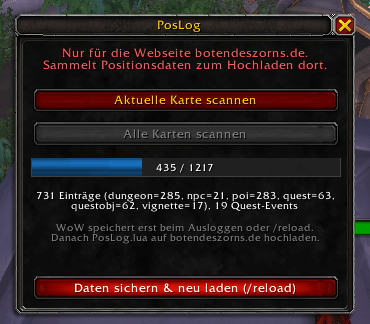
- Scan current map: reads the map you are standing in – available quest givers, flight points, area points of interest, dungeon/raid entrances and the targets of your active quests – and stores them with exact coordinates.
- Scan all maps: walks through every continent, zone, dungeon and micro map in the game with a progress bar. You do not need to visit anything; the data comes straight from the map.
- Automatic scans: the map you are in is scanned automatically when you enter the world, change zones or open the world map (at most once every 5 minutes per map).
Export
/poslog exportopens a window with your data as semicolon-separated CSV – select all, copy, paste into a spreadsheet, database or upload form. Columns:type;id;name;map;x;y;count;flags;offers;turnins;extra.- Filter by type, for example
/poslog export taxior/poslog export vignette. Types:npc,quest,questobj,taxi,poi,dungeon,vignette. /poslog logshows the quest event log as CSV.- Coordinates are percent of the map (0–100) plus the
uiMapID, so they work with any map tool. - Optional PHP converter (
poslog2csv.php, separate download) turns the saved-variables filePosLog.luainto CSV/JSON files on your computer or web server.
How it changes your experience
- In-game: one small, draggable window (
/poslog) with three buttons, a progress bar and a status line showing how many entries have been collected. Outside of that you will only see one chat message after login. No action bars, tooltips, nameplates or map icons are changed. - Gameplay: nothing is automated and nothing is sent to the game server. PosLog only reads information the game already shows you. It is inactive during combat.
- Performance: collection is event-driven and lightweight. "Scan all maps" runs in small slices over a few seconds, so the game does not freeze.
- Your data stays with you. Everything is saved locally in the standard WoW
SavedVariablesfile. PosLog contains no network code and collects no personal information – only map positions and game object IDs.
Quick start
- Install PosLog and log in. After about two seconds a chat message confirms it is loaded.
- Type
/poslogand click Scan all maps (optional – you will also collect data just by playing). - Click Save data & reload (/reload). WoW only writes SavedVariables when you log out or reload the UI.
- Find your data in
World of Warcraft/_retail_/WTF/Account/<ACCOUNT>/SavedVariables/PosLog.lua, or use/poslog exportto copy it as CSV directly in the game.
Commands
| Command | Effect |
|---|---|
/poslog |
Open the window |
/poslog scan |
Scan the current map |
/poslog scanall |
Scan all maps |
/poslog export [type] |
Show data as CSV |
/poslog log |
Show quest event log |
/poslog verbose |
Print a chat line for every new entry |
/poslog reset confirm |
Delete all collected data |
Optional: upload to a guild website
PosLog was originally built to feed a guild website (WoltLab forum with an import plugin). If you run something similar, put your domain into ns.WEBSITE in PosLog/Config.lua; the window then names your site. Leave it empty for a neutral display.
Compatibility and known limitations
- World of Warcraft Retail 12.0.x (Interface 120001).
- NPC positions from interaction and mouseover are your own position, so they can be off by a few yards; map scans, flight points, POIs, vignettes and dungeon entrances are exact.
- The in-game window and chat messages are currently in German; an English interface is planned.
- Maximum of 30,000 lines per export – use the type filter for larger sets.
Feedback
Found a bug or want another data type collected? Please leave a comment or open a ticket on the project page.
The PosLog Team
