Portal Maps
- By
Eastern Kingdoms.png
Description
Portal Maps
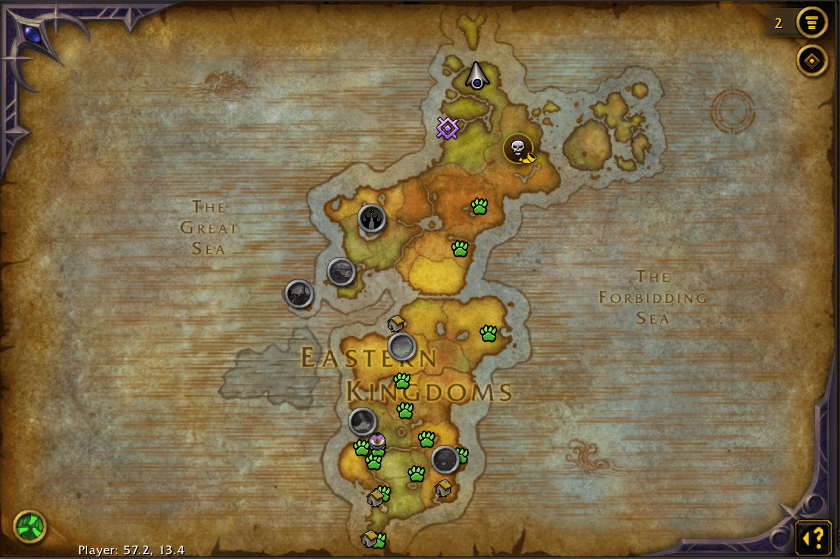
Portal Maps turns the World Map into a launch pad for every teleport in World of Warcraft. Open the map and you'll see a gold-ringed button wherever a teleport can take you. That includes:
- mage city teleports and portals
- class teleports like Moonglade and Death Gate
- Mythic+ dungeon teleports, on their dungeon entrances
- engineering wormholes and transporters
- teleporting gear, items and toys
Click a button and it casts the spell or uses the item, then closes the map so you can watch yourself go. Teleports you don't have yet appear greyed out, and their tooltip tells you how to get them.
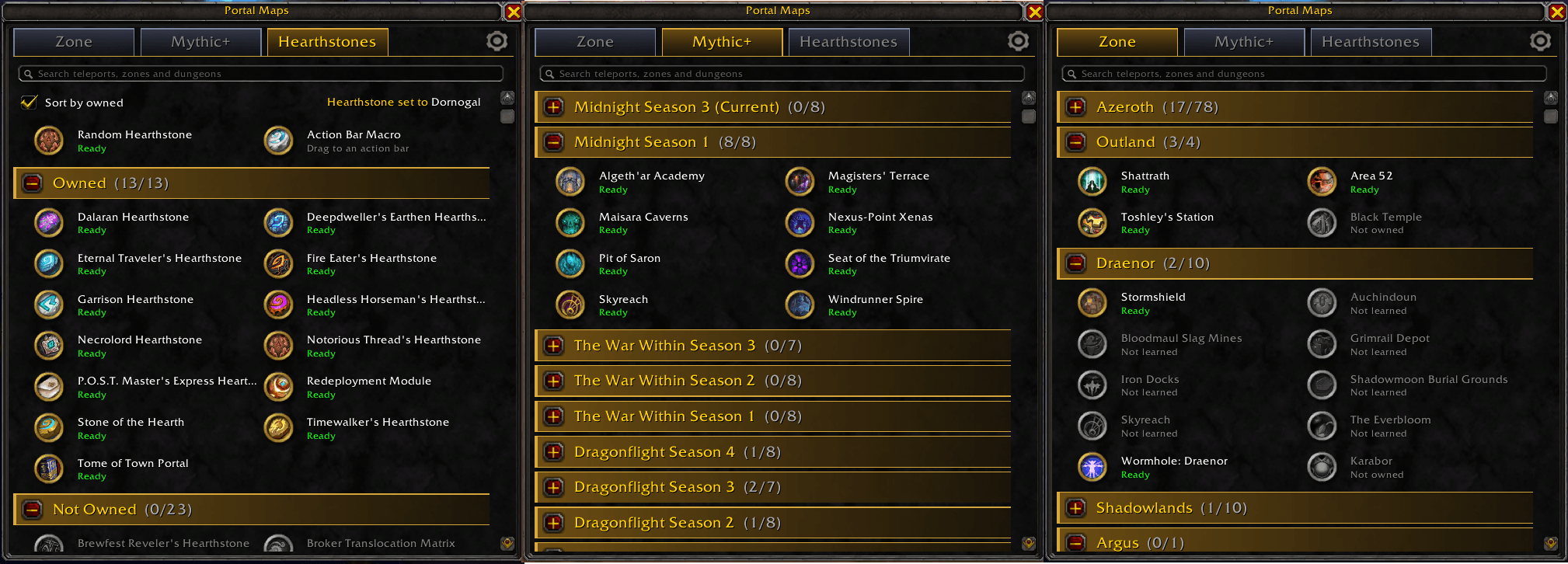
A searchable teleport list shows every teleport by continent, by Mythic+ season, or as a full hearthstone collection. It also has favorites, a random hearthstone button and an action bar macro. You can open it from the map, the minimap, the addon menu or a keybind.
Getting started
- Open the World Map (default key M) and browse to any city, zone or continent. Teleport buttons appear where they lead.
- Hover a button for its tooltip, and click it to teleport.
- To see every teleport in one place, click the Portal Maps button on the minimap.
Teleport buttons on the World Map
Where they appear:
- Cities and fixed places: in the middle of the city's own map, and over the same spot on its zone and continent maps. For example, Silvermoon shows on the Silvermoon City, Eversong Woods and Quel'Thalas maps.
- Dungeon teleports: on the dungeon's entrance marker, wherever the game draws that entrance.
- Engineering wormholes: in the middle of their continent, since they drop you somewhere on it rather than at one spot.
What clicks do:
- Click to teleport: spells are cast, toys are used, and items in your bags or equipped are used. Equippable teleports like Kirin Tor rings get equipped on the first click; click again once their use timer is ready. The map closes when you click.
- Right-click a mage city to cast its Portal instead of the Teleport, so you can take your group with you. The tooltip shows which portal you'll cast. If you haven't learned the portal, right-click teleports as normal.
- Shift-click to favorite. This adds the teleport to your Favorites (see the teleport list below) and puts a gold star on its button. Shift-click again to remove it.
How they look and behave:
- Look: a round icon in a gold minimap-style ring. A cooldown sweep shows when the spell or item is on cooldown.
- Size: the buttons stay the same size on screen as you pan and zoom. They're full size when the map is full screen and half size in the smaller windowed map. You can make them bigger or smaller with the Map button size setting.
- Overlap handling: when several teleports share a spot (a mage's Stormwind teleport and a guild cloak, say), the buttons fan out around it instead of stacking. Teleports you can actually use get the true spot first.
Teleports you don't have
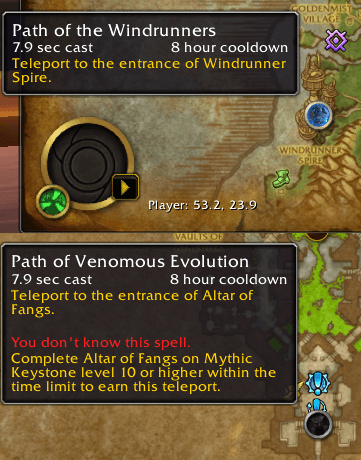
They appear with a greyed-out icon and ring and can't be clicked.
Hover one to see three things:
- the spell or item tooltip
- a red "You don't know this spell" or "You don't have this item" line
- a hint on how to get it:
- Mage and class teleports: who can learn them, for example "Only Druids can learn this."
- Dungeon teleports in the current Mythic+ season: "Complete dungeon on Mythic Keystone level 10 or higher within the time limit."
- Dungeon teleports not in the current season: a note that it can't be earned right now.
- Items and gear: where the item comes from, for example the Argent Tournament, guild vendors or the Stranglethorn Fishing Extravaganza.
To hide unavailable teleports entirely, turn off Show teleports you don't have in the settings.
The other faction's teleports
Teleports only the other faction can use are hidden by default, on the map and in the teleport list. That covers their capital city teleports, faction tabards and guild cloaks, so a Horde mage isn't shown Alliance capitals they can never learn. To show them anyway, turn on Show the other faction's teleports in the settings.
The map toggle button
A small portal icon in the bottom-left corner of the World Map.
- Left-click: shows or hides all teleport buttons on the map. The icon is green when they're shown and red when they're hidden. The setting is remembered between sessions.
- Right-click: opens or closes the teleport list (below).
- Tooltip: shows the current state and what each click does.
The teleport list
A movable window that lists every teleport in the addon. You can open it in several ways:
- the minimap button
- the game's addon menu by the minimap
- your keybind
- right-clicking the map toggle
- the button on the Mythic+ Dungeons screen
/tpmaps browse
Using the list:
- Every entry is a working teleport button, two per row, with the same tooltips, hints, portals, favorites and cooldown sweep as the map buttons.
- Under each name you'll see:
- Ready, if it's off cooldown
- the time left (for example "12m"), if it's on cooldown
- Not learned or Not owned, if you don't have it
- Search box: type to filter the current tab as you go. Search for a teleport ("Karazhan"), or for a zone or section ("Pandaria", "Season 1") to list everything in it. All sections open while you search.
- Section headers show how many teleports in them you can use, out of the total, for example Northrend (3/12). Click a header to expand or collapse it. The window remembers which sections are open.
- Header style: headers are full-width bars with large +/- icons. Top-level sections get tall gold bars, and subsections get slimmer steel bars.
- Unusable teleports are greyed out, with grey names.
- The gear icon at the right end of the tab row opens the addon settings.
- Clicking a teleport closes the list.
Zone tab
Favorites appear at the top. These are teleports and hearthstones you've shift-clicked, from any tab.
Below them, teleports are grouped by where they go:
- Azeroth, with subsections for Kalimdor, Eastern Kingdoms (including Quel'Thalas), Northrend, Pandaria, Zandalar, Kul Tiras, Broken Isles, Dragon Isles and Khaz Algar.
- Outland, Draenor, Shadowlands and Argus.
- Other, for anything that couldn't be placed on a continent, such as some class halls.
Within each section, teleports are ordered by type (mage, class, dungeon, engineering, gear, items), then by name.
Mythic+ tab
Dungeon teleports grouped by the season they belonged to, newest first:
- Current season: for example Midnight Season 2 (Current). It's at the top and expanded, and its dungeon list comes live from the game.
- Past seasons: Midnight Season 1, The War Within Seasons 3 to 1, Dragonflight Seasons 4 to 1 and Shadowlands Seasons 4 to 1.
- Challenge Modes: Warlords of Draenor and Mists of Pandaria, the original source of those dungeon teleports.
A dungeon that ran in several seasons is listed under each one.
Hearthstones tab
Your full hearthstone collection, including Hearthstone, Garrison Hearthstone, Dalaran Hearthstone and more than 30 hearthstone toys, from the Innkeeper's Daughter to the Cosmic Hearthstone.
- Hearthstone location: shows where your hearthstone is currently set.
- Sort by owned: split the list into Owned and Not Owned, or untick it for one alphabetical list.
- Random Hearthstone: uses a random hearthstone you own, and picks a new one every time. It skips the Garrison and Dalaran hearthstones, since they don't take you to your hearth location.
- Action Bar Macro: drag it onto an action bar, or click it to pick it up. You get an account-wide macro called Random Hearth that works just like the Random Hearthstone button, from any character, without opening the list. You can also create it with
/tpmaps macro.
Hearthstones are only listed here, not on the map, because most of them go to your hearth location rather than a fixed place.
Mythic+ Dungeons screen button
A portal icon in the top-right of Group Finder > Mythic+ Dungeons, the screen that shows your rating. Click it to open the teleport list on the Mythic+ tab with the current season expanded, so the teleports for this season's dungeons are one click away.
Minimap button, addon menu and keybind
- Minimap button: left-click opens the teleport list, and right-click opens the settings. Drag it to move it anywhere around the minimap's edge (square minimaps work too). You can turn it off in the settings.
- Addon menu: Portal Maps is also in the game's addon menu by the minimap. It works the same as the minimap button, so it's still there if you hide that button.
- Keybind: set Toggle teleport list under Options > Keybindings > AddOns > Portal Maps.
Supported teleports
Mage teleports (right-click for the matching Portal):
- Alliance: Stormwind, Ironforge, Darnassus, Exodar, Theramore, Stormshield and Boralus.
- Horde: Orgrimmar, Undercity, Thunder Bluff, Silvermoon, Stonard, Warspear and Dazar'alor.
- Both factions: Shattrath, Dalaran (Northrend), Ancient Dalaran, Tol Barad, Vale of Eternal Blossoms, Hall of the Guardian (teleport only), Dalaran (Broken Isles), Oribos, Valdrakken and Dornogal.
Alliance and Horde versions of the same destination share one button.
Other class teleports:
- Druid: Teleport: Moonglade and Dreamwalk.
- Death Knight: Death Gate.
- Monk: Zen Pilgrimage.
- Warrior: Jump to Skyhold.
Mythic+ dungeon teleports: every "Path of …" dungeon teleport from Mists of Pandaria to Midnight. Dungeons added in later seasons (Altar of Fangs, for example) are found automatically. The addon matches each dungeon entrance against the game's teleport spells by name, so new seasons work without an update.
Engineering:
- Wormhole generators: Northrend, Pandaria, Draenor (Centrifuge), Argus, Kul Tiras, Zandalar, Shadowlands, Dragon Isles (Wyrmhole) and Khaz Algar.
- Transporters and rippers: Everlook, Gadgetzan, Area 52, Toshley's Station and Mechagon.
Gear:
- Kirin Tor rings (all versions).
- Argent Crusader's Tabard.
- Baradin's Wardens and Hellscream's Reach tabards.
- Guild cloaks (Stormwind and Orgrimmar).
- Violet Seal of the Grand Magus (Karazhan).
- Boots of the Bay (Booty Bay).
Items and toys:
- Jaina's Locket.
- Dalaran Hearthstone.
- Blessed Medallion of Karabor (Black Temple).
- Relic of Karabor.
- Time-Lost Artifact (Timeless Isle).
- Lunar Festival Invitation (Moonglade).
Hearthstones: listed on the Hearthstones tab (see above).
Teleports with random or player-chosen destinations aren't included.
Settings
Find them under Options > AddOns > Portal Maps. You can also open them with /tpmaps config, the gear icon in the teleport list, or a right-click on the minimap button or addon menu entry.
Teleports shown on the map: one checkbox per category, all on by default:
- Mage teleports
- Other class teleports
- Mythic+ dungeon teleports
- Engineering teleports
- Gear teleports
- Item and toy teleports
Display:
- Show teleports you don't have (on): turn this off to show only teleports you can use right now.
- Show the other faction's teleports (off): turn this on to also show teleports only the other faction can use.
- Map button size (100%): sets the size of the map buttons, from 50% to 150%.
- Show minimap button (on): turn this off to hide the minimap button. The addon menu entry and
/tpmaps configstill work.
Changes apply immediately. The following are all saved between sessions:
- your settings and favorites
- the map toggle state
- the minimap button's position
- the teleport list's open sections, last tab and hearthstone sorting
Slash commands
| Command | What it does |
|---|---|
/tpmaps |
Prints what's on the current map, which is useful for troubleshooting. It lists the map ID, the cursor's map coordinates, each visible teleport button, and every dungeon entrance with its matched teleport. |
/tpmaps browse |
Opens or closes the teleport list. |
/tpmaps config |
Opens the addon settings. |
/tpmaps macro |
Creates (or updates) the Random Hearth macro and puts it on your cursor, ready to drop on an action bar. |
/tpmaps check |
Checks the addon's data against the game. It reports spells, portals, maps or items that don't exist, and items that don't cast the teleport they should. Run it twice if it says items are still loading. |
Combat restrictions
World of Warcraft doesn't let addons show, hide, move or reconfigure spell-casting buttons during combat. Because of that:
- Map buttons: they keep working. If something changes during combat (you zoom, change maps or toggle them), they catch up as soon as combat ends.
- Teleport list: it can't be opened, closed, switched between tabs or have sections expanded during combat, and you'll see a red message if you try. Teleport buttons inside an already-open list still work. If you search or shift-click a favorite during combat, the list updates as soon as combat ends.
- Random Hearthstone button and macro: they still work in combat, but they use the hearthstone picked just before combat started. Picking a new one resumes afterwards.
- Map toggle: works in combat, and the buttons update once combat ends.
Portal Maps Team