WoWScrnShot_090326_223331.jpg
WoWScrnShot_090326_223338.jpg
WoWScrnShot_090326_223348.jpg
Description
✨ Portable
A modern Mage travel hub for World of Warcraft Retail
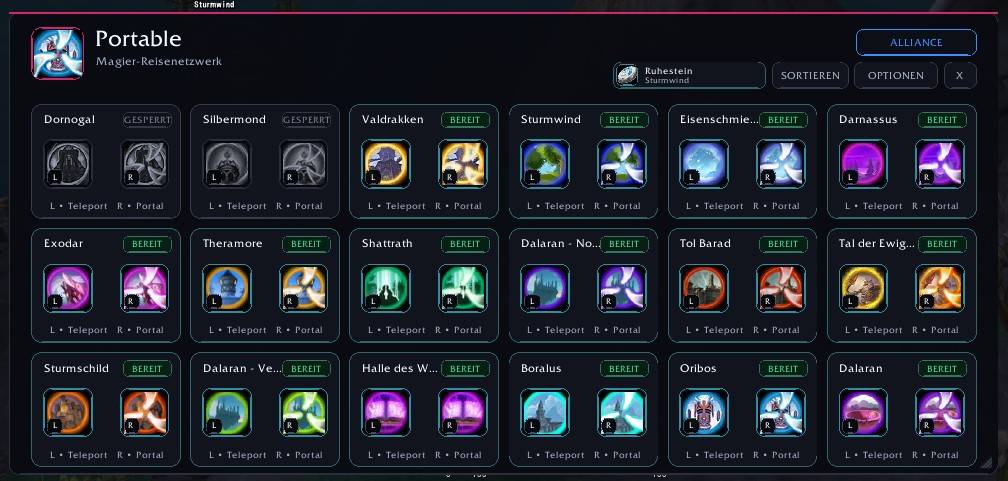
Portable brings your Mage Teleports, Portals, World Map travel pins, and the regular Hearthstone together in one clean and configurable interface.
🇬🇧 English
✨ Features
- 🔮 Automatic detection of available Mage Teleports and Portals
- 🧭 Teleport and Portal spells combined by destination
- 🗺️ World Map pins for Mage travel destinations
- 📍 Automatic learning of destination positions after teleporting
- 👁️ Per-destination visibility controls
- 📌 Individual map pin visibility
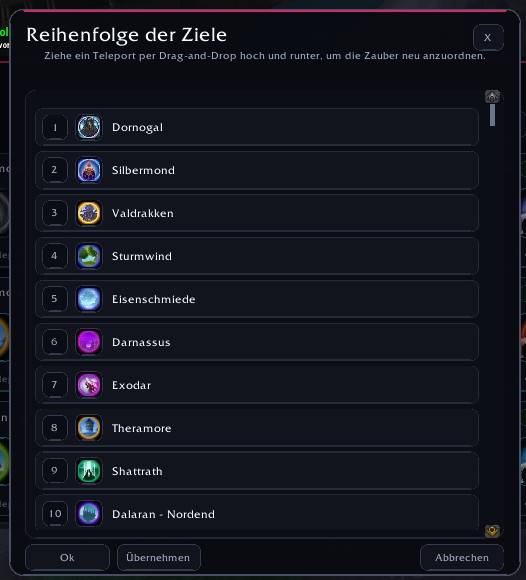
- ↕️ Drag-and-drop destination sorting
- 🧠 Optional learning order for frequently used destinations
- 🪨 Regular Hearthstone support with your current bind location
- 🎨 Modern, scalable interface
- 🖱️ Smart left/right click actions for solo and group play
- 📌 Mage-only minimap button and LibDataBroker support
- ⌨️ Key binding and slash commands
- 🌍 English, German, French, Russian, and Simplified Chinese localization
- 💾 Profile support
🚀 Smart Travel Controls
Portable automatically adjusts its click actions depending on whether you are solo or in a group.
| Situation | Left Click | Right Click |
|---|---|---|
| Solo | Teleport | Portal |
| In a Group | Portal | Teleport |
Unavailable spells are clearly marked in the interface.
🔮 Automatic Teleport & Portal Detection
Portable automatically detects your Mage Teleports and Portals from World of Warcraft.
New Mage travel destinations can be picked up automatically, while spell names, availability, and icons are taken directly from the game.
🗺️ World Map Pins
Portable can display your Mage travel destinations directly on the World Map.
After using a Teleport, Portable can remember the destination position and use it for the corresponding map pin.
You can:
- Enable or disable Mage travel pins globally
- Change the map pin size
- Enable or disable individual destination pins
- Show a destination in Portable while hiding its map pin
- Show a map pin while hiding the destination from the main Portable window
👁️ Destination Visibility
Every detected destination can be configured individually.
For each destination you can choose:
- Show in Portable
- Show map pin
Hidden destinations keep their saved sorting position and can be enabled again at any time.
A Reset Visibility option can restore all destinations and map pins.
↕️ Destination Ordering
Manual ordering
Open the destination order window and drag and drop destinations into your preferred order.
Learning order
Enable Learn frequently used order and Portable can automatically prioritize the destinations you use most often.
🪨 Hearthstone
Portable includes the regular Hearthstone as a separate travel utility.
- Uses the Hearthstone directly from your bags
- Shows your current bind location
- Works with left or right click
- Remains separate from Mage destination sorting
🎨 Modern Interface
Portable uses a modern card-based interface designed for quick access to your travel spells.
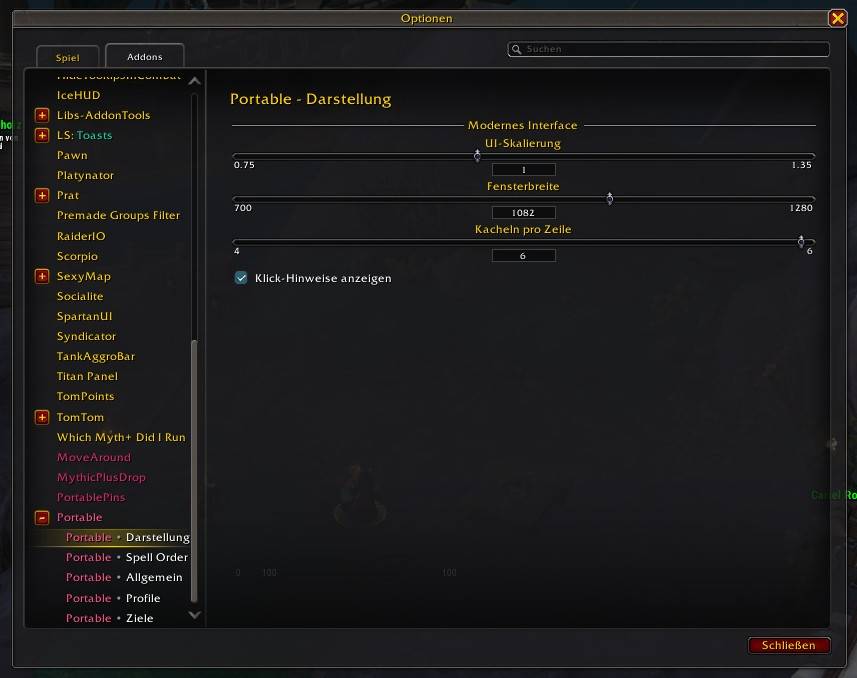
Available appearance options include:
- UI scale
- Window width
- 4–6 destination cards per row
- Optional click hints
- Manual window resizing
- Close with Escape
Spell and item icons are loaded directly from World of Warcraft.
📌 Minimap & Data Broker
Portable includes a Mage-only minimap button and LibDataBroker support.
- Left Click: Open or close Portable
- Right Click: Open Portable settings
The minimap button can be disabled in the addon settings.
⚙️ Settings
Portable integrates into Blizzard's addon settings and provides sections for:
- Appearance
- Spell Order
- General
- Profiles
- Destinations / Map Pins
⌨️ Commands & Key Binding
/portable
/portable show
/portable hide
/portable toggle
/portable config
/portable sort
/portable help
Portable can also be opened through a key binding.
📦 Installation
- Download Portable from CurseForge or GitHub.
- Extract the addon folder to:
World of Warcraft/_retail_/Interface/AddOns/Portable/- Start or restart World of Warcraft.
- Log in with a Mage and open Portable through the minimap button, key binding, or
/portable.
All required libraries are included.
✅ Compatibility
- World of Warcraft Retail
- Midnight / 12.x
- Designed for Mages
❤️ Credits
- Maintenance & development: BloodDragon2580
- Original code: Feyawen Ariana (2007–2015)
Thanks to everyone who tests Portable, reports bugs, and suggests improvements.
🇩🇪 Deutsch
✨ Portable – das moderne Reisenetzwerk für Magier
Portable vereint deine Teleport-Zauber, Portale, Weltkarten-Pins und den normalen Ruhestein in einer modernen und übersichtlichen Oberfläche.
✨ Funktionen
- 🔮 Automatische Erkennung verfügbarer Magier-Teleports und -Portale
- 🧭 Teleport und Portal werden dem passenden Reiseziel zugeordnet
- 🗺️ Karten-Pins für Magier-Reiseziele auf der Weltkarte
- 📍 Automatisches Lernen von Zielpositionen nach einem Teleport
- 👁️ Reiseziele im Portable-Fenster einzeln ein-/ausblenden
- 📌 Karten-Pins pro Ziel einzeln ein-/ausschalten
- ↕️ Drag-and-Drop-Sortierung
- 🧠 Optionaler Lernmodus für häufig verwendete Reiseziele
- 🪨 Normaler Ruhestein inklusive aktuellem Heimatort
- 🎨 Moderne und skalierbare Oberfläche
- 🖱️ Intelligente Links-/Rechtsklick-Steuerung
- 📌 Minimap-Button und LibDataBroker-Unterstützung
- ⌨️ Tastaturbelegung und Slash-Befehle
- 🌍 Englisch, Deutsch, Französisch, Russisch und vereinfachtes Chinesisch
- 💾 Profil-Unterstützung
🚀 Intelligente Klicksteuerung
Portable passt die Aktionen automatisch daran an, ob du allein oder in einer Gruppe unterwegs bist.
| Situation | Linksklick | Rechtsklick |
|---|---|---|
| Solo | Teleport | Portal |
| In einer Gruppe | Portal | Teleport |
Nicht verfügbare Zauber werden in der Oberfläche entsprechend markiert.
🔮 Automatische Erkennung von Teleports & Portalen
Portable erkennt deine verfügbaren Magier-Teleports und -Portale automatisch aus World of Warcraft.
Neue Magier-Reiseziele können dadurch automatisch erkannt werden. Namen, Verfügbarkeit und Symbole werden direkt aus dem Spiel übernommen.
🗺️ Weltkarten-Pins
Portable kann deine Magier-Reiseziele direkt auf der Weltkarte anzeigen.
Nach einem Teleport kann Portable die Zielposition speichern und anschließend für den entsprechenden Karten-Pin verwenden.
Du kannst:
- alle Magier-Karten-Pins global ein-/ausschalten
- die Größe der Karten-Pins ändern
- einzelne Karten-Pins aktivieren oder deaktivieren
- ein Ziel in Portable anzeigen und nur den Karten-Pin ausblenden
- einen Karten-Pin anzeigen und das Ziel im Portable-Fenster ausblenden
👁️ Sichtbarkeit der Reiseziele
Jedes erkannte Reiseziel kann einzeln eingestellt werden.
Für jedes Ziel kannst du wählen:
- In Portable anzeigen
- Karten-Pin anzeigen
Ausgeblendete Ziele behalten ihre gespeicherte Sortierposition und können jederzeit wieder aktiviert werden.
Mit Sichtbarkeit zurücksetzen können alle Ziele und Karten-Pins wieder eingeblendet werden.
↕️ Reiseziele sortieren
Manuell
Öffne die Zielreihenfolge und verschiebe deine Reiseziele per Drag-and-Drop in die gewünschte Reihenfolge.
Automatisch lernen
Mit Häufig genutzte Ziele lernen kann Portable häufig verwendete Ziele automatisch weiter nach vorne sortieren.
🪨 Ruhestein
Portable unterstützt den normalen Ruhestein als separate Reisefunktion.
- Direkte Nutzung aus den Taschen
- Anzeige des aktuellen Heimatortes
- Links- und Rechtsklick möglich
- Nicht Teil der Teleport-Sortierung
🎨 Moderne Oberfläche
Portable verwendet eine moderne Karten-Oberfläche für schnellen Zugriff auf deine Reisezauber.
Einstellbar sind unter anderem:
- UI-Skalierung
- Fensterbreite
- 4–6 Reiseziele pro Zeile
- Klick-Hinweise
- Manuelle Fensterbreite
- Schließen mit Escape
Zauber- und Item-Symbole werden direkt aus World of Warcraft geladen.
📌 Minimap & Data Broker
Portable bietet einen Minimap-Button für Magier sowie LibDataBroker-Unterstützung.
- Linksklick: Portable öffnen/schließen
- Rechtsklick: Portable-Einstellungen öffnen
Der Minimap-Button kann in den Einstellungen deaktiviert werden.
⚙️ Einstellungen
Portable besitzt eigene Bereiche in den Blizzard-Addon-Einstellungen:
- Darstellung
- Spell Order / Reihenfolge
- Allgemein
- Profile
- Ziele / Karten-Pins
⌨️ Befehle & Tastaturbelegung
/portable
/portable show
/portable hide
/portable toggle
/portable config
/portable sort
/portable help
Portable kann zusätzlich über eine Tastaturbelegung geöffnet werden.
📦 Installation
- Portable über CurseForge oder GitHub herunterladen.
- Den Addon-Ordner nach folgendem Pfad entpacken:
World of Warcraft/_retail_/Interface/AddOns/Portable/- World of Warcraft starten oder neu starten.
- Mit einem Magier einloggen und Portable über den Minimap-Button, die Tastaturbelegung oder
/portableöffnen.
Alle benötigten Bibliotheken sind bereits enthalten.
✅ Kompatibilität
- World of Warcraft Retail
- Midnight / 12.x
- Für die Klasse Magier
❤️ Credits
- Aktuelle Entwicklung & Pflege: BloodDragon2580
- Ursprünglicher Code: Feyawen Ariana (2007–2015)
Danke an alle Spieler, die Portable testen, Fehler melden und Vorschläge einreichen.
The New Portable Team


Owner