푸근모험 Poogoon Adventure Mate (푸근한 모험 친구)
- By
푸근 (Poogoon) – 푸근한 모험 친구
All in One Quality of Life Addon for WoW TBC Classic
푸근은 설치만 하면 바로 플레이에 도움을 주는 모험 파트너입니다.
올인원 애드온
"한글이 안써질때 시계를 클릭하세요". 안되면 잠시 기다렸다가 다시 클릭하시면 됩니다.
🔥 Core Features
🍞 Auto Food & Water (자동 물빵)
🎯 One-click Focus CC (메즈 관리)
🧙 Smart Buff Grid (손쉬운 버프)
📢 Quest Progress & Completion Alert (퀘스트 알림)
🪵 Shaman Totem Bar (토템바)
🔍 Inventory Search (Poogle)
📘 Adventure Board (귀환바로가기/레이드 귀속/골드/전문기술 쿨타임)
⏰ Clock (시계) - 한글이 안써질때 시계를 클릭하세요.
🐎 Dual Mount Button (탈것 2개 등록 / 캐릭별 저장 )
💬 P-Talk Unified Chat (길드·채널·귓속말 통합 채팅창)
📊 Reputation Tracker Bar (선택 평판 실시간 추적 바)
🎲 Dice Roll Tracker (파티·공대 주사위 자동 집계 / 하이·로우 / 발표 버튼 방식)
⌨️ Skill Shortcut Button (스킬 단축키 버튼) -new
모든 기능은 개별 ON/OFF 가능.
⌨ Slash Commands / 명령어
/pg/poogoon/푸근
→ Open settings window (설정 창 열기)
혹은 각 기능창에서 우측버튼을 눌러도 옵션창을 보실 수 있습니다.
⭐ How to Use / 사용 방법
No setup required — install and play.
별도의 설정 없이 설치 후 바로 사용 가능합니다.
🍞 Auto Food & Water (자동물빵)
버튼 클릭만으로 가장 좋은 음식/물 자동 사용.
Automatically uses the best food/water with one click.
🎯 Focus CC Button
좌클릭: 메즈 시전 / 우클릭: Focus(주시대상) 설정.
Left-click casts CC, Right-click sets Focus.
📢 Quest Alert
퀘스트 진행·완료 시 화면 알림 표시.
Shows alerts when quests progress or complete.
🧙 Smart Buff Grid
유닛 클릭으로 버프 리필 (좌: 단일 / 우: 광역).
Click units to reapply buffs (Left: single / Right: group).
🪵 Totem Bar (Shaman)
자주 쓰는 토템 빠르게 소환.
Quickly summon your totems.
🔍 Poogle Search
가방/은행 아이템 통합 검색.
Searches items in bags & bank instantly.
⏰ Clock
서버 시간/날짜 및 던전 입장 횟수 표시. 한글이 안써질때 시계를 클릭하시면 한글입력이 됩니다.
Displays server time, date, and dungeon entries.
🐎 Dual Mount Button
좌클릭: 탈것 1 탑승 / 우클릭: 탈것 2 탑승.
Left-click mounts 1 / Right-click mounts 2.
💬 P-Talk Unified Chat
길드·선택 채널·귓속말을 하나의 창에서 관리.
Manage Guild, selected Channels, and Whispers in one clean window.
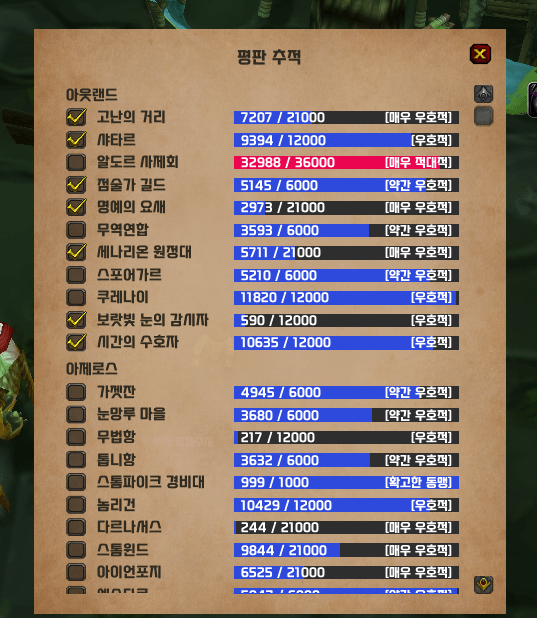
📊 Reputation Tracker Bar (평판 추적 바)
헤더 좌클릭: 전체 평판 목록 열기 / Shift+드래그: 이동.
Left-click header: open full reputation list / Shift+Drag: move.
🎲 Dice Roll Tracker (주사위 집계)
파티·공대 주사위를 자동 수집하고 발표 버튼으로 결과 출력.
Automatically collects Party/Raid rolls and announces results via the Announce button.
⌨️ Skill Shortcut (스킬 단축키)
주문/아이템/매크로를 등록하고 R/T/F/G 키로 바로 사용.
Assign spells, items, or macros and use them instantly with R/T/F/G hotkeys.
All features work out of the box and can be toggled ON/OFF if needed.
모든 기능은 기본 설정 없이 동작하며, 필요 시 옵션에서 ON/OFF 가능합니다.
🐎 Dual Mount Button (탈것 버튼) — Detailed Guide
1) 탈것 설정하기
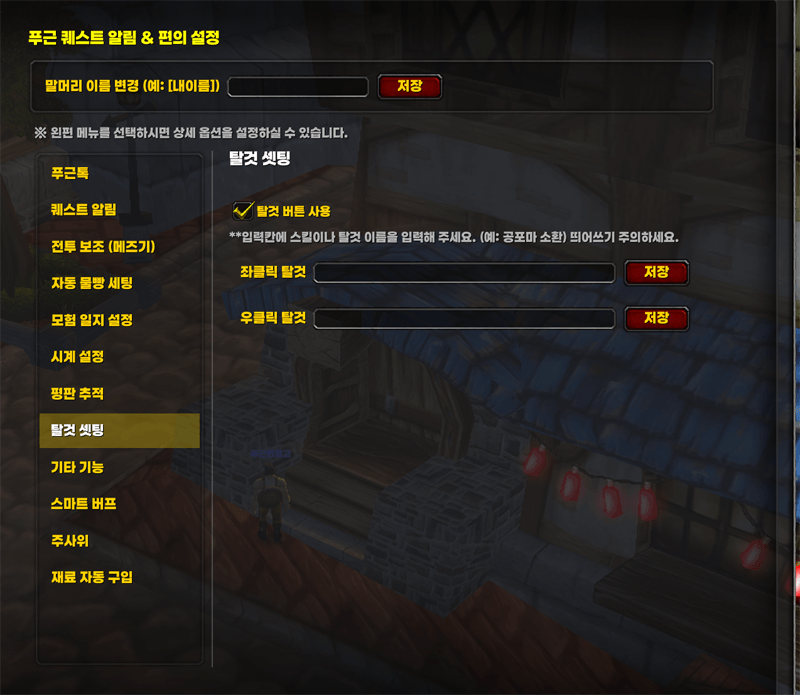
옵션창을 열고 탈것 1 / 탈것 2에 원하는 탈것 이름을 입력하세요.
Open the Options window and enter your desired mounts in Mount 1 / Mount 2.
예시: 입력칸에 "공포마 소환"
→ 스킬 입력 시 띄어쓰기를 정확히 입력해 주세요.
Example: Enter "Summon Dreadsteed"
→ Make sure the spell name is entered exactly as written, including spaces.
2) 탑승 방법
- 좌클릭: 탈것 1 탑승
- 우클릭: 탈것 2 탑승
Left-click mounts 1.
Right-click mounts 2.
아래는 게임 내 탈것 버튼 이미지입니다.
Below is how the Mount button appears in-game.
탈것 입력시, 띄어쓰기 유의해 주세요.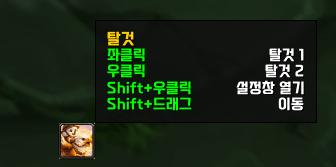
✨ New Feature: Smart Buff (스마트버프)
Recommended for players who want fast and simple buff management without complicated setup.
복잡한 세팅 없이 빠르게 버프를 관리하고 싶은 분들께 추천합니다.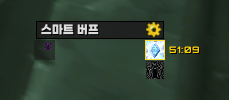
━━━━━━━━━━
1. Automatic Buff Detection
자동 버프 감지
━━━━━━━━━━
This addon automatically detects buffs your character can cast.
이 애드온은 캐릭터가 사용할 수 있는 버프를 자동으로 감지합니다.
Supports up to 25 players.
최대 25명까지 지원됩니다.
━━━━━━━━━━
2. Basic Controls
기본 조작
━━━━━━━━━━
Left Click → Single Buff
왼클릭 → 단일 버프
Right Click → Greater Buff
우클릭 → 광역 버프
🍞 Automatic Food & Water System (자동 물빵 시스템)
This is NOT a simple “use food” button.
푸근의 자동 물빵은
👉 가방을 직접 관리하지 않아도 되는 시스템입니다.
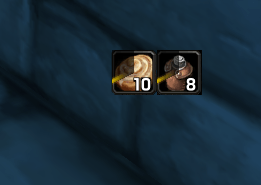
- Automatically selects and uses the best available food & water in your bags
- Highest priority: Mage Conjured Food & Water
- No need to place food or water on your action bars
- Top priority: Mage Conjured Food & Water
- Perfect for leveling, dungeon runs, and everyday gameplay
✔ 먹을 걸 고민할 필요 없이
✔ 가방에 있는 것 중 가장 좋은 물빵을 자동으로 선택해줍니다.
✔ 단축창에 올릴 필요도 없습니다.
단축키 임의 지정하여 실행 가능
물 : 원하는 키로 설정
빵 : 원하는 키로 설정
Custom hotkeys can be assigned
Water: assign any key you want
Food: assign any key you want
🌀 CC & Mez Helper (메즈 & 주시 대상 관리)
Crowd control made simple.
- One button: 버튼 하나로 메즈와 주시대상설정, 재메즈 까지
- Apply CC (Mez)
- Automatically set Focus target
- Same button:
- Re-Mez the focused target instantly
- No target switching needed
- Perfect for Mage / Warlock / Hunter CC play
👉 전투 중 시야와 흐름을 유지하는 CC 관리
우클릭시 주시대상을 설정합니다.
버튼만 누르면 자동으로 주시대상에게 스킬을 시전합니다.
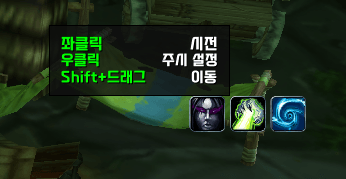
단축키 지정 옵션 추가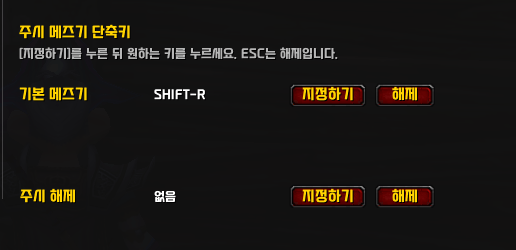
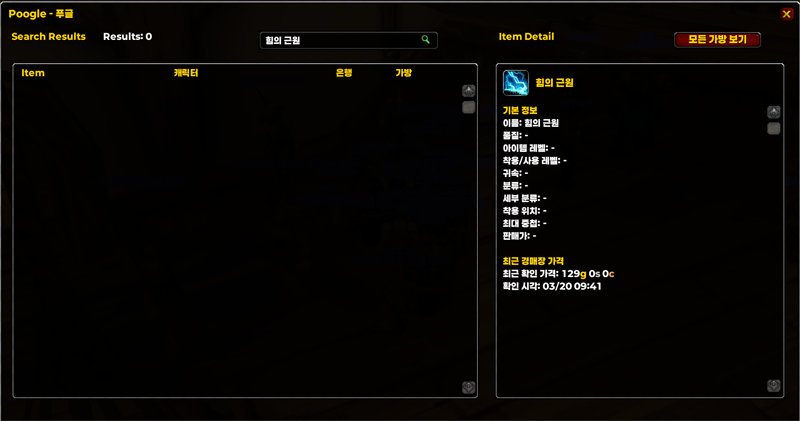
🔍 Poogle (Account-wide Item Search)

Search items across your entire account.
계정 내 캐릭터 아이템을 통합 검색할 수 있습니다.
- 계정내 아이템 검색
Search items across all characters on your account
- 경매장 검색 아이템 최근 가격 표시
Show recent Auction House prices for searched items
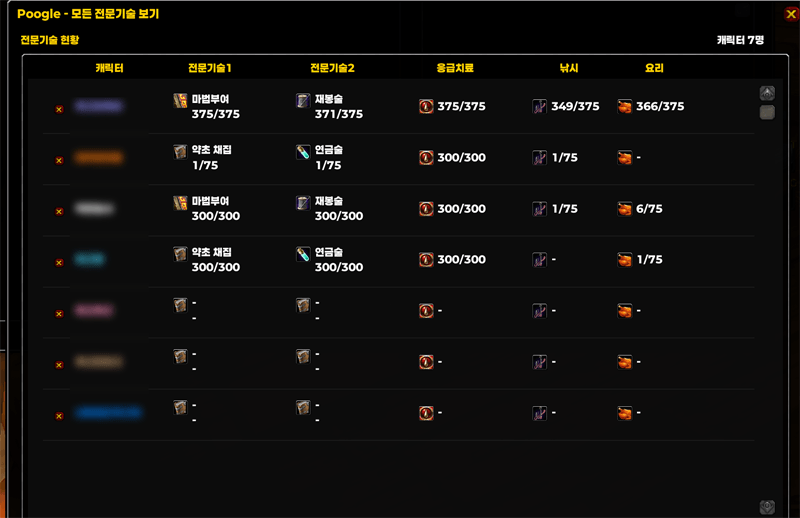
- 계정내 캐릭터 전문기술 현황판
Profession overview for all characters on your account
- 모든 캐릭터 은행을 한번 열어 주셔야 저장됩니다.
To save bank data, you need to open each character’s bank at least once.
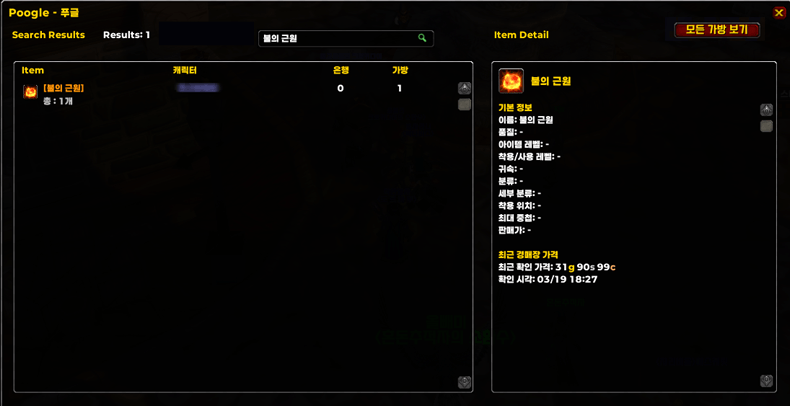
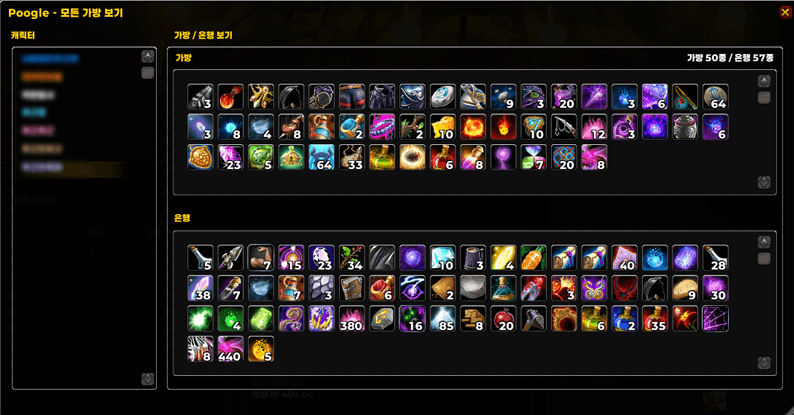
내가 가지지 않은 아이템도 경매장 검색한 것은 저장이 되어. 최근 가격을 확인 하실 수 있습니다.
Poogle Recent Auction Price
- Saves the most recently checked price of items searched in the Auction House.
- Saved prices can still be viewed in Poogle even after closing the Auction House window.
- This feature is intended for quickly checking the last viewed price again later.
모든 캐릭터 전문기술 현황판 표시
Profession Overview for All Characters
🔮 Shaman Totem Helper
- Totem bar & timer support
- Clean and minimal UI
- Designed for quick decision making
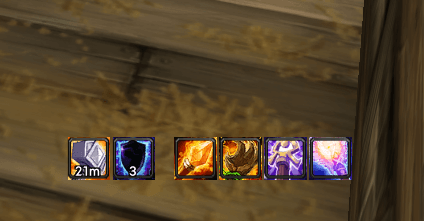
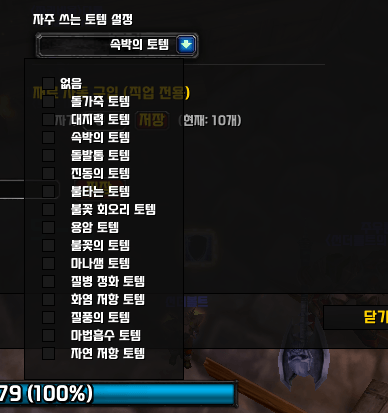
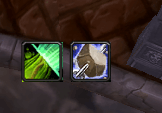
[New] Shaman: "Favorite Totem" Shortcut Added
- A generic button has been added next to the 'Totemic Call' (Recall) button.
- You can assign a specific totem via Options (/pg) to cast it instantly during combat.
- [한글] 주술사: '자주 쓰는 토템' 단축 버튼이 추가되었습니다.
- '토템의 부름(회수)' 버튼 바로 옆에 생성됩니다.
- 설정창(/푸근)에서 미리 지정해둔 토템을 전투 중 목록을 열지 않고 즉시 시전할 수 있습니다.
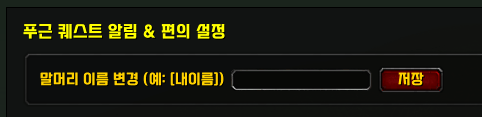
🔔 Quest Alert System
Never miss quest progress.
- Alerts you when quest objectives are updated or completed
- Helps you stay focused on gameplay without constantly checking the quest log
👉 퀘스트 진행 / 완료 알림 지원
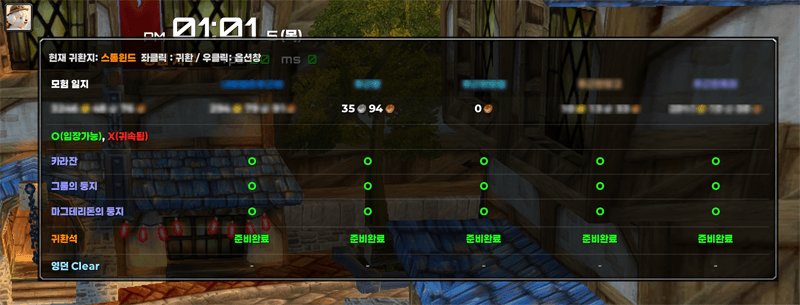
📘 Adventure Journal (모험일지)
Account-wide info at a glance.
계정 내 캐릭터 정보를 한눈에 확인할 수 있습니다.
- Adventure Board Return Enabled 모험일지 버튼으로 귀환 가능
- Gold per character 캐릭터별 골드 확인
- Instance lockouts 인던 / 레이드 귀속 여부
- Profession cooldowns 전문기술 쿨타임 확인
- Easy Access (간편한 사용)
- A dedicated icon appears on your screen.
- Mouseover: Open the Adventure Board.
- Right-Click: Open Settings (Toggle characters visibility).
- 화면에 전용 아이콘이 생성됩니다.
- 마우스 오버: 모험 일지 열기.
- 우클릭: 설정창 열기 (표시할 캐릭터 선택 가능).
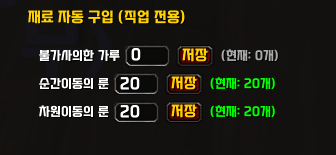
🎯 Auto-Buy Reagents (직업 재료 자동 구매)
- Automatically restocks class reagents (Ankhs, Powders, Candles, Seeds) at vendors.
- 상점 방문 시 윤회, 가루, 양초 등 설정한 개수만큼 자동 구매합니다.
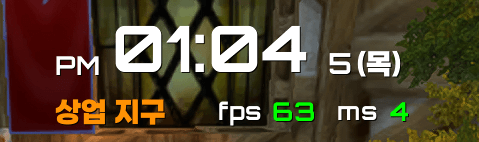
🎯 Zone Info & Clock (지역 정보 및 시계)
- Displays current Zone name and Time. (현재 지역명과 시간 표시)
- Move with [Shift + Left-Drag]. (Shift+드래그로 자유로운 이동 가능)
- 한글이 안써질때 시계를 클릭하세요. IME를 초기화해서 한글입력이 가능하도록 만들어줍니다.
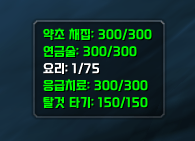
🎯 Profession Monitor(전문기술 전광판)
- Real-time HUD for Primary/Secondary skill levels.
💬 P-Talk Unified Chat (통합 채팅창) — Detailed Guide
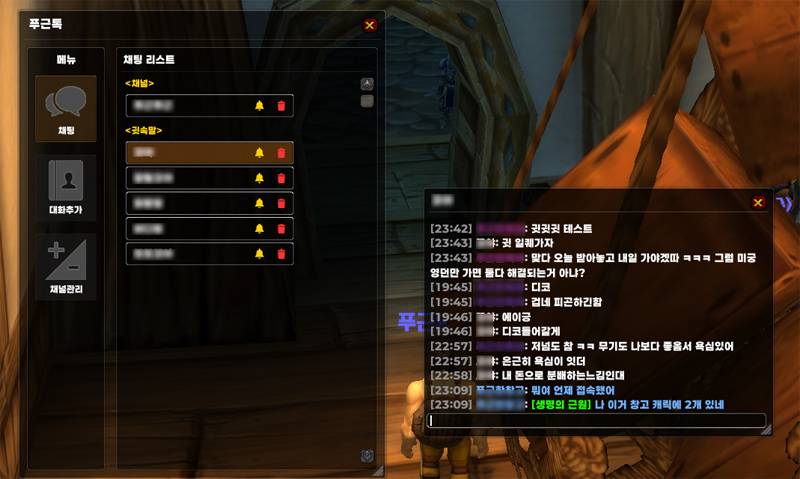
푸근톡은 메신저 기능입니다.
Poogoon Talk functions as a messenger system.
- 1:1 대화 = 귓속말 (기록 유지)
- 1:1 = Whisper (history preserved)
- 오픈 채팅 = 길드 / 생성 채널 (2주 저장)
- Open Chat = Guild / Custom Channels (stored for 2 weeks)
- 일반/거래/구매 채널은 포함되지 않습니다.
- General/Trade channels are not included.

1) 창 열기
화면에 있는 푸근톡 아이콘을 클릭하세요.
좌클릭: 창 열기 / 닫기
우클릭: 옵션 창 열기
Shift + 드래그: 아이콘 이동
Click the P-Talk icon on your screen.
Left-click: Open / Close
Right-click: Open Options
Shift + Drag: Move the icon
2) 대화방 구성
푸근톡은 아래 3가지 채팅을 하나의 창에 정리합니다.
- 길드 (Guild)
- 채널 (Channels)
- 귓속말 (Whispers)
P-Talk organizes:
- Guild
- Selected Channels
- Whispers
3) 채널 설정 방법
왼쪽 하단의 "채널추가" 버튼을 클릭하세요.
현재 참가 중인 채널 목록이 표시됩니다.
체크한 채널만 푸근톡에 표시됩니다.
Click the "Add Channels" button at the bottom-left.
Only checked channels will appear in P-Talk.
4) 메시지 보내기
현재 선택된 방으로 자동 전송됩니다.
길드 방 → 길드 채팅
채널 방 → 해당 채널
귓속말 방 → 해당 캐릭터
Messages are automatically sent to the currently selected room.
5) 귓속말 시작 방법
먼저 기본 채팅창에서 아래처럼 입력하세요:
/w 캐릭터이름 메시지
/귓 캐릭터이름 메시지
예시:
/w 푸근푸근 안녕
그 후 푸근톡에 귓속말 방이 생성되며,
이후부터는 푸근톡에서 계속 대화 가능합니다.
Start the first whisper using:
/w CharacterName message
After that, a whisper room appears in P-Talk.
6) 안읽음 표시
- 왼쪽 방 목록에 숫자로 표시
- 아이콘에 N 표시
Unread messages:
- Number badge on the room
- “N” badge on the icon
7) 귓속말 방 삭제
귓속말 방 오른쪽의 빨간 X 버튼을 누르면
대화 기록과 함께 삭제됩니다.
Click the red X button to delete a whisper room.
8) 채팅 링크 지원
아이템을 Shift+클릭하면 푸근톡 입력창에 링크가 삽입됩니다.
메시지 영역에서 아이템 링크 클릭 시 툴팁이 표시됩니다.
Shift-click items to insert links.
Item links are clickable and show tooltips.
9) 기록 저장
길드/채널: 14일 보관
귓속말: 방 삭제 전까지 유지
Guild/Channels: 14 days
Whispers: kept until manually deleted
아래는 게임 내 푸근톡 창 예시입니다.
Below is how the P-Talk window appears in-game.
📊 Reputation Tracker Bar (평판 추적 바) — Detailed Guide
-
평판 선택하기
헤더를 좌클릭하면 전체 평판 목록이 열립니다.
추적하고 싶은 평판을 체크하세요.
Left-click the header to open the full reputation list.
Check the reputations you want to track.
예시: “세나리온 원정대” 체크
→ 체크된 평판만 화면 바에 표시됩니다.
Example: Check “Cenarion Expedition”
→ Only checked reputations will appear as bars on screen.
-
화면에서 확인하기
선택한 평판은 실시간 진행도 바 형태로 표시됩니다.
현재 수치 / 퍼센트 / 평판 단계가 함께 표시됩니다.
Tracked reputations are displayed as real-time progress bars.
Current value, percentage, and standing are shown together.
-
추가 기능
Shift + 드래그: 위치 이동
우클릭: 옵션창 열기
Shift + Drag: Move the frame
Right-click: Open Options
아래는 게임 내 평판 추적 바 예시입니다.
Below is how the Reputation Tracker Bar appears in-game.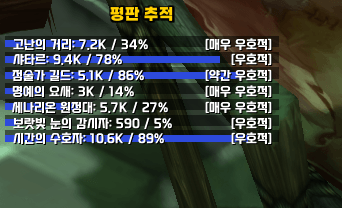
🎲 Dice Roll Tracker (주사위 집계) — Quick Guide
-
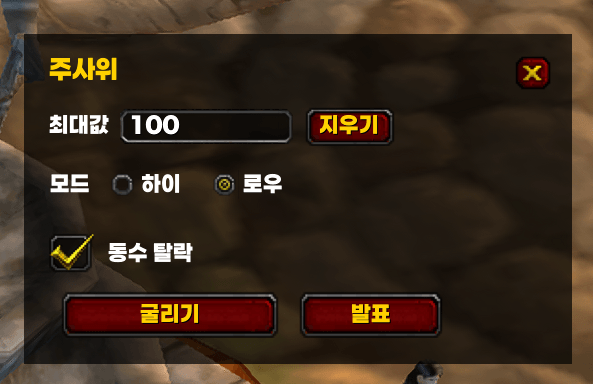
최대값 설정 (Set Max Value)
최대값을 입력하세요. 기본값 100.
Enter the maximum roll value (default 100). -
모드 선택 (Select Mode)
하이: 높은 숫자 1등
로우: 낮은 숫자 1등
High = Highest wins / Low = Lowest wins -
진행 방법 (How to Use)
① 굴리기 클릭
② 파티/공대원 /roll
③ 발표 버튼 클릭
Click Roll → Members roll → Click Announce.
-
동수 탈락 옵션 (Tie Elimination)
동일 숫자 발생 시 전원 탈락 처리 가능.
Optional tie elimination for fair distribution.
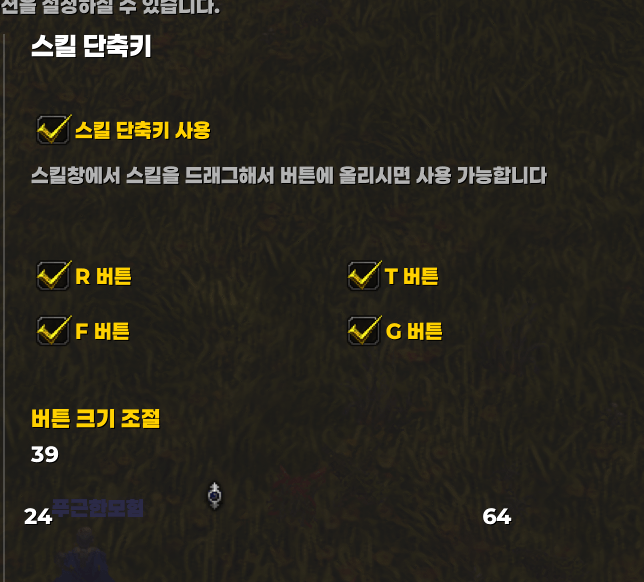
⌨️ Skill Shortcut (스킬 단축키)
주문/아이템/매크로를 등록하고 R/T/F/G 키로 바로 사용.
Assign spells, items, or macros and use them instantly with R/T/F/G hotkeys.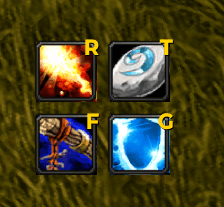
🔍 Search Keywords
Poogoon, 푸근, TBC Classic addon, Quality of Life, Quest Alert, Focus CC, Totem Bar, Auto Food Water, Smart Buff, Inventory, 전문기술현황, 자동물빵, 스마트버프, 계정내 아이템검색, 퀘스트알림, P-Talk, 푸근톡, Unified Chat, Guild Channel Whisper, 통합채팅창, 귓속말관리
The 푸근모험 Poogoon Adventure Mate (푸근한 모험 친구) Team