Polestar Guides
- By
Screenshot_20261014_110447.png
Screenshot_20261013_232552.png
Screenshot_20261013_232536.png
Screenshot_20261013_232501.png
Screenshot_20261013_232443.png
Description
A free, open-source guide addon for World of Warcraft: Forever: leveling routes for every start, found by simulation and written step by step.
What it is
Polestar is one addon for the whole of WoW: Forever. It carries 220 guides: 57 leveling guides that take both factions from 1 to 60 from every race's starting zone (Zephras Isle for the Skyborne included), 62 class guides for every class's quest chains, the twelve professions from 1 to 300, 17 reputations, 7 exploration guides, the Legacy challenges and 64 collectible guides, one per mount and per pet.
Around the guides it adds a 3D waypoint arrow that walks real paths and a travel planner, quest markers on the map, an upgrade indicator on item tooltips, a dungeon quest journal, rare alerts and the quality-of-life helpers a long leveling session needs, and every window works with a gamepad. Its interface and its guides read in English, German, French, Spanish (Spain and Latin America), Brazilian Portuguese, Russian, Korean and Chinese (Simplified and Traditional), with every NPC, place, item and quest named as your game names it. It is free, open source under the GPL-3.0, and made in the open on GitHub.
A guide that keeps up with you
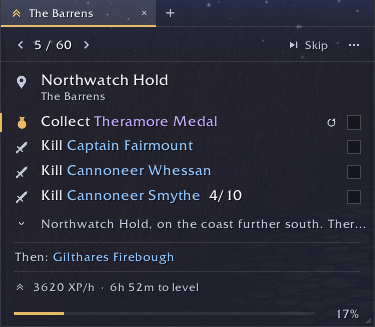
The guide window. The step's goals with their counters, who comes next, XP per hour and the time to level.
- One person at a time. In a quest hub the window shows only who to talk to now and their quests, then who comes next ("Person 2 of 8"), and the arrow points at that person.
- Goals check themselves off as you play: quests accepted and turned in, kills, loot, places reached, trainers visited, skills and reputation. Your place is worked out from your quest log, so it survives lost saved variables.
- A guide for where you are. The window opens with a guide for your race, class, level and zone, and each guide hands over to the next one in its chain when you finish it.
- Solo by design. The leveling routes use only quests one player can do alone; a quest that needs an elite appears as an extra marked "optional". Class quests come at the level each class gets them.
- Tabs. Up to six guides open at once: a leveling route and a profession, say.
- Gamepad. Every Polestar window answers the D-pad, A, B, Y and LB / RB, with a bar of button hints. Options, Gamepad names the buttons (Xbox letters or PlayStation shapes) and binds any Polestar action to a key, a button or two buttons held together; nothing is bound until you choose.
Finding the way
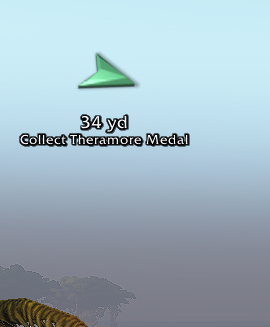
The arrow. Distance and the goal it leads to.
- A 3D waypoint arrow points at the current goal, with distance and ETA, and knows every place a target spawns: a click moves it on to the next one.
- Real paths: the arrow walks you round cliffs, walls and water, through town gates, into caves and down the Undercity's lifts, on Polestar's walking maps with a router that started from the routing engine of Cillian Berragan's Shortest Path Forever, used with his kind permission. Walks keep to roads where they are not much longer, stay out of the other faction's towns and go round zones far above your level; the route style (Fastest, Balanced or Roads) is yours to pick. With Shortest Path Forever itself installed, Polestar still guides; Hand guiding to Shortest Path Forever (Options, Integrations) hands it the guiding instead, so the two never guide at once.
- The travel planner uses known flight paths, boats, zeppelins, the tram, lifts, portals, class teleports and your Hearthstone when they are faster, with boats and zeppelins on their real timetables, each leg with its own caption and time ("Fly to Crossroads", "Take The Great Lift, leaves in about 0:15").
- Quest markers for givers, objectives and turn-ins on the world map and the minimap, with tooltip lines on the mobs and items a quest needs and nameplate icons on the mobs you still need.
- Upgrade advice on item tooltips and on the quest reward panel: by how much an item is an upgrade for your spec at your level, and which reward to take.
- Class training reminders every two levels, with the nearest trainer of your class.
Every guide in one place
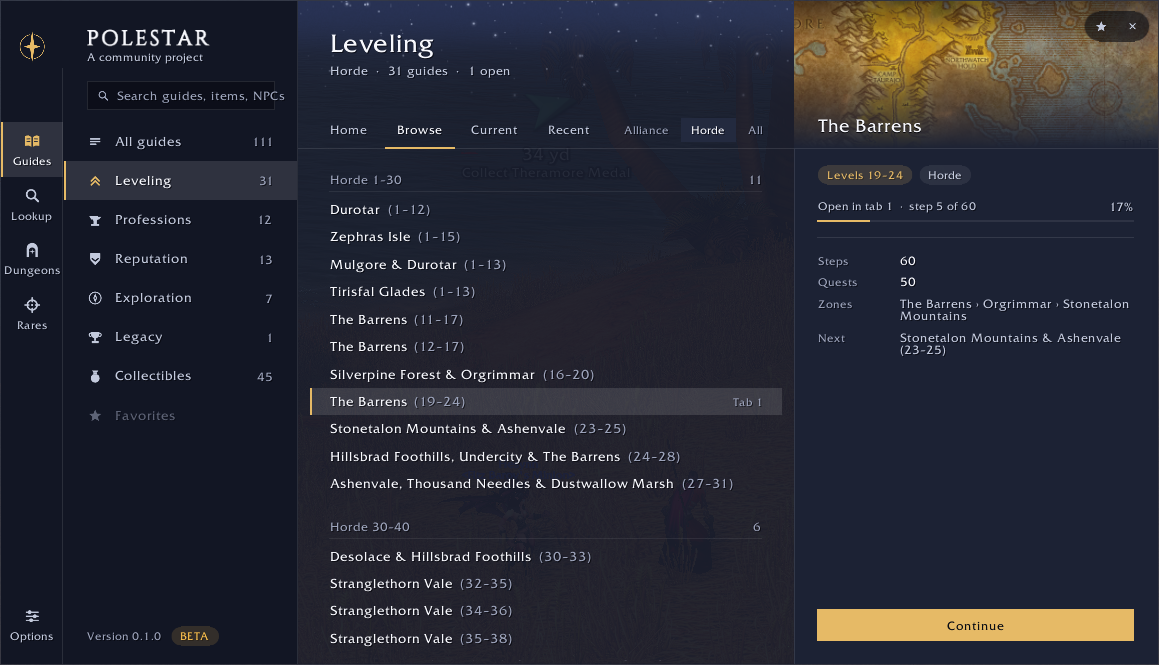
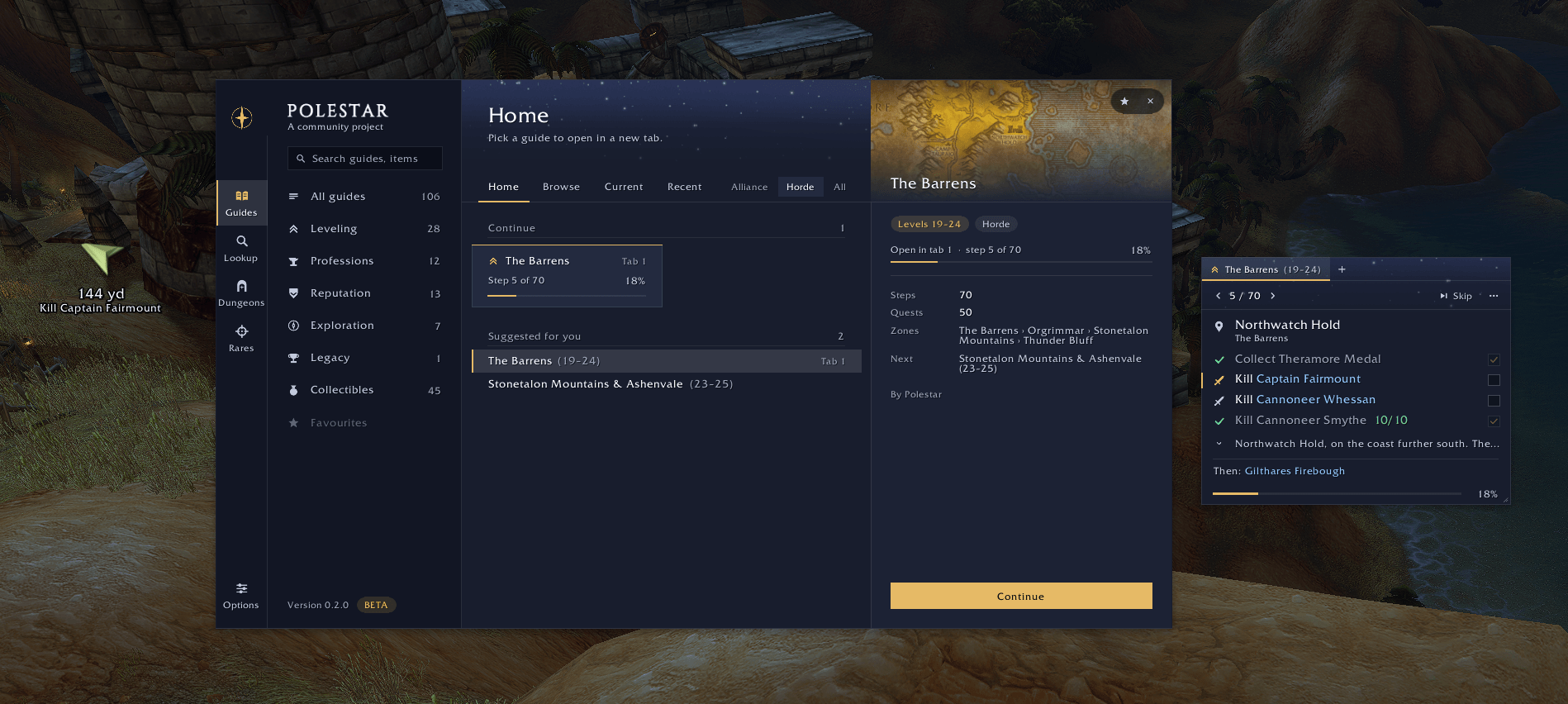
The hub. Guides, Lookup, Dungeons and Rares on one rail, Options at its foot. Here the Horde leveling guides by level band, and the selected guide's zone, progress, quests and the guide after it.
- Leveling, professions, reputations, exploration, Legacy challenges, mounts and pets, each guide with its levels, steps and the guide that follows it.
- Professions send you to the nearest trainer, vendor or inn of your own faction from where you stand.
- Community guides, other people's guides for Polestar, appear here too under their own heading, each credited to its author.
Lookup, Dungeons and Rares
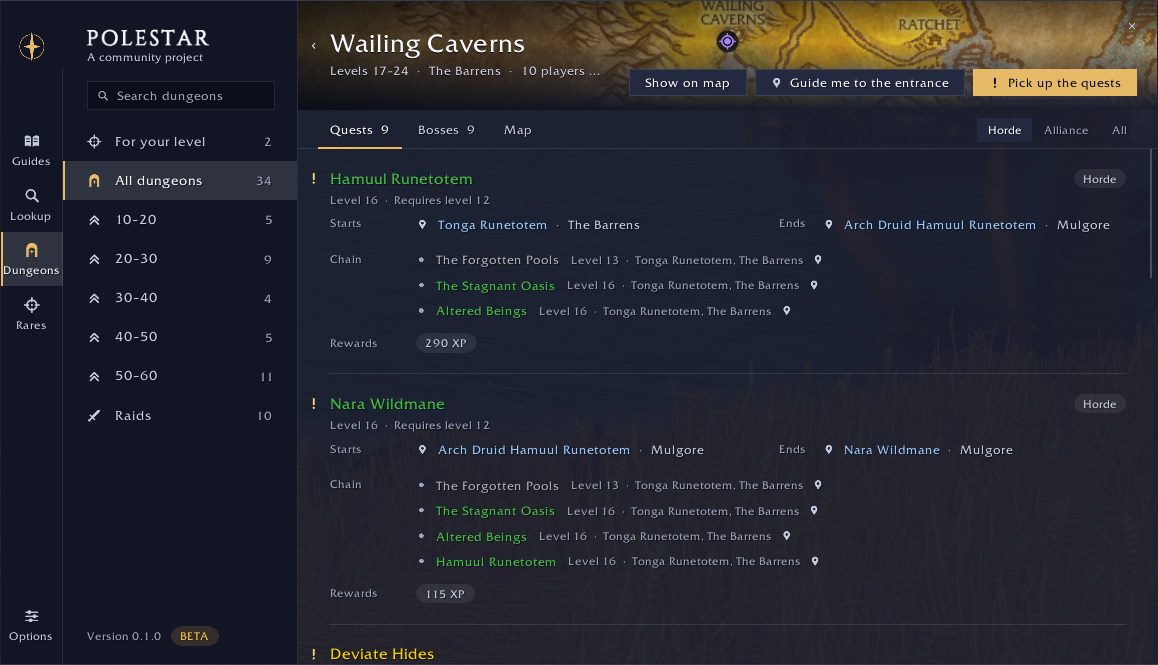
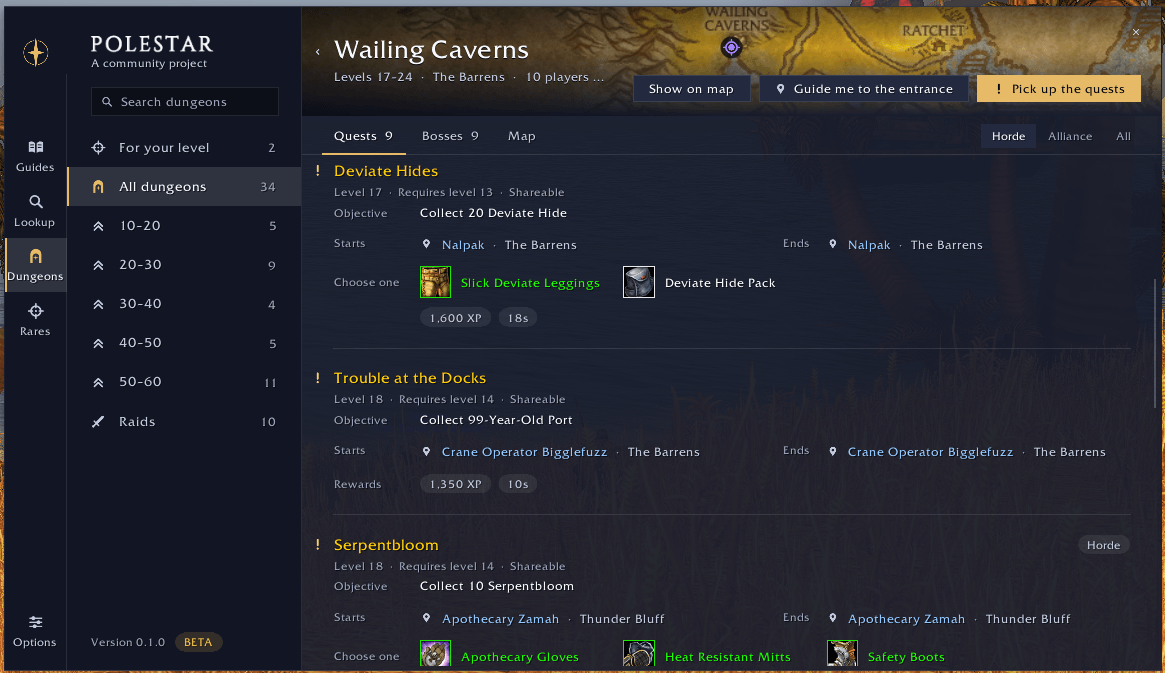
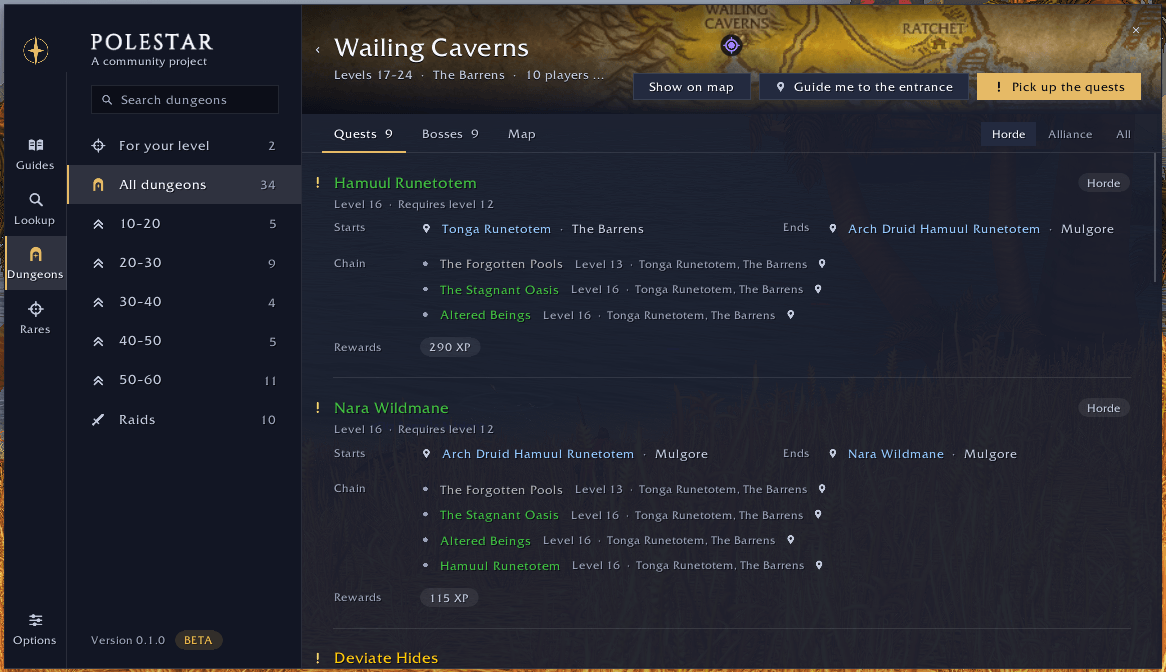
A dungeon's page. Who starts and ends each quest and its chain; one button guides you round to pick them all up.
- Lookup searches guides, items, mounts, pets, NPCs, quests, zones, dungeons and rares, and answers "how do I get that?" with the sources ranked for your character.
- Dungeons: a page per dungeon with every quest, its objective, chain and rewards, the bosses and the entrance. "Pick up the quests" builds a guide that collects them on the way to the door.
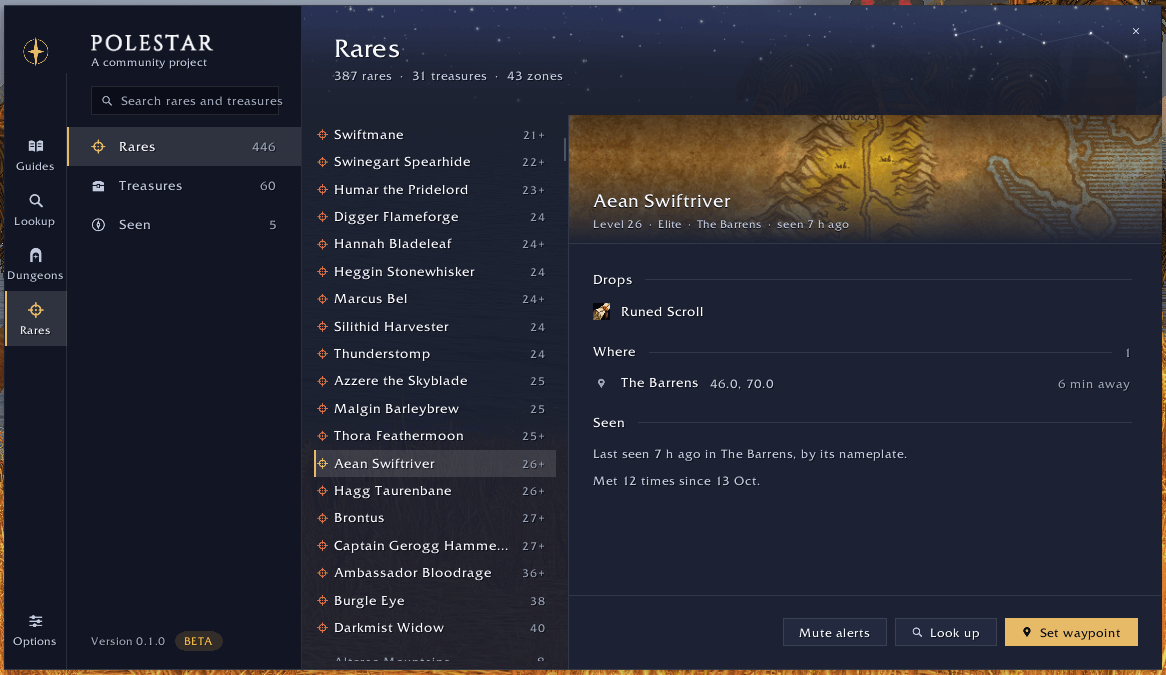
- Rares: rares and treasures by zone with their spawns and signature drop, and an alert when one shows up.
Dungeons, Rares and Lookup beyond the guides read a data pack that is not part of the download yet. Without it, Lookup still searches the guides and each section says what is missing.
Your look
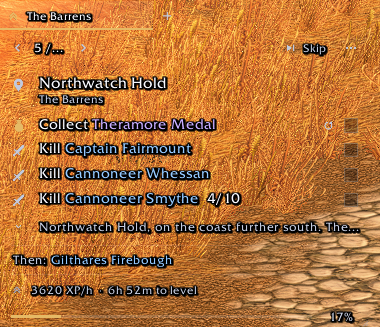
Transparent mode. Outlined text straight on the world; the controls appear under the cursor.
- Skins: Polestar's own look (the default), Halo, Hearth, and WoW Forever, Blizzard and Classic drawn in the game's own art. Every window and the arrow take the skin.
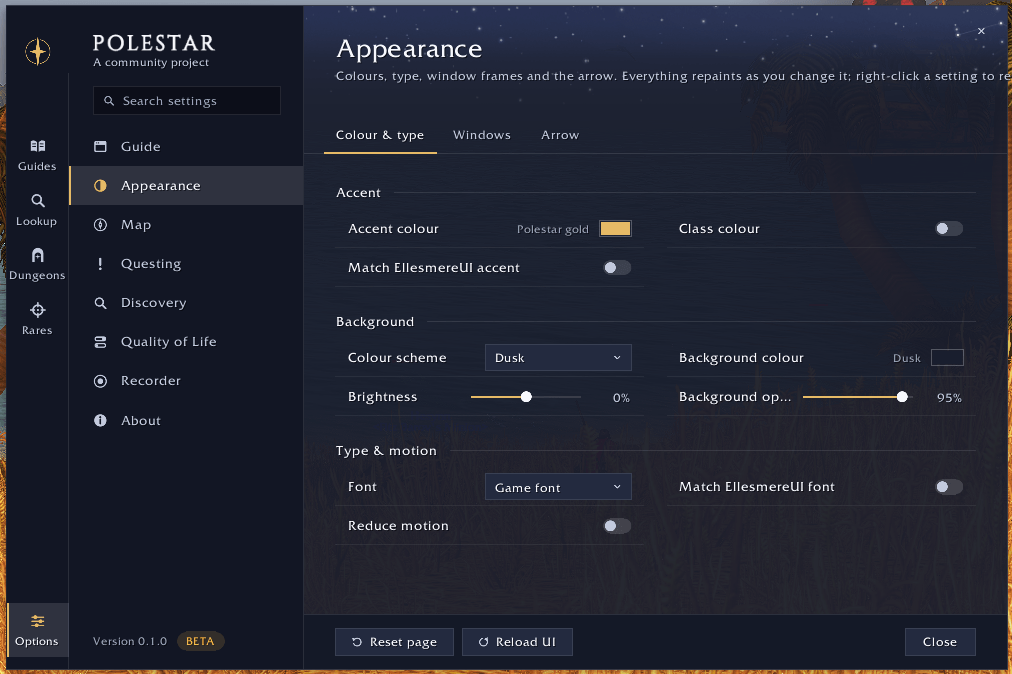
- Colour schemes: Dusk (the default), Night and Graphite, with your own accent or your class colour, background colour, opacity and brightness on top. Text stays legible whatever you pick.
- Windows: the guide window standard, compact or transparent, its scale, width and opacity; the arrow's style, size and colours; reduced motion.
- Fonts: the skin's by default (the game's own, Fira Sans in Halo), or the game's, Inter or Fira Sans. With EllesmereUI installed, Polestar follows its accent and font.
Quality of life
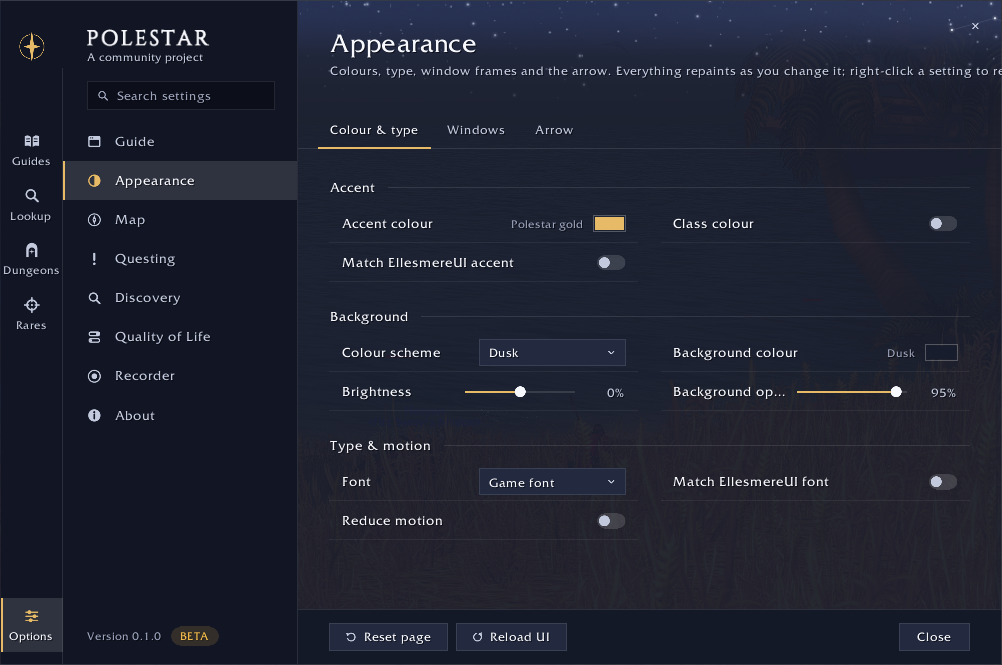
Options. Every setting as one row, applied as you change it, with a search that finds any of them.
Quest item, target and Hearthstone buttons; XP per hour and time to level; selling greys and repairing; taking the best quest reward; instant quest text and faster auto-loot; flight map and death helpers; a minimap button. Requests from other players: accept summons, resurrections and party invitations from friends and guildmates; decline other party invitations, guild invitations and duels. Hold Shift to skip auto-accept, auto-turn-in, auto-sell or the flight helper once, or to answer a request yourself.
Integrations. Options, Integrations holds every setting that depends on another addon, and lists each one only while it is installed: Shortest Path Forever, TomTom, EllesmereUI, and Questie, whose tracker can show where Polestar plans to hand in each completed quest.
How the routes are made
The leveling routes are not hand-picked. A simulator models every quest Forever offers a faction (solo quests only, with their levels, prerequisites, givers and the kills and drops their objectives take), plays millions of complete 1-60 routes for each start, and keeps the one that reaches 60 soonest under its model. From level 12 one shared route per faction is searched, so the guides join into one chain; the guides are written by hand from it and scored under the same model. Four independent searches land within five hours of each other, and under the model the guides reach 60 in about 130-132 hours played for the Horde and 132-134 for the Alliance, counting only what they require (their optional extras can save up to about 8 hours).
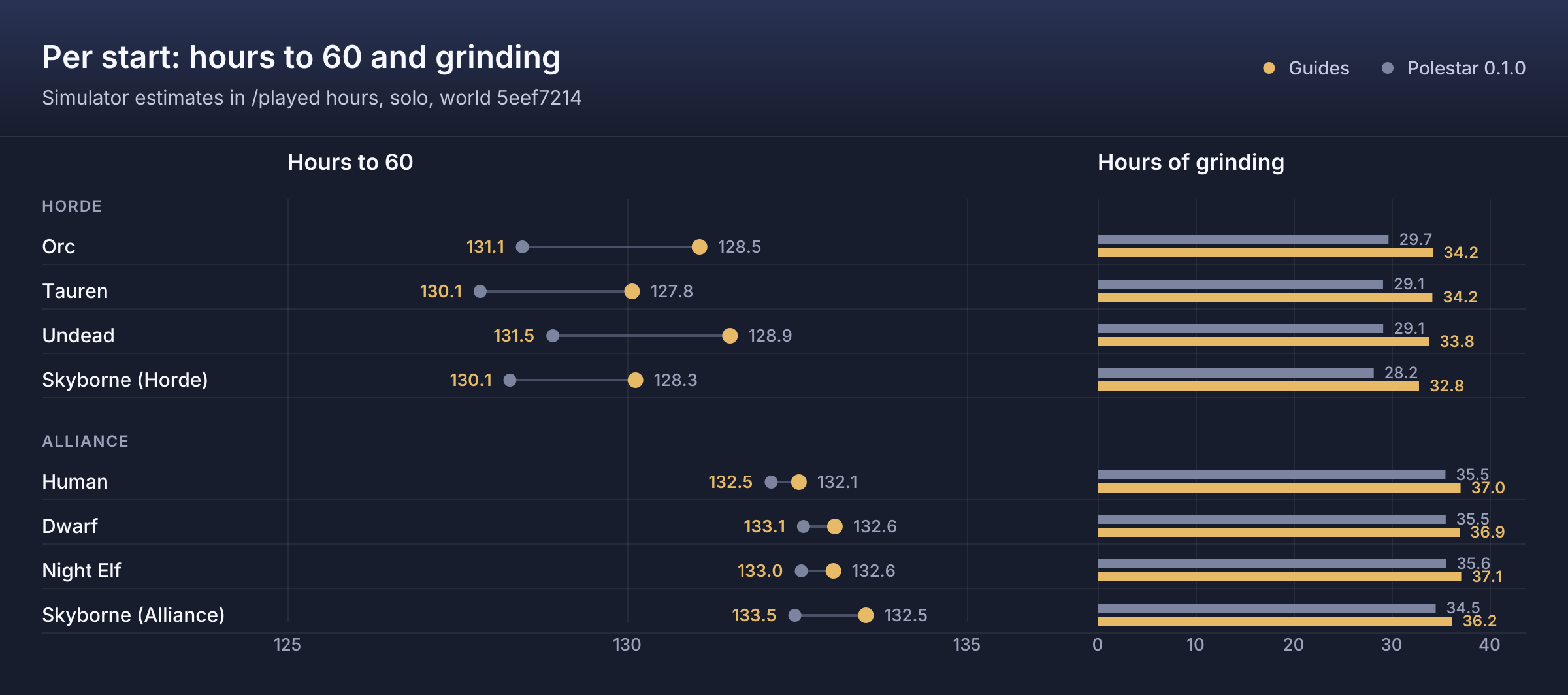
These hours are the simulator's estimates, not measured play: nobody has played a route end to end on Forever yet. The method, the four searches and every number are in the README and docs/SIMULATION.md.
Install
With the CurseForge app: install Polestar, then restart the game completely.
By hand:
- Download the zip from the Files tab.
- Unzip it into the game's AddOns folder, so the Polestar folders (
Polestar,Polestar_Guidesand the data folders beside them) sit directly inside it:World of Warcraft/_classic_beta_/Interface/AddOns/on the beta client,_forever_instead of_classic_beta_from launch. - Restart the game completely (a
/reloaddoes not load new addons) and log in.
To update by hand, delete the old Polestar folders first, then unzip the new version the same way.
Getting started
- The welcome. Each new character's first login opens a short welcome: a hello, the guide Polestar suggests for that character and the three things to know.
/polestar welcomeshows it again. /polestar guidesopens the hub: every guide, Lookup, Dungeons and Rares./polestar(or/pole) shows the guide window. The minimap button (Options, Map; off by default) shows or hides the guide window with a click and opens the settings with a right-click.- With the game's gamepad interface on, Polestar's slash commands are off, because the game blocks gamepad actions after any addon command typed in chat: open Polestar from its minimap button, on by default with the gamepad, or bind a key in Key Bindings.
/polestar optionsholds every setting. Quest markers on the map are off until you turn them on under Map./polestar skipmoves on from a step for good (the window offers Undo);/polestar nextand/polestar prevonly look ahead or back./polestar helplists every command.
Community guides
A community addon is someone else's guides for Polestar. It is a separate addon, made by its author, not by Polestar, and its guides are not Polestar's leveling routes.
Get a community addon from its author's own project page and install it like any addon. Its guides then appear in the guide menu under Community guides, credited to the author, and Options > Community guides (/polestar packs) turns each one on or off.
Each community addon is supported by its author: report its problems to them, not to Polestar. It is an addon like any other, so install community addons from authors you trust.
Write leveling guides of your own? Polestar's guide format, compiler, checks, playtests, arrow and markers are yours to use. Publish your guides as your own addon and they appear in Polestar's menus under Community guides. Community guides explained covers both sides.
Beta
Polestar is in beta. Every guide compiles, lints and plays to the end in a simulator for every race and class it serves, but nothing has been play-tested end to end on Forever yet. Forever's new 30-60 content (Riverglades, Shen'dralas, Mount Hyjal) is not in any data yet; the routes will take it in once it is.
A step in the wrong order, or a quest that is not where the guide says? Please tell us on the Polestar Discord or open an issue on GitHub, with the guide, the step and what you saw. /console scriptErrors 1 shows Lua errors.
Links
- Discord: Polestar | Leveling Guides, for questions and reports
- Source code: github.com/fitzforge/polestar
- Issues: report a wrong step or a bug
- Changelog: CHANGELOG.md
- Docs: README, the documentation index, community guides explained, writing a community addon
Support Polestar
Polestar is free and stays free, with no ads and nothing locked. If it saves you some hours on the way to 60 and you'd like to say thanks, you can buy me a coffee on Ko-fi. It helps keep the routes and the data up to date. Reports, guides and translations help just as much.
Licence and credits
Polestar is free and open source under the GNU General Public License, version 3. Its data comes from public sources, the game client's own tables and recordings, each used as its licence allows: THIRD_PARTY.md credits every input with its licence. No game art ships with Polestar: every texture is drawn in code, and zone paintings and the game-art skins are read from your own client. The Inter and Fira Sans typefaces (SIL Open Font License 1.1) ship with the addon. The screenshots show the game (© Blizzard Entertainment).
World of Warcraft is a trademark of Blizzard Entertainment. Polestar is a community project, not affiliated with or endorsed by Blizzard.
Polestar Guides Team