File Details
1.6.3
- R
- Feb 28, 2025
- 2.56 MB
- 80.9K
- 11.1.0+3
- Classic + 1
File Name
Plumber-1.6.3.zip
Supported Versions
- 11.1.0
- 4.4.2
- 4.4.1
- 1.15.6
- Unspent Knowledge: This new module displays the number of your unspent Profession Specialization Knowledge on the Professions Book UI.
- Drawer Macro: Hide Unusable Actions should now work correctly on items.
Changelog of Previous Release:
Backpack Item Tracker
- Updated item upgrade currencies (crests) to S2.
Dragonriding Race Medal
- The medals you earn from Undermine car racing and Skyrocketing will appear on the window when you interact with a Timekeeper.
Drawer Macro
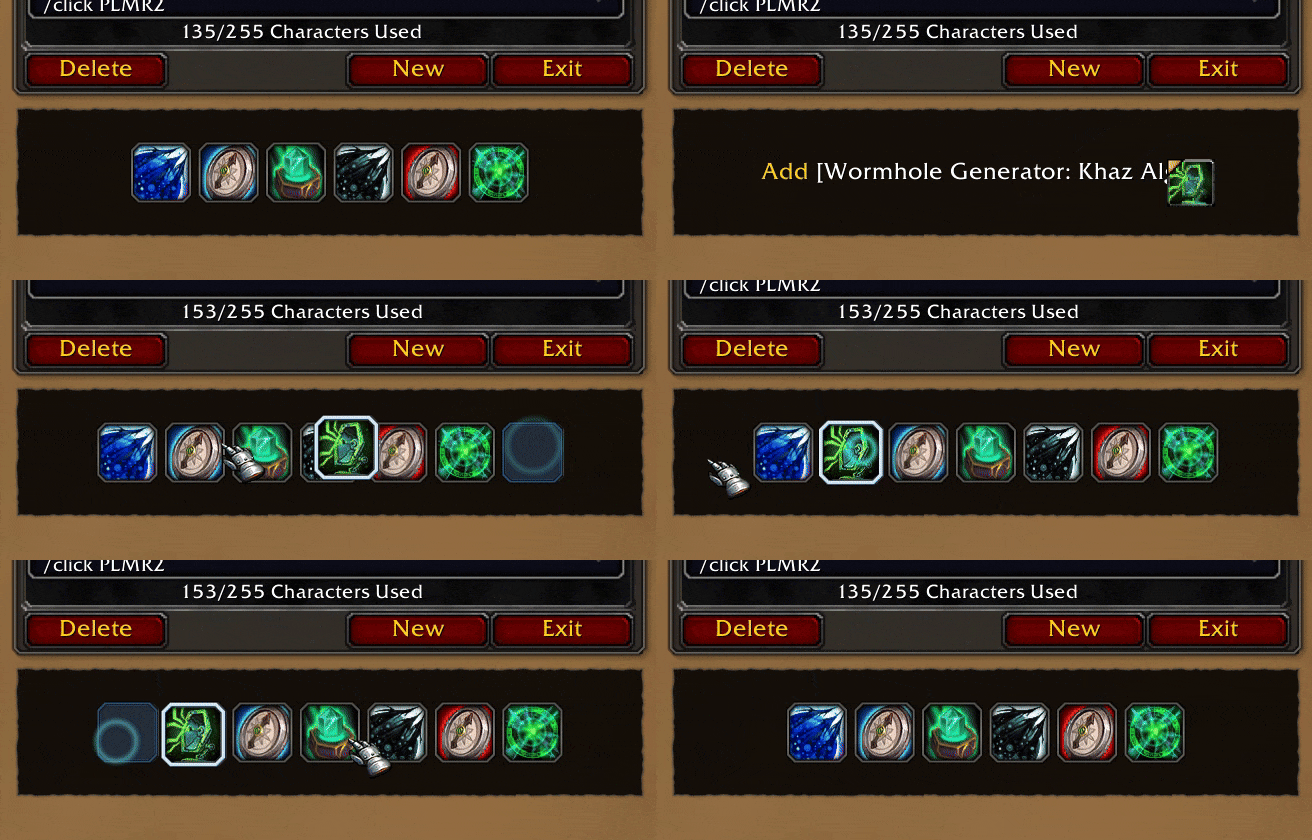
- To create a Plumber Drawer Macro. Create a new macro then edit the content, type #plumber:drawer
- When you are editing a Drawer Macro, our Editor will appear below the MacroFrame. You can drag and drop an item, spell, pet, mount, or toy into the window, and it will be automatically added to the drawer. You can also click and drag to reorder the buttons.
- Added an option to choose between showing all buttons on the same row or 4 buttons per row.
- Added an option to close the flyout menu after clicking any buttons on the menu.
- Added an option to hide unowned items or unlearned spells. This option doesn't affect consumables like potions.
- The button will display its crafting quality icon, if any.
- For items with the same name (e.g. Healing Potion tier 3 and Healing Potion tier 2): You can now use the correct item if you use its ID in the macro instead of its name.
- Toys should no longer always appear grey.