PlayerTracker
- By
Screenshot 2026-09-07 124105.png
Screenshot 2026-09-07 124311.png
Screenshot 2026-09-07 124250.png
Description
PlayerTracker
Remember the people you play with.
PlayerTracker keeps a record of your own experience with other players: groups, dungeon and raid runs, loot, deaths, roles, quests and useful trades. The next time you see a familiar name, you can look up what happened last time.
Tracking runs in the background. Open /pt when you want to check someone, browse history or change the view. There is no session button to press before a run and no farm mode to turn on.
Supports Classic Era, Hardcore, TBC Classic and WoW Forever. Instance lists and client-specific features follow the client you are playing.
What it does
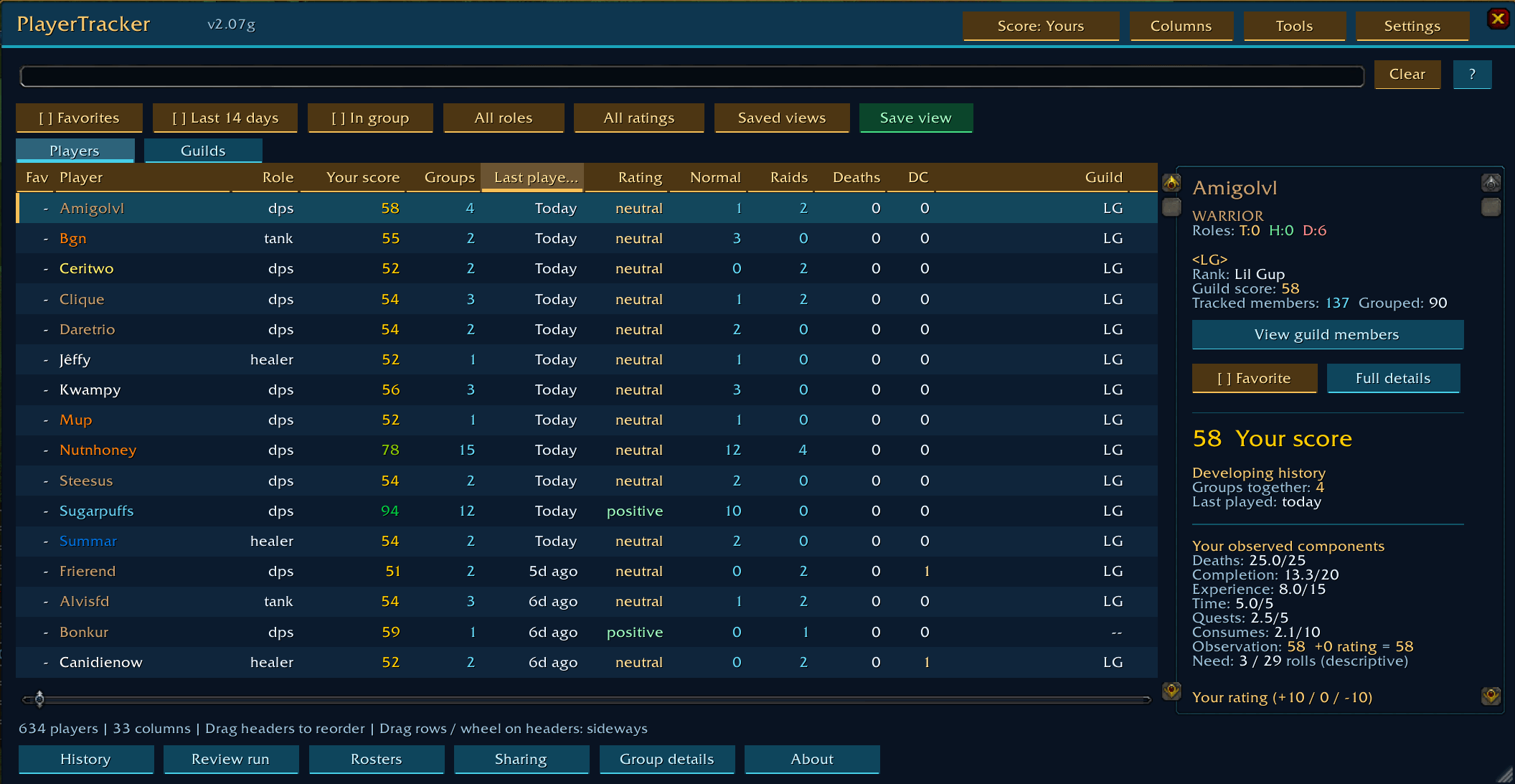
- Player history. See groups together, time played, last seen together, guild, observed roles, ratings and notes. Names use class colors and open the player's profile. Current group members stay above the rest of the list, with sorting inside each section.
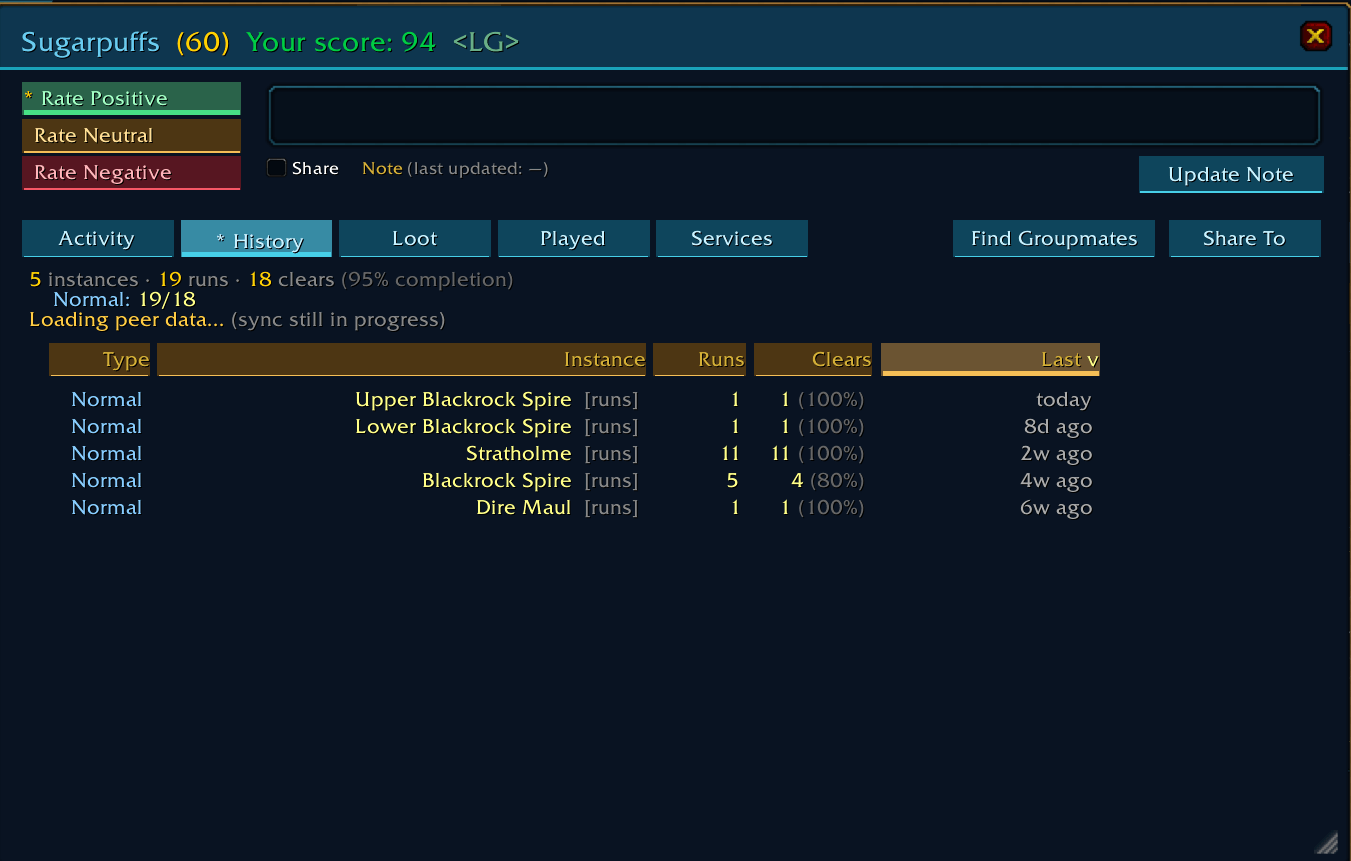
- Dungeon and raid history. Separate runs, bosses killed, clears, deaths, loot and who was there. Summary tables include lifetime visits as well as saved individual runs. Normal and Heroic difficulties stay separate. Scouting visits with no recorded kills are hidden by default.
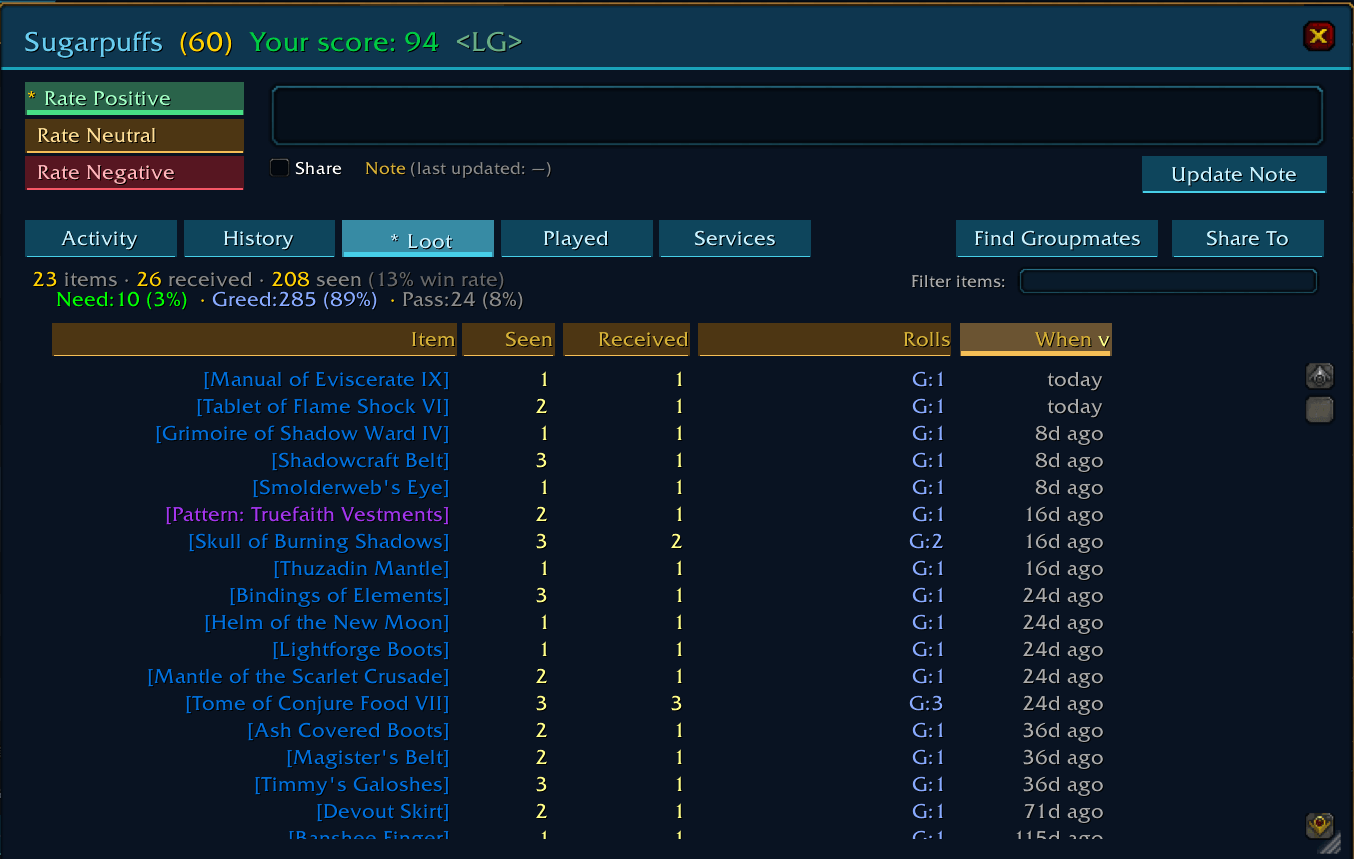
- Loot and rolls. Track Need, Greed and Pass choices, loot seen and loot received. Gargul and supported RCLootCouncil award events can supply confirmed recipients. Temporary master-looter pickups and disenchant materials have their own filters.
- Quests together. Count your observed quest turn-ins with the people grouped with you. Regular, repeatable, dungeon and raid quests have separate counters. Older totals without category evidence remain unclassified.
- Trades and services. Keep meaningful completed trades, including money, materials, equipment and observed Not Traded-slot modifications. Service entries record what happened, the provider, the customer and the date. Routine food, conjured water, healthstones and grey items are excluded. An item delivery alone does not establish the trader's profession.
- Observed responsibilities. Track master looter, raid leader, party leader, raid main tank and raid assistant. Flags are sampled at boss kills and counted once per run, even if assignments change repeatedly. Counts and percentages use groups where that responsibility could be observed.
- Performance history. With a supported Details meter, or the public native damage meter on Forever, see last-run and average DPS/HPS with the number of measured runs. Only eligible combat while grouped contributes. Averages use measured combat time. Comparable recent results and local percentiles help put those numbers in context.
- Group memory and sessions. Look up your last run with familiar companions. Back-to-back runs of the same normal dungeon can form a farm summary when timing and roster overlap fit, while each run remains separate. Session recaps collect your observed activity without requiring a manual start or stop.
- Hardcore history. Keep confirmed deaths associated with a character name, including later characters with the same name. Matching-realm Deathlog evidence can confirm a death. Feign Death and merely appearing dead do not establish a permanent death.
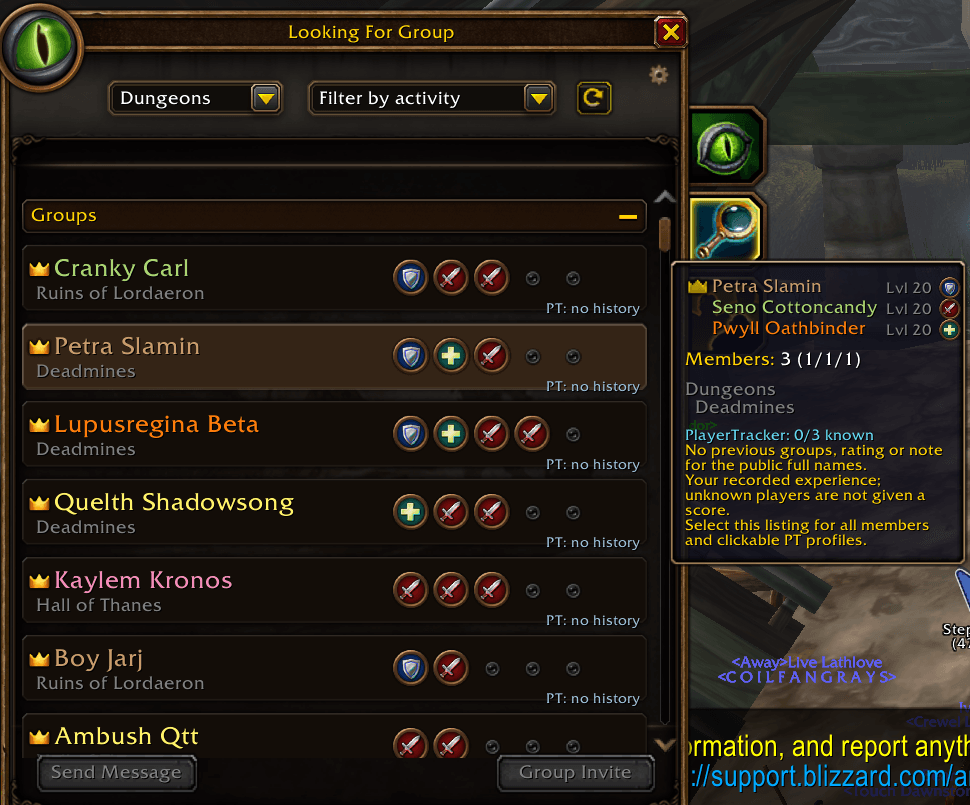
- Guild and LFG context. Browse observed members of a selected guild. Supported native group-finder listings can show your existing history with listed players, including scores, groups, notes and experience in the activity. PT uses saved observations and public roster data; it does not poll
/whoto discover online status. - Your own view. Choose columns, reorder headers, sort, search and save layouts. Player profiles provide Activity, History, Loot, Played, Services and Performance views. The main profile panel has compact shortcuts to those tabs.
- Optional sharing. Copy and paste exports independently of subscriptions. Choose a full personal backup or a narrower sharing scope. Imported and peer observations retain their provenance. Private tags and workflow notes stay local; player notes are shared only through the relevant sharing controls.
Choose what appears
The column selector includes the complete field list below. Player name stays visible; every other listed column can be shown or hidden. Availability follows the client, so TBC raid fields do not appear on Era, Hardcore or Forever.
- Identity & notes: Fav, Player, Guild, Rating, Presence, Known aliases, Your private note, Private tags, Guild rank, Main / alt links, Your character / alt marker, Level, Class, Race.
- Roles & leadership: Role, Roles T/H/D, Tank observations, Healer observations, DPS observations, Master looter, Raid leader, Party leader, Raid main tank, Raid assistant.
- Scores & evidence: PT score (selected source), Guild score, Trend, Your score, History confidence, Score before your rating, Your rating adjustment, Network score, Number of score contributors, Community rating, Community rating vote count.
- Groups & time: Groups, Last played, Last grouped date, First grouped date, Minutes together.
- Quests: Quests (total), Regular quests, Repeatable quests, Dungeon quests, Raid quests, Unclassified quests.
- Runs & bosses: Normal, Heroic (TBC), Raids, Normal clears, Heroic clears (TBC), Boss kills, Normal runs / clear %, Heroic runs / clear % (TBC), Raid runs / clear % (TBC), Normal dungeon boss kills, Heroic dungeon boss kills (TBC), Raid boss kills, Raid clears (total), Normal dungeon clear percentage, Heroic dungeon clear percentage (TBC), Raid clear percentage.
- Deaths & risk: Deaths, DC, Risk, Group RIP, Group RIP %, RIP/g, Deaths per group, Normal dungeon deaths, Heroic dungeon deaths (TBC), Raid deaths, Deaths per normal dungeon, Deaths per heroic dungeon (TBC), Deaths per raid, Hardcore deaths for this name, Hardcore death / alive-again status.
- Loot & rolls: Roll choices, Need, Greed, Pass, Loot received, Loot seen, Rare loot, Epic+ loot, Rolls / loot, Loot received / seen percentage, Need-roll percentage, Greed-roll percentage, Pass-roll percentage.
- Services & trades: Services to you, Last service, Service date, Trades, Services you provided to them.
- Performance: Last run DPS, Average DPS, DPS runs (n), Last run HPS, Average HPS, HPS runs (n), Last measured-run context, Comparable recent DPS, Comparable recent HPS, Comparable DPS runs (n), Comparable HPS runs (n), Comparable DPS change %, Comparable HPS change %, DPS higher than %, HPS higher than %, DPS comparison players (n), HPS comparison players (n), Performance comparison context.
- Raid clears: Karazhan clears, Gruul's Lair clears, Magtheridon's Lair clears, Serpentshrine Cavern clears, Tempest Keep clears, Mount Hyjal clears, Black Temple clears, Zul'Aman clears, Sunwell Plateau clears, Molten Core clears, Onyxia's Lair clears, Blackwing Lair clears, Zul'Gurub clears, Ruins of Ahn'Qiraj clears, Temple of Ahn'Qiraj clears, Naxxramas clears.
- Consumables: Consumable score, Pulls observed for consumables, Flask percentage, Food-buff percentage, Battle-elixir percentage, Guardian-elixir percentage, Scroll percentage, Weapon-enhancement percentage.
Settings > Tooltip has independent switches for PT's tooltip fields, plus a floating preview that stays visible while you browse the options. You can turn off all PT additions. These settings do not remove Blizzard's own name, level, class or other tooltip information.
Tooltip presentation options also include the PlayerTracker heading, rating rules, Need-roll explanation, score-range explanation, rating text color, heading color based on rating, gold note highlighting and player-list click instructions. Display preferences do not delete observations or turn off recording.
Recording, display and notification options
Tracking and filters: log groups outside instances; ignore PvP groups; include green loot; ignore disenchant materials; ignore temporary master-looter pickups; import matching-realm Deathlog evidence.
Display: hide unawarded loot; show scouting visits with no recorded kills; add PT history to the supported native LFG browser; dock the player panel; compact rows; font size; window opacity; minimap button visibility. History date ranges filter the view. Column and tooltip visibility are independent.
Notifications: negative-rating warnings; group history updates; private whisper history; friend/Battle.net login notes; guild login notes; completed-run impact; optional run reviews; familiar-companion reminders; session recap updates. Friend and guild login notices default on and stay quiet for people without a meaningful PT record. Unknown roles are omitted. Automatic results live in the journal's Updates area, with controls to turn them off.
Public chat: automatic party/raid announcements and summaries; public !ptwho replies. These are separate opt-in controls. Local login and whisper history notices do not send replies to other players.
Sharing and maintenance: incoming subscription requests can be blocked; individual player notes have a Share checkbox with hover help. Export scopes control what leaves your database. Compact export format and compact live database storage are separate tools. Pruning is an explicit maintenance action.
How it does it
PlayerTracker records events you can observe through the game: group rosters, instance entries, monster and boss kills, loot messages and public roll history, your quest turn-ins and completed trades. Optional addons can supply additional award, death or damage-meter evidence.
You do not need to rate players or write notes for tracking to work. Ratings, notes, tags and optional reviews add your own opinion to the recorded history. A positive rating adds 10 to your numeric score, neutral adds 0 and negative subtracts 10, with the score capped at 0-100. The observation score and your rating adjustment remain separately visible. Need-roll counts are descriptive; they are not a score penalty. DPS/HPS and percentiles are also separate from PT scores.
Role counts reflect roles observed in your groups. Presence comes from roster, friend, guild and other public observations, with a distinction between known online status and a recent sighting. Main/alt links use observed login or peer evidence rather than guessing account ownership from similar names.
Percentiles compare a player with other players you have measured in a matching context, not everyone on the server. Comparisons require enough eligible peers. Missing or restricted meter data stays unavailable rather than becoming zero.
The database is local SavedVariables shared by your characters on this installation. Saved player records carry realm provenance. Trades are stored by realm and full name; performance uses client/realm buckets. Instance catalogs are filtered by client. Forever's full character names are preserved, and ambiguous first-name loot messages are not assigned to a guessed player.
History does not expire automatically. Recent-data filters can hide older records without deleting them. WoW saves SavedVariables on a normal logout or /reload; a crash or forced termination can lose changes since the last save.
Help
- Install the PlayerTracker folder in
Interface/AddOns, enable it and open/pt. - Play normally. Group, run, quest and trade observations appear as you collect them.
- Select a player for a quick summary. Double-click to open the full profile. Column headings sort; player names open profiles.
- Use Columns to choose a view. Horizontal arrows, the bottom handle, dragging rows sideways and Shift + mouse wheel provide access to additional columns.
- Use Settings > Tooltip to choose tooltip details and see the preview. Settings > Notifications controls automatic updates and login notices.
Useful commands:
/pt- open PlayerTracker./pt center- recover the main window's position./pt history,/pt runs,/pt sessions,/pt services- open those views./pt sharing- subscriptions and data transfer./pt selftest- check database invariants./pt selffix- use the existing database repair tool./pt compact- open live storage maintenance./pt selffix compact- compact live records and the SavedVariables representation across frames, without pruning or merging runs./pt selftest compact- report live storage usage without compacting it./pt compact restore- expand records back to ordinary storage./pt export compact- open the separate compact export utility./pt ver- show the version and client information.
For a personal backup, choose the full backup scope and save the generated export text as a file. Full backups include private notes. Shared exports should use a scope appropriate for the recipient.
Live compaction requires PlayerTracker 2.09i or newer. If you plan to install an older version, restore ordinary storage first and then /reload or log out normally. Keep both PlayerTrackerDB and PlayerTrackerStorage when backing up the raw SavedVariables file.
If a view is empty, check its search, date range, client availability and scouting-visit filter. Lifetime player visit counters and saved individual run logs are different records; a historical visit count cannot recreate an old run's missing roster or timestamps.
When reporting an issue, include the addon version, client, action you clicked and the full Lua error. Screenshots help with layout problems.
PlayerTracker Team