


Play Timer
- By
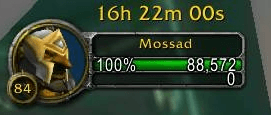
image-2026-01-09-152135 - Copy.png
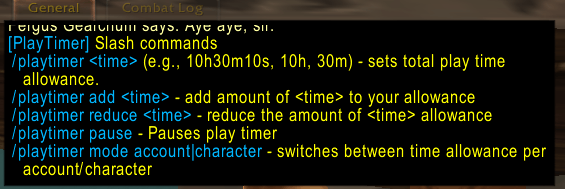
image-2026-01-09-152257.png
Description
Play Timer
Play Timer is a simple playtime allowance addon that shows a live countdown while you play, helping you enjoy WoW without losing track of time or feeling guilty afterwards.
You earn allowance by spending time completing tasks and responsibilities in real life, and topping up your playtime allowance guilt-free.
How it's intended to be used
In real life, using any stopwatch or time-tracking app you prefer, you track time spent on things such as:
- tasks and responsibilities you need to get done,
- working toward personal or career goals you want to prioritize
Then, in World of Warcraft, you manually add that time to your playtime allowance, for example /playtimer add 3h20m15s.
While you are logged in and playing, the allowance counts down and so does the timer. When it reaches zero, nothing forces you to stop. The addon simply keeps reminding you, you've exceeded your playtime allowance. In a chat pane, it doesn't interfere with the gameplay. It's up to you to decide what to do next.
Quick start commands
Whenever you see <time> in a command, replace it with a duration such as 3h25m10s. This means 3 hours, 25 minutes, and 10 seconds.
You may use hours, minutes, or seconds on their own, as long as you specify them with h, m, or s.
When you first install the addon, you start with 10 hours of playtime allowance, which you are free to change.
/playtimer <time>- sets the TOTAL allowance time/playtimer add <time>- adds extra time to your allowance/playtimer reduce <time>- removes time from your allowance
Account vs Character mode
You can choose whether the playtime allowance is shared across your entire account or tracked per character.
By default, Play Timer uses account-wide tracking.
/playtimer mode- displays currently active mode/playtimer mode character- activates character allowance mode on currently logged on/playtimer mode account- reverts to account-wide allowance for currently logged on character
Features
- Live, movable countdown frame (best placed in top left corner above your character portrait)
- Manual playtime allowance system
- Account-wide or per-character tracking
- No forced logout or similar restrictions
- Lightweight, no gameplay interference
What Play Timer does NOT do
- Does not lock you out of the game.
- Does not enforce limits automatically.
- Does not track real-life time for you.
Coming soon: Youtube video explaining the philosophy of this, and showcase the command functionality.
The Play Timer Team
