PlateScroll by Aetzu
- By
Combat numbers that scroll up from the top of enemy nameplates, instead of floating in the middle of the screen. Numbers stack like lines of text, are color coded, and everything is adjustable from a small in-game menu.
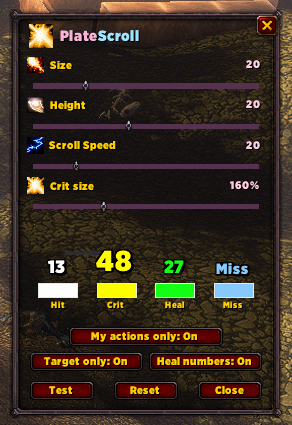
psmenu.png
Description
PlateScroll
Combat numbers that scroll up from the top of enemy nameplates, instead of floating in the middle of the screen. Numbers stack like lines of text, are color coded, and everything is adjustable from a small in-game menu.
Features
- Numbers on nameplates: damage, healing and misses appear above the nameplate of the unit involved.
- Stacking like text: each new number appears at the bottom and pushes older ones up, so they never overlap.
- Color coded, and you choose the colors:
- Regular hits are white.
- Crits are yellow and larger.
- Heals are green.
- Miss, Dodge, Block and Parry (plus Immune, Absorb, Resist and similar) are light blue and appear in their own column to the right.
- Ability icons: a small icon the same size as the text shows next to a number, so you can see which ability landed.
- Mine-only filtering: options to hide numbers from other players (see the notes below).
- Settings are saved between sessions.
Commands
| Command | What it does |
|---|---|
/platescroll |
Opens or closes the settings menu |
/ps |
Same as /platescroll |
Everything else is controlled from the menu.
Settings menu
Sliders
- Size: base text size.
- Height: how far above the nameplate the numbers start.
- Scroll Speed: how far the numbers travel as they fade.
- Crit size: how much larger crits are.
Color swatches: click a swatch to open the color picker. Hit, Crit, Heal and Miss/Dodge/Block/Parry each have their own, and the preview numbers above them update live.
Toggles
- Target only: only show numbers on your current target.
- Heal numbers: turn healing numbers on or off.
- My actions only: try to hide other players’ numbers (see below).
Buttons
- Test: shows sample numbers on your current target, so target something with a nameplate first.
- Reset: restores the default sizes and colors.
- Close: closes the menu.
Important notes
- Other players’ numbers: the game doesn’t tell addons who caused a hit, so PlateScroll estimates it. “My actions only” shows numbers shortly after you cast something, or while you’re auto-attacking. This hides most numbers from other players but can’t be perfect. In groups a few can slip through, and some of your own delayed numbers (DoT/HoT ticks, channeled spells, pet damage) may be hidden. Turn the option off if you’d rather see everything.
- Ability icons are a best guess for the same reason. The icon is taken from your most recent cast, so it can occasionally be wrong or missing.
- Blizzard’s default floating combat text is turned off while PlateScroll is enabled, and your original settings are restored when you log out. This also hides the numbers for damage you take.
- Settings are saved in
PlateScrollDB.
Installation
Extract the PlateScroll folder into your Interface/AddOns directory, then restart the game or type /reload.
PlateScroll by Aetzu Team