


PlanCraft
- By
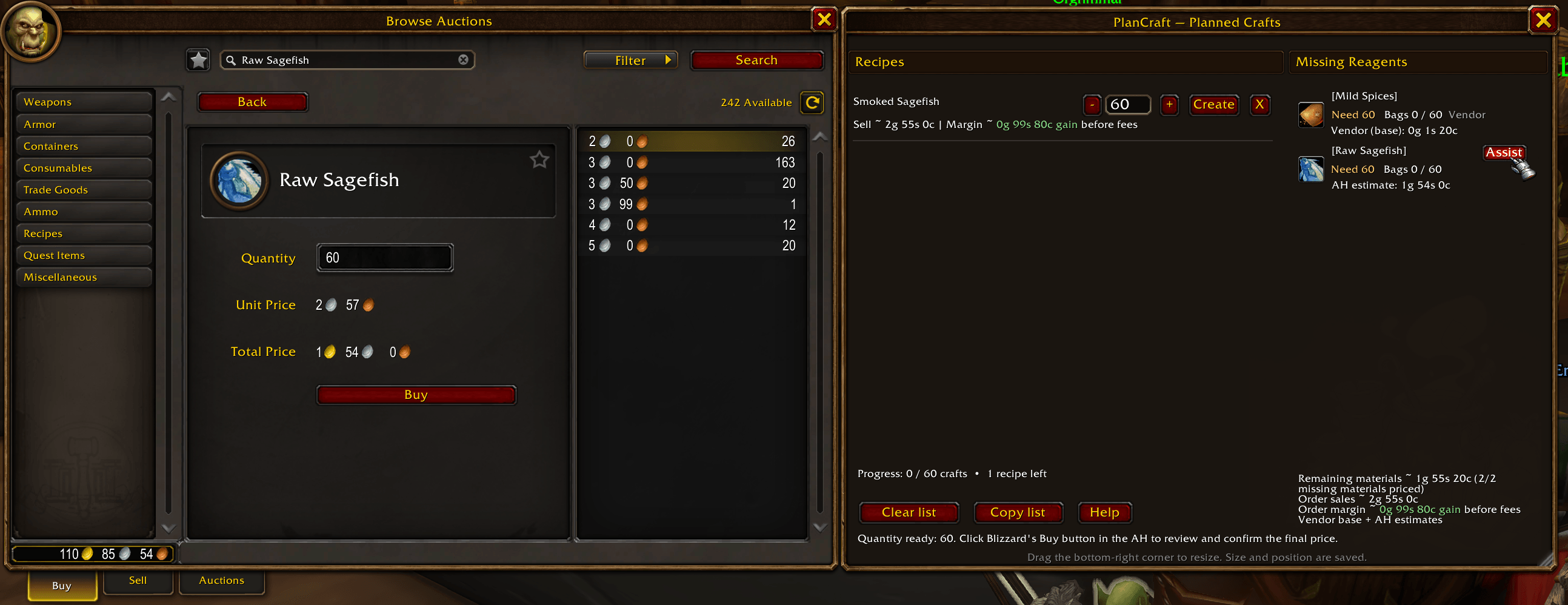
Plan 60 Smoked Sagefish, see missing reagents and estimated costs, then use Assist to search for Raw Sagefish and fill the required quantity. Review and confirm the purchase with Blizzard’s Buy button. Estimated sales and margin appear alongside the plan.
Description
PlanCraft
Pick your recipes. Plan the parts. Create what you need.
Made by Logdog7 for WoW Forever.
PlanCraft adds a saved crafting plan to Blizzard’s profession UI. Whether you are making an outfit for an alt or a large order across professions, it combines required reagents, helps you choose which components to make or buy, and assists with Auction House searches.
Plan across professions
- Click Plan One on a learned recipe, then open Planned Crafts beside the profession skill bar.
- Set quantities with minus/plus or enter a number. Counts represent crafting operations.
- Shared reagents combine automatically, including components required by multiple recipes.
- Choose Buy to obtain a finished component or Craft to plan its ingredients recursively. These checkboxes change your plan; they do not purchase or craft.
- Use the separate Create button on a component or final recipe to make the available portion. You do not need materials for the entire order to start.
- PlanCraft opens the matching profession when needed. Click Create again after switching.
- Completed planned crafts reduce the remaining amount and update saved progress.
Open each learned profession to discover its component recipes. Discovered recipes and Buy/Craft choices save per character.
Know what is ready
A subtle green row and ✓ Ready label show that the full remaining batch has its bag materials. Earlier ready rows get first use of shared bag materials; incomplete batches do not reserve them.
The Missing Reagents column shows what still needs collecting. Fully collected reagents disappear. Confirmed AH purchases appear as Bought, covering purchasing shortages while they wait in your mail; bag counts update when you collect them at the mailbox.
Auction House assistance and estimates
Quotes refresh automatically when you open the AH or update the plan while it is open.
Assist searches a missing reagent and prepares its quantity. Review results and use Blizzard’s purchase and confirmation controls yourself. Vendor supplies never show AH Assist and use known standard vendor purchase prices before reputation discounts.
The bottom-right summary combines remaining purchasing cost, estimated output sales, and the order’s estimated margin. Gains are green and losses red. Margin values all required inputs, including materials you already own, before AH fees, deposits, unsold stock, and time.
Prices are minimum loaded asking-price estimates, not completed sales or guaranteed demand. Cached prices are labeled. Missing prices prevent a full margin estimate; partial subtotals show their pricing coverage.
Other conveniences
- Saved plans, quantities, component choices, purchase tracking, progress, and window geometry per character.
- Native filters: Have some materials, Ignore vendor reagents, and Have all non-vendor materials.
- Copy list exports missing reagents as
[Kingsblood]x10 [Peacebloom]x10. Use its Copy button to select the text, then Ctrl+C. - Confirmation before clearing a plan.
- An action-aware first-use tutorial, replayable from Help, with optional step skipping.
- Movable and resizable window; right-click the resize corner to lock or unlock it.
- Optional Ellesmere profession styling. No dependencies or bundled libraries.
Installation and compatibility
For WoW Forever 1.60.1 / interface 16001. Other editions are not advertised as supported.
Install PlanCraft through the CurseForge app with your WoW Forever installation selected. The app downloads and installs it for you. For a manual installation, extract the PlanCraft folder from the ZIP into Interface/AddOns.
Type /plancraft to open your planned crafts.
Calculations use carried bags, excluding banks and other characters. Only supported fixed required item reagents expand into components; unknown, variable-output, and unsupported component recipes remain items to buy. Vendor detection covers common supplies, not every vendor item.
Crafting and purchases stay under your control: no automatic buying, chained crafting, or timer-triggered protected crafting.
For bug reports, include your client build, relevant addons, any BugSack error, and diagnostics from /plancraftdebug or /plancraftauctiondebug.
PlanCraft Team
