Plaid UI
- By
One well-dressed interface: unit frames, nameplates, quests, bags, chat and more; with pixel perfect positioning; all in matching plaid.
Description
Plaid UI
Your interface, tailored. No assembly of seventeen addons required.
You know the ritual. Fresh install, and before you've killed a single boar you're hunting down a unit frame addon, a nameplate addon, a bag addon, a chat addon, a minimap addon, and a fourteenth addon whose only job is to hide the buttons the other thirteen added. Then a patch lands and half of them are crying in your error log.
Plaid UI is one addon that does the lot, in one consistent design, with no bundled libraries and an options window that doesn't need a degree in archaeology to navigate. Every module switches on or off on its own, so take the whole outfit or just the bits that fit.
Plus it allows you to design your own tartan and use that as a texture. Freeeedoooom!
It runs on Midnight (Retail) and WoW: Forever.
The modules
❤️ Unit frames
Player, target, focus, pet, boss, party and raid frames for up to 40 people, with heal prediction, absorbs, cast bars, auras, class resources, portraits, and text you can put anywhere on the frame. Your target gets the Race bar: your health pushes in from one side, theirs from the other, and Plaid UI calls it plainly as Winning, Losing or Even. It's finally an objective answer to "should I be running?"
🎯 Nameplates
Enemies sorted by mob type (boss, miniboss, caster, melee, trivial), an outline on important casts worth kicking, and who each enemy is targeting. When it says "> You", start running. Quest mobs are coloured while you still need them, and friendly NPCs wear little role icons so you can spot the vendor across a crowded town.
🔘 Action bars
Built on Blizzard's own buttons, so your bindings, cooldowns and proc glows simply work. They page by stance or form, fade when idle and take Masque skins. Key binding mode is painless: hover a button, press a key, done.
⏱️ Cooldown manager
The game's own Cooldown Manager, re-tailored with square icons, crisp borders, your own fonts, and fading out of combat. When a big cooldown is ready again, its icon pulses in the middle of your screen like a polite tap on the shoulder.
📜 Quest tracker
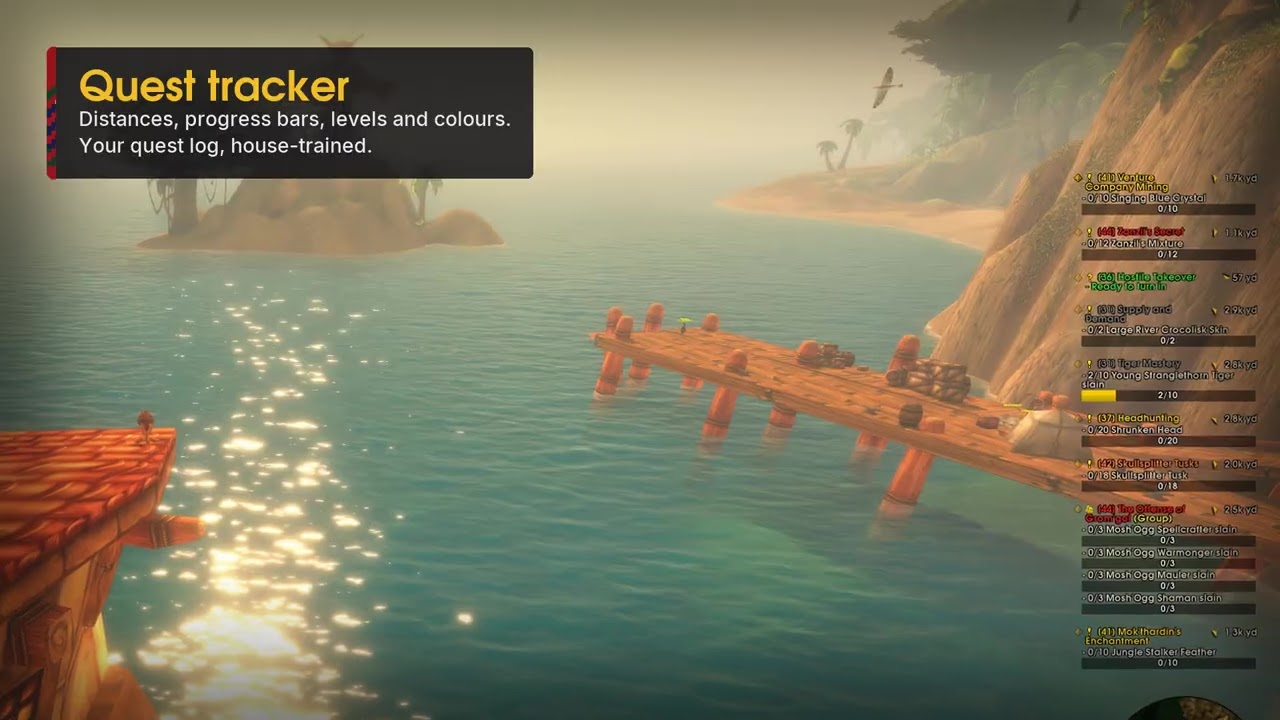
A quest tracker with manners. It fades away until you mouse over it, keeping just your focused quest in view, and wakes up with a glow and a shine when you make progress. You get distance and a direction arrow to your next step, several focused quests at once, a search box, sorts you build yourself, and a Mythic+ block with the timer and +2/+3 marks. It can share a whole zone's quests with your group in one go, sparing you eleven right-clicks while the tank sighs. It can also accept and hand in quests for you, marking the best reward along the way.
🗺️ Minimap
Square or round, any size, with coordinates, mouse-wheel zoom, and a button bag that politely herds everyone else's minimap buttons into one place. A key pops up a big see-through map overlay that you can still click through, and there's a compass strip across the top of the screen. Minimap pings show who did the pinging, so you know who to blame.
📊 Info bar
Mission control in a slim strip: clock, frame rate, latency, DPS, durability, bag space, gold across every character, coordinates, XP with time to level, Great Vault and Mythic+ progress, friends, guild, a teleport menu, and other addons' broker plugins. Readouts can be graphs, dots or meters, and you drag them into any order you like.
💬 Chat
Tabbed windows you drag apart and back together, smooth scrolling, history that survives logging out, short channel names, clickable web links, and click a timestamp to copy the line. Every whisper gets its own tab, so private conversations stay private-ish.
💭 Tooltips
Placed where you want them, not glued to your cursor. They show a player's spec and item level, who they're targeting, and auction, vendor and disenchant values on items. They can hide in combat, so they stop covering the boss.
🎒 Bags
All your bags in one window, sorted into categories, with a search so clever it's slightly
smug: #boe, #upgrade, item level ranges, even & | !. Junk sells itself at vendors. You
also get the bank, warband bank and guild bank in the same design, plus your alts' bags
from anywhere.
✉️ Mailbox
Every letter in one list, and a Collect all button that scoops up your auction house gold in a single click.
🛒 Vendor
Everything for sale in one scrolling grid, with search, filters, upgrade arrows and ticks for things you already own. Bulk buying goes past the game's per-click limit. Undo selling rescues the heirloom you just vendored by accident.
🧥 Character sheet
Item level, durability and a rarity gloss on every slot, a red mark for missing enchants or gems (yes, that ring), and a full stats panel. With Pawn installed, one button updates every equipment set with the best gear in your bags. Sets can even swap themselves when you change spec.
💰 Loot
Toasts for items, gold, currencies and reputation, plus roll windows that show everyone's choices. When someone "needs" on your trinket, now you'll know.
📈 Damage meter
Small, tidy windows built on the game's own numbers, so nobody argues about whose meter is right. Click a bar for that player's spell breakdown.
📣 Announcements
Stylish banners for new zones, discoveries, achievements, reputation and profession skill-ups. They wait their turn behind the game's own toasts, so nothing piles up. Even "Not enough mana" gets restyled to look like it belongs.
💎 Rare alerts
A toast the moment a rare, treasure or event pops onto your minimap, with how far away it is and an arrow pointing the way. Click it to drop a map pin, or Shift-click to brag in chat.
👻 Frame visibility
Rules for any frame in the game, other addons' too: show it, hide it or fade it by situation or on mouseover, safely in combat. Point at a frame and tell it how to behave.
☕ Quality of life
- A travel search: type a place, and it lists every way you can get there, quickest first. That means teleports, your hearthstone, and multi-leg flights pieced together from routes you've flown, plus boats, zeppelins, the tram and portal rooms. Click a row to set off.
- Flight times, with a bar while you fly and times on the flight map.
- Train all, so you learn everything at a trainer in one click.
- Max camera zoom, faster auto loot, and more small fixes than fit on this page.
The options window
Settings menus are usually where joy goes to die. Plaid UI's has a search box, hover help on every option, a guided tour, test mode with dummy party and raid frames, and the full user guide built in. It comes in three themes: Default, Liquid glass and Tactile brutalism (exactly as dramatic as it sounds).
It's a separate load-on-demand addon, so it costs nothing until you open it.
Built properly
- No libraries bundled. Lean and self-contained.
- Works within Midnight's combat rules, so it keeps going in raids, Mythic+ and rated PvP.
- Never taints Blizzard's secure frames. Anything you change in combat waits politely for combat to end.
- Profiles per character, switching automatically by spec or group type, with import and export.
Plays nicely with
Masque · Clique · Pawn · TomTom · LibSharedMedia · LibDataBroker · Auctionator · TradeSkillMaster · Syndicator · DialogueUI. All optional: Plaid UI needs none of them.
Getting started
Install, log in, type /pui. That's it. Mind the bagpipes.
Plaid UI: because your interface deserves better than looking like an explosion in a button factory.
Plaid UI Team