


Pixel Perfect Edit Mode
- By
Unlock pixel-perfect precision in Edit Mode. No more "eye-balling" your layout—ensure a perfectly uniform UI across all your characters with ease.
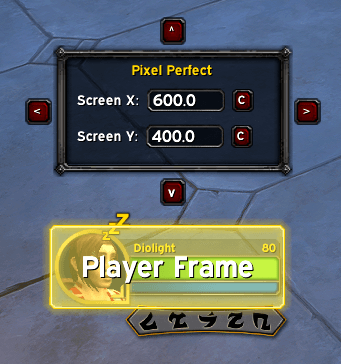
Screenshot 2026-01-27 020914.png
Description
Pixel Perfect Edit Mode
Take total control of your interface. While Blizzard's Edit Mode is a great start, it lacks the fine-tuning needed for a truly clean setup.
What it does
- Exact Positioning: Enter manual X/Y coordinates for every UI element.
- Uniformity: Easily align frames to the same pixel height or width.
- Lightweight: Seamlessly integrates into the existing Edit Mode menu.
- Arrow Nudging: Select an element, and use your arrow keys to move that element by 1 pixel at a time for precise positioning. Hold Shift to move by 10 pixels at a time.
- Axis Centering: On a per element basis, you can center on the X or Y axis (or both) with a click of a button. Makes it much easier to properly mirror elements across your UI
- Movement Arrows: Don't want to move with the arrow keys? The popup element provides arrows around the box for precise 1 pixel movement as well. Can be used with the shift modifier to move 10 pixels at a time.
Future Features
- Anchor Visualization: Display a simple point on the selected element to show where coordinates anchor to.
- Snap to Edge: Buttons and hotkeys to quickly snap an element to any edge of your screen.
- Increment Input: Allows the user to provide a number of pixels they want to move per shift action. Default is 10 when shift is held.
Hotkeys
- Shift: Moves element by 10 pixels per action (Arrow Keys & UI Arrows)
The Pixel Perfect Edit Mode Team
