PI Manager Midnight
- By
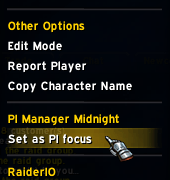
You can easily set PI Focus by right clicking on a player name.
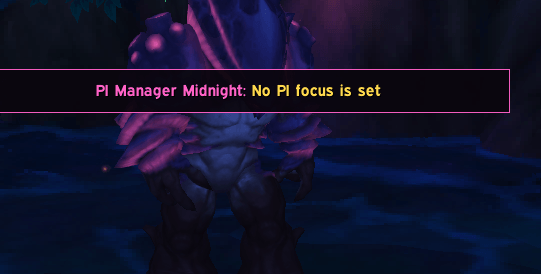
warning if no pi focus is set
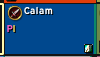
PI indicator.
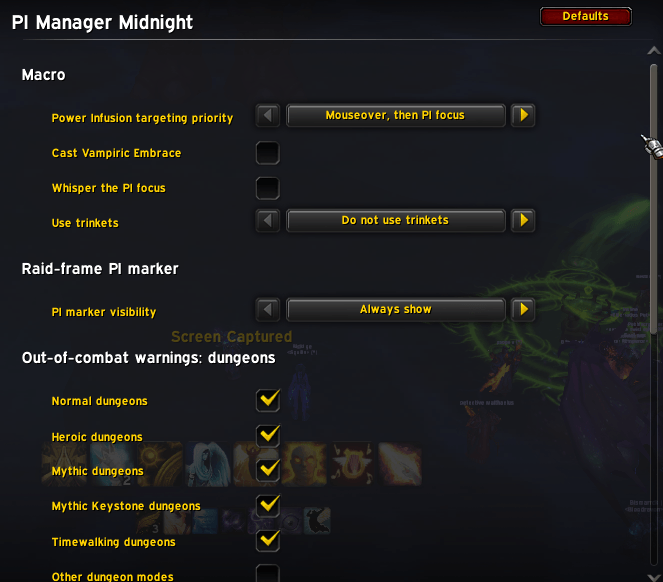
Configurable addon!
Description
PI Manager
PI Manager keeps Power Infusion targeting simple and helps priests avoid assigning PI to the same player.
The addon creates and maintains a character-specific macro named PI. Pick a
player from a unit-frame right-click menu, place the macro on your bar, and the
saved player becomes the macro's fallback target after mouseover.
Features
- Creates a character-specific
PImacro automatically - Configurable priority between friendly mouseover and the saved PI focus
- Optional Vampiric Embrace and trinket use
- Optional
PI On You!whisper to the saved focus - PI marker on Blizzard party and raid frames
- Out-of-combat warnings when the focus is missing, outside the group, or in another zone
- Warning controls for dungeons, raids, Delves, Ritual Sites, scenarios, arenas, and battlegrounds
- Lightweight priest-to-priest assignment sync
- Duplicate PI assignments shown in gray
Getting started
- Log in or reload the UI.
- Right-click a friendly player, party frame, or raid frame.
- Open the PI Manager section and choose Set as PI focus.
- Drag the character-specific
PImacro to an action bar.
Options are available under Options > AddOns > PI Manager. You can also open
the page with /pim.
Priest coordination
PI Manager shares assignments with other priests in the current party or raid who also have the addon. It sends an update when a focus changes, when the group roster changes, or when a player reloads and needs the current assignments. There is no periodic background broadcast.
If two priests choose the same player:
- The PI marker changes from pink/yellow to gray.
- The top-screen warning reports the duplicate while out of combat.
- The player's right-click menu lists the other priests focusing them.
Assignments are only shared through the WoW addon channel for the current group. Everyone who wants to participate in syncing needs PI Manager installed.
Macro options
The generated macro always starts with #showtooltip and stays within WoW's
255-character macro limit. Depending on your settings, it can also include:
- Vampiric Embrace
- Trinket slot 13
- Trinket slot 14
- Both trinket slots
- A whisper to the saved focus saying
PI On You!
Power Infusion is always attempted first. Selected trinkets are attempted next (slot 13 before slot 14), followed by Vampiric Embrace. This protects the PI cast if an optional action uses the global cooldown. WoW cannot cast two global-cooldown abilities from one key press, so press the macro again if Vampiric Embrace did not fire. Trinkets that share a cooldown may likewise allow only the first usable slot to activate.
Targeting priority can be set to either:
- Mouseover, then PI focus
- PI focus, then mouseover
Normal targeting remains the final fallback in both modes.
The whisper is part of the macro, so it is sent when the macro is pressed. WoW does not provide a reliable macro condition for checking whether Power Infusion was successfully cast before sending the message. It always goes to the saved focus, even when the macro's mouseover branch casts PI on someone else.
PI focus changes requested during combat are queued. The saved focus, macro, peer assignment, and raid-frame marker all switch together after combat. A chat message confirms when the update succeeds.
Raid-frame marker
The small PI marker appears on the saved focus in Blizzard compact party and
raid frames. Its visibility can be set to:
- Always show
- Hide during combat
- Always hide
Warning controls
Warnings are hidden during combat and outside enabled content. Normal, Heroic, Mythic, Mythic Keystone, Raid Finder, Timewalking, flexible Mythic raids, Delves, Ritual Sites and other scenarios, arenas, and battlegrounds can be configured separately.
Delves, Ritual Sites, and other scenarios only warn when you are grouped, so solo runs are left alone. Decor Duels are excluded from the battleground rule.
Commands
/pim- open the options/pim target- set the current friendly player target as the PI focus/pim clear- clear the PI focus/pim status- show the current PI focus/pim macro- request a macro refresh
Compatibility
Built for World of Warcraft: Midnight retail. No external libraries are required.
Gameplay functionality is Priest-only. On every other class the addon does not create or edit macros, register player menus, display markers or warnings, or participate in peer syncing. Its settings page only displays the Priest Council message.
The PI Manager Midnight Team