PetMarker
- By
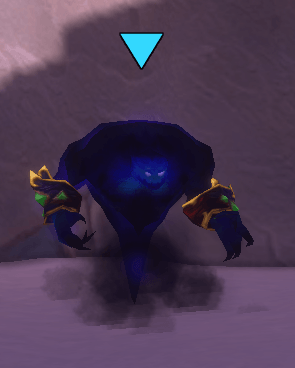
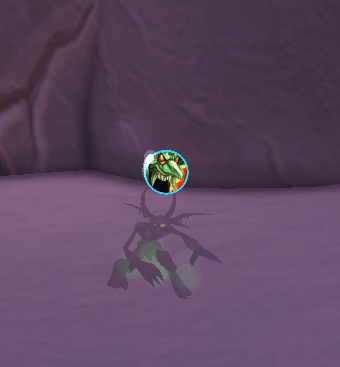
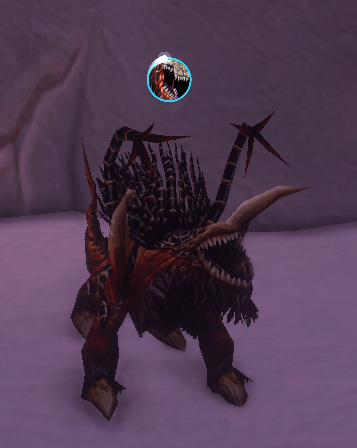
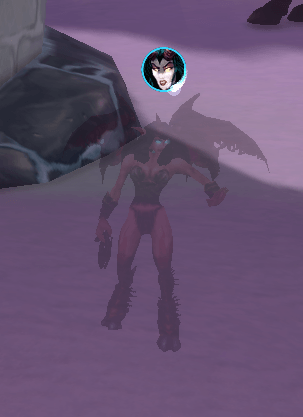
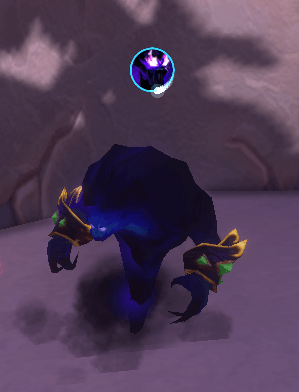
Hides pet nameplates and places circular pet markers with radar sweep effects above your summons.
5.png
4.png
3.png
2.png
1.png
Description
⚠️ IMPORTANT: Disabled Inside All Instances
PetMarker does NOT work inside any instance (dungeons, raids, battlegrounds, arenas, scenarios, delves, etc.). All nameplate hiding and pet marker features operate only in the open world outside instances to prevent UI errors and combat restrictions.
Features
Hide All Player Pets: Hides the nameplate UnitFrame for player pets to reduce screen clutter.
My Pet Marker: Displays a marker above your own pet's nameplate.
Marker Style & Position: Switch between a circular icon and an arrow, adjust marker size (12 to 100) and height offset (-300 to +100), and toggle the circular border.
Custom & Auto Pet Icon: Automatically detects common pet and summon icons by name and family, or lets you enter a custom texture path.
Circular Border Radar Sweep: Adds a rotating comet-style highlight around the circular border with adjustable rotation speed (1 to 5) and glow intensity (1 to 10).
Minimap Button & Localization: Provides a PM minimap button (left-click to open settings, drag to move) and automatically shows Korean on koKR clients and English on all other clients.
Required WoW Settings & How to Use
- Enable Nameplates (Crucial): Because PetMarker attaches markers and nameplate hiding to nameplate frames, nameplates (including friendly/pet nameplates where applicable in your client/UI setup) must be enabled in World of Warcraft's interface/nameplate settings for markers to appear. If nameplates are turned off, no marker can show.
- Open Settings: Left-click the PM minimap button to open or close the configuration window, and drag the button to reposition it.
- Adjust Markers: Toggle pet hiding or your own pet marker, change marker style/size/height, set or reset a custom icon path, and configure or toggle the circular border radar sweep.
⚠️ 필독: 모든 인스 내부 작동 안 함
던전, 공격대, 전장, 투기장, 시나리오/구렁 등 모든 인스턴스 내부에서는 애드온 기능이 작동하지 않으며, 인스 밖(필드)에서만 정상 동작합니다. (인스 내 UI 오류 및 전투 제한 방지를 위해 자동 비활성화됩니다.)
주요 기능
모든 플레이어 소환수 숨김: 플레이어 소환수의 이름표 UnitFrame을 숨겨 화면 혼잡도를 줄입니다.
내 소환수 마커: 내 소환수 이름표 위에 마커를 표시합니다.
마커 모양 및 위치: 원형 아이콘과 화살표 중 선택할 수 있고, 마커 크기(12~100)와 높이 오프셋(-300~+100), 원형 테두리 표시 여부를 조절합니다.
자동 판별 및 사용자 아이콘: 소환수 이름과 종족을 기준으로 아이콘을 자동 판별하며, 원하는 아이콘 경로를 직접 입력해 적용하거나 자동 아이콘으로 되돌릴 수 있습니다.
원형 테두리 레이더 효과: 원형 테두리를 따라 회전하는 혜성형 빛 효과를 켜고 끌 수 있으며, 회전 속도(1~5)와 빛 강도(1~10)를 조절합니다.
미니맵 버튼 및 언어 자동 전환: PM 미니맵 버튼(좌클릭으로 설정창 열기/닫기, 드래그로 이동)을 제공하며, 한국 클라이언트(koKR)는 한글로, 그 외 글로벌 클라이언트는 영어로 표시합니다.
필수 와우 설정 및 사용법
- 이름표 활성화 필수: PetMarker는 이름표 프레임을 기준으로 동작하므로, 와우 설정에서 이름표(소환수·아군 이름표 등 사용 환경에 맞는 이름표 표시 옵션)가 켜져 있어야 마커가 정상적으로 표시됩니다. 이름표가 꺼져 있으면 마커가 보이지 않습니다.
- 설정창 열기: 미니맵의 PM 버튼을 좌클릭해 설정창을 열고 닫으며, 드래그해서 버튼 위치를 옮길 수 있습니다.
- 마커 및 효과 설정: 소환수 이름표 숨김과 내 소환수 마커를 토글하고, 크기·높이·아이콘 경로·레이더 효과를 원하는 대로 맞출 수 있습니다.
애드온 피드백 & 버그 문의
카카오톡 오픈채팅: https://open.kakao.com/o/g88bp7Mi
☕ Buy the Developer a Coffee / 개발자에게 커피 한 잔 사주기
🔴 Patreon (Global Support) 정기 후원하기
Your support keeps addon development going! 제작자를 응원해 주시면 애드온 개발에 큰 힘이 됩니다!
PetMarker Team

Owner