PeaversToolTip
- By
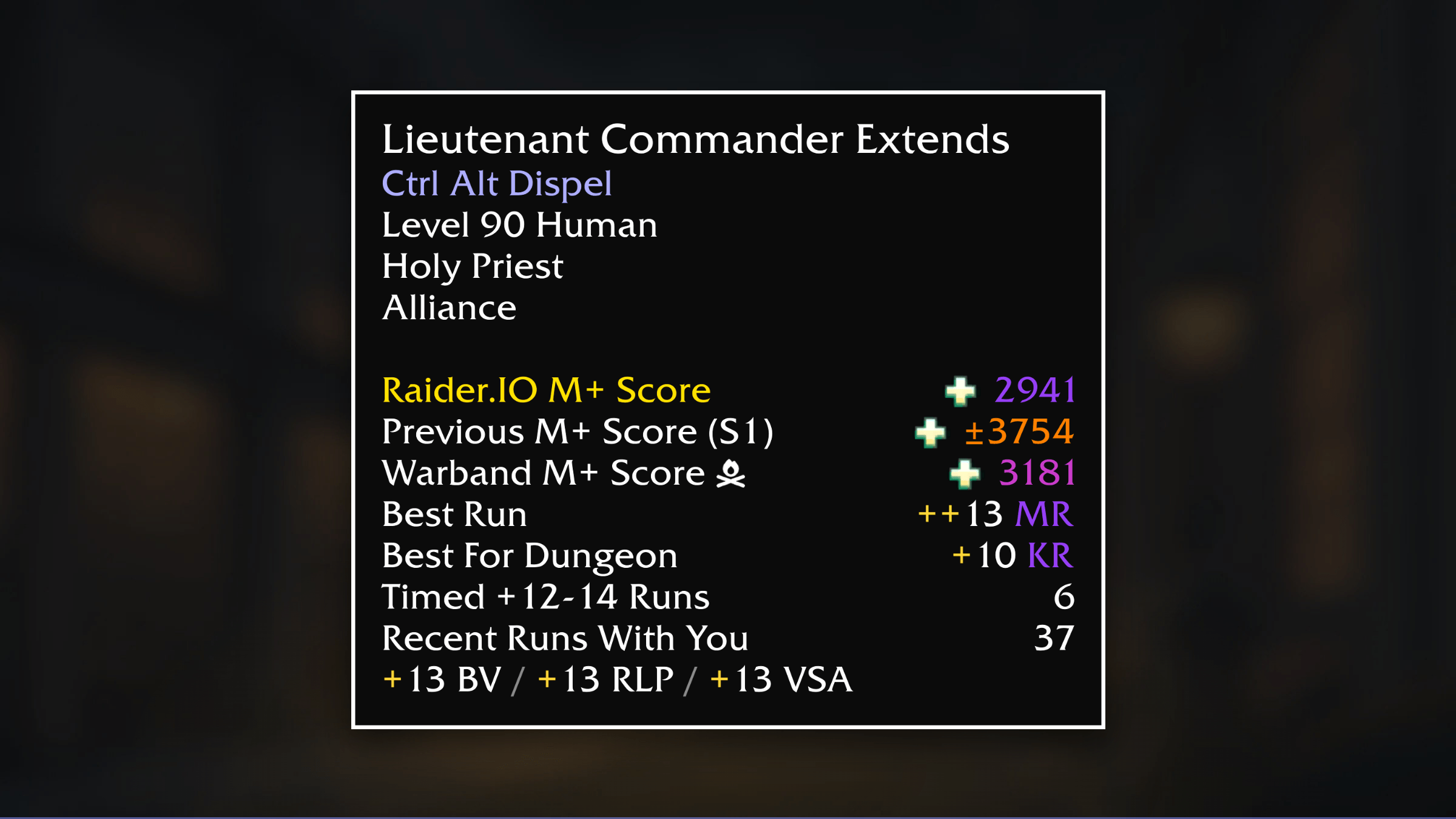
A World of Warcraft addon that redraws the game's tooltips as a flat black box with a 1px border, and puts that border to work.
PeaversToolTip.png
Description
PeaversToolTip


A World of Warcraft addon that redraws the game's tooltips as a flat black box with a 1px border, and puts that border to work: it carries the item's quality or the unit's class and reaction, so the colour tells you what you are looking at before you have read a word.
Part of the Peavers Ultra Performance family: addons that hold themselves to a published budget, measured on every push.
Measured performance
Tooltip addons have a bad reputation for performance, and it is earned. The usual
way to keep a tooltip on the mouse is to move it in an OnUpdate, which is work
on every frame the tooltip is visible. This addon has no OnUpdate at all —
cursor following is done by the client's own ANCHOR_CURSOR_RIGHT, in C, for
free.
That is a negative claim, and negative claims rot quietly, so it is measured
rather than asserted. The table below is regenerated on every push by the
Ultra Performance harness,
which loads this addon's real source into a Lua VM, drives three hundred hovers
with every optional feature switched on, then hunts down every OnUpdate
handler the addon installed on any frame it created and ticks them for a
simulated second. If any number goes outside perf/budget.json, the build fails.
Measured on every push by the Ultra Performance harness. The build fails if any number here exceeds the budget in
perf/budget.json.
| Check | Measured | Budget | |
|---|---|---|---|
| Packaged size | 81.8 KB | 100 KB | pass |
| Bundled libraries | 0 | 0 | pass |
| Widget calls per frame | 0 | 0 | pass |
| Widget calls per second while idle | 0 | 0 | pass |
| Widget calls per second | 43 | 48 | pass |
Scenarios driven against the real addon source, outside the game:
| Scenario | Calls/frame | Calls/sec | Notes |
|---|---|---|---|
| hovering units, 1 tooltip/sec | 0.00 | 43.0 | 43 calls per tooltip: skin re-asserted, border coloured, health bar placed and read |
| hovering items, 1 tooltip/sec | 0.00 | 18.0 | 18 calls per tooltip, icon and item ID both on |
| idle, tooltip on screen | 0.00 | - | 0 OnUpdate handlers installed; the cursor is followed by the client |
<sub>2,221 lines of Lua · 81.8 KB packaged · no bundled libraries</sub>
The per-second figures are quoted at one tooltip a second, which is roughly what sustained play looks like. Mousing quickly along an action bar is a burst of four or five a second and the cost scales linearly — so read the notes column, not the headline, as the ceiling.
The zeroes are the point, so they are worth explaining:
- Nothing runs per frame. The cursor is followed by the client. The health bar updates from
OnValueChanged, which fires when health changes, not on a schedule. There is no ticker anywhere in the addon. - The skin is built once. Five textures per tooltip — one fill, four hairline edges — created on first sight and afterwards only recoloured. Showing a tooltip allocates nothing.
- A tooltip you are not looking at is free. WoW does not tick hidden frames, and the addon leaves nothing queued behind one.
- The cost is per hover, not per second. Forty-odd client calls when the mouse lands on a new unit, then silence until it lands on the next one.
Features
- Flat black-box tooltips with a 1px hairline border, matching the rest of the Peavers UI
- Border coloured by item quality, or by the unit's class and reaction
- Tooltips that follow the cursor, or sit at a fixed spot you drag into place
- A restyled health bar that can sit above or below the tooltip, coloured by class or reaction, with an optional readout
- Class-coloured names and a line showing what the unit is targeting
- Optional icon, item ID and spell ID
- Hide tooltips in combat — for units, or for everything — with Shift as an override
- Adjustable scale, font size, background colour and opacity
- Fully reversible: turning it off hands every tooltip back to Blizzard, with no reload
- Runs nothing per frame and nothing on a timer
Usage
Tooltips are skinned as soon as you log in. Everything else is optional and lives in the settings, under /ptt.
Out of the box tooltips follow the mouse cursor. If you would rather they appeared in a fixed spot, switch the anchor on the Position page, then unlock the anchor and drag it wherever you want them — the tooltip works out for itself which way to grow so it never runs off the edge of the screen.
Slash Commands
/ptt- Open settings/ptt anchor- Unlock the fixed anchor and drag it into place/ptt cursor- Go back to following the mouse cursor/ptt scale N- Set the tooltip scale (0.60-1.60)/ptt enable//ptt disable- Turn the addon on, or hand every tooltip back to Blizzard/ptt info- Print what is currently skinned
The border does the work
Most of what a tooltip addon can usefully tell you fits in its border. An epic is purple before you have read the item name; an elite is red before you have found the level; a guildmate is their class colour. That is why the border is 1px and coloured, rather than a thick frame in a fixed colour — the information is free, and it arrives faster than text does.
The colour set on the Appearance page is the fallback for everything else.
What it deliberately does not do
It never removes or rewrites a line the game wrote.
That is a limit, not an oversight. A tooltip line cannot be deleted once it has been added, only blanked, and a blanked line leaves an empty row where the text used to be. The alternative — tearing the tooltip down and rebuilding it from the data — breaks embedded widgets, quest reward frames, and every other addon's additions, and needs fixing every time Blizzard adds a line.
So this addon recolours and appends, and stops there. That is the difference between a tooltip that keeps working across a patch and one that does not.
Restricted data
Since the 12.0 pre-patch the client hides enemy health, names and class behind secret values: an addon may store one and pass it on, but arithmetic, comparison, or using one as a table key is a hard Lua error. This is what makes unit frames and tooltips go blank in raids, keys and rated PvP.
Every unit read here goes through guards that keep the value sealed and hand it to a formatter the client allows to consume it, so a boss's health bar and its readout work exactly as a party member's do. Where the client genuinely will not say — an unreadable class token, for instance — the addon leaves Blizzard's own colour alone rather than painting over it with a grey "unknown".
Health bar
The bar under a unit tooltip can sit below the tooltip, above it, or stay where Blizzard puts it. Outside the tooltip it gets a hairline box of its own, so it reads as part of the same design rather than a stripe stuck to the bottom.
Installation
Recommended: PeaversUpdater
Download and install PeaversUpdater, the desktop updater for the whole Peavers collection. It installs PeaversToolTip together with its required dependencies and delivers updates before they reach CurseForge.
Alternative: CurseForge
- Download from CurseForge
- Ensure PeaversCommons is also installed
- Ensure PeaversConfig is also installed
- Enable the addon on the character selection screen
Part of the Peavers addon collection · Report an issue · Support development on Patreon
PeaversToolTip Team

Owner