PeaversPerformance
- By
A World of Warcraft addon that boosts FPS with three transparent one-click graphics presets, showing exactly which CVars change and restoring your original settings on demand.
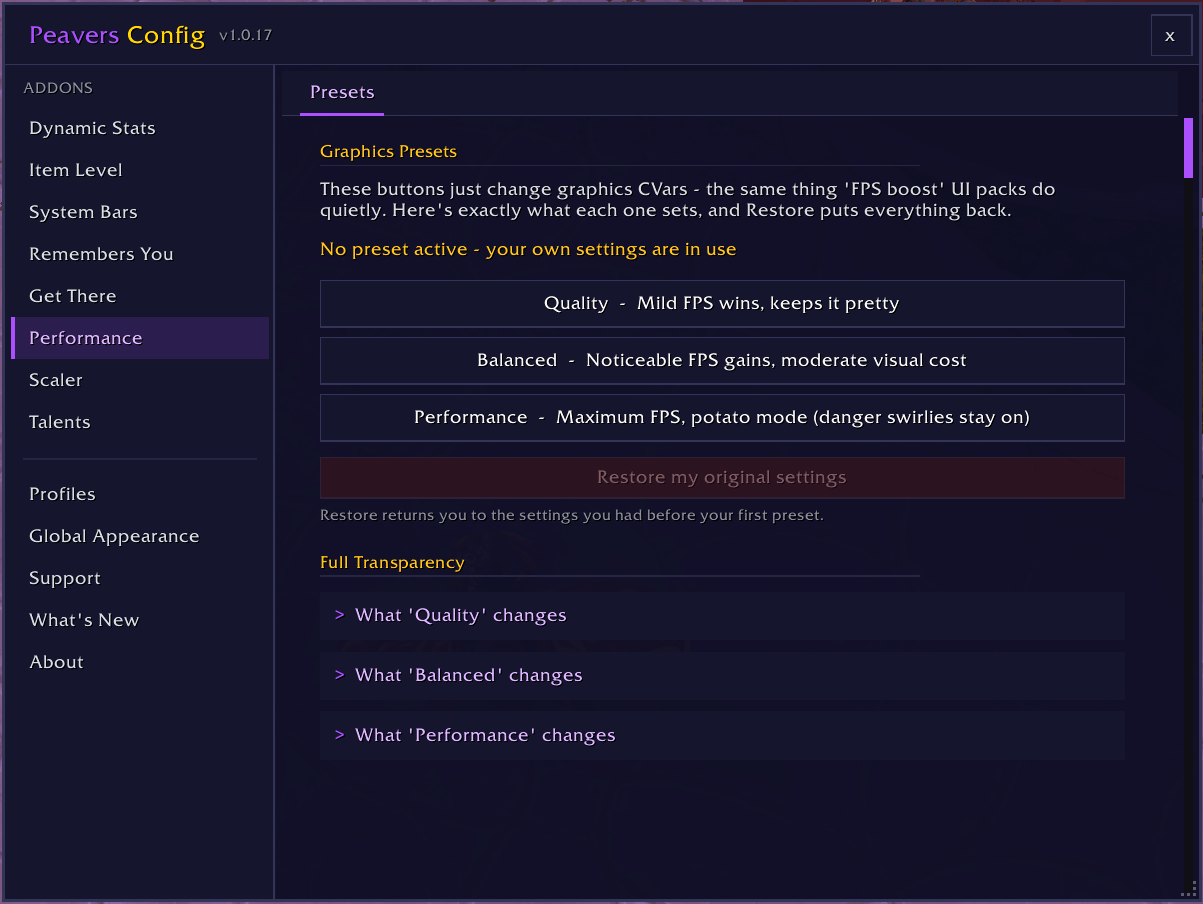
Easy pick and see the changes in real time
Description
PeaversPerformance

A World of Warcraft addon with transparent one-click graphics presets spanning the whole scale, showing exactly which CVars change and restoring your original settings on demand.
Features
- Five one-click graphics presets spanning the whole scale: Maximum, Quality, Balanced, Performance, and Minimum
- Auto-switch (opt-in): apply a chosen preset when you zone into a raid, Mythic+, or dungeon, and switch back in the open world
- Full transparency - every preset lists exactly which CVars it changes, with current and new values
- Snapshots your original settings before the first preset and restores them with one click
- Safety floor in every tier: ground danger indicators stay on and essential spell effects are always kept
- Applies to raids and battlegrounds too, and queues safely if you're in combat
Usage
Popular "FPS boost" UI packs get much of their reputation by quietly lowering graphics settings. PeaversPerformance does the same thing honestly - pick a preset, see exactly what it changes, and restore your own settings whenever you like.
- Open the settings with
/pperf(or/pconfig> Performance) - Review any preset on the Transparency tab before applying
- Click a preset button on the Presets tab to apply it
- Optionally enable location-based switching on the Auto-Switch tab
- Click "Restore my original settings" at any time to undo everything
Slash Commands
/pperf- Open settings/pperf max- Everything cranked, for beefy rigs/pperf quality- Mild FPS wins, keeps it pretty/pperf balanced- Noticeable FPS gains, moderate visual cost/pperf performance- Maximum FPS, potato mode/pperf min- Absolute floor, everything off that can be off/pperf restore- Restore your original settings/pperf auto- Toggle auto-switching by location/pperf status- Show the active preset
Configuration
Access the preset panel through /pperf. Settings are organised into tabs:
- Presets: Apply Maximum, Quality, Balanced, Performance, or Minimum with one click, and restore every CVar to its pre-preset value
- Auto-Switch: Enable location-based switching and pick a preset (or "My original settings") per location - raid, Mythic+, dungeon, open world. Every automatic switch is announced in chat
- Transparency: Per-preset list of every CVar it changes, with current and new values
- Information: Overview and slash command reference
Classic clients
PeaversPerformance also runs on Classic Era (including Hardcore and Season of Discovery), Anniversary, and Mists of Pandaria Classic. The presets are the same, with a few differences:
- Settings the client does not have (spell density, depth effects, compute effects) are skipped rather than reported as failures, and are left out of the Transparency tab
- The safety floor keeps ground danger indicators on; the "essential spell effects" guarantee relies on spell density, which only retail has
- Auto-switch offers Challenge Mode instead of Mythic+ on Mists of Pandaria Classic, and has no timed-dungeon location on Era or Anniversary
Installation
Recommended: PeaversUpdater
Download and install PeaversUpdater, the desktop updater for the whole Peavers collection. It installs PeaversPerformance together with its required dependencies and delivers updates before they reach CurseForge.
Alternative: CurseForge
- Download from CurseForge
- Ensure PeaversCommons is also installed
- Ensure PeaversConfig is also installed
- Enable the addon on the character selection screen
Part of the Peavers addon collection · Report an issue · Support development on Patreon
PeaversPerformance Team

Owner