PeaversGetThere
- By
A World of Warcraft addon that lets you search any location and gets you there — smart multi-leg routes through portals and your own teleports, map pins, a direction arrow, and step-by-step guidance.
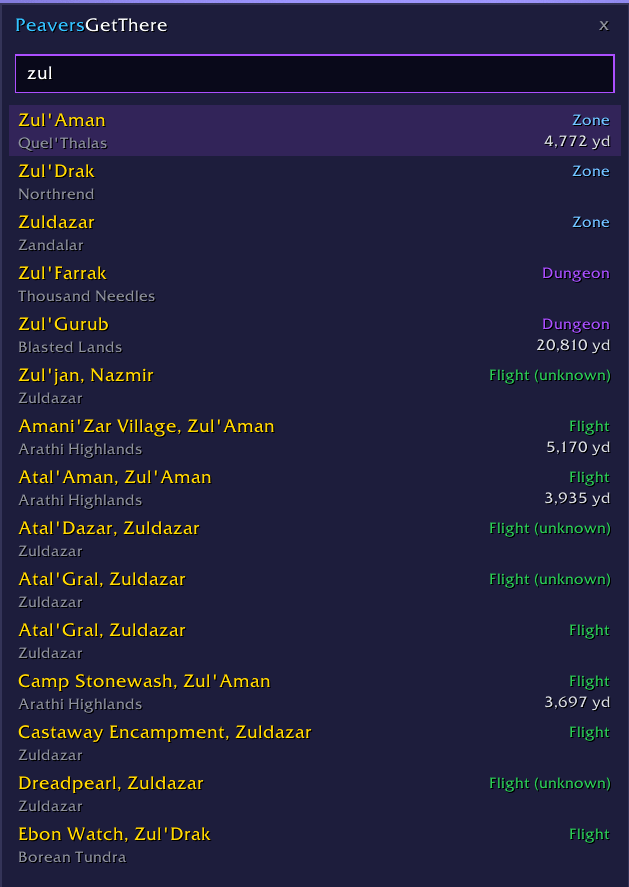
Full fuzzy search
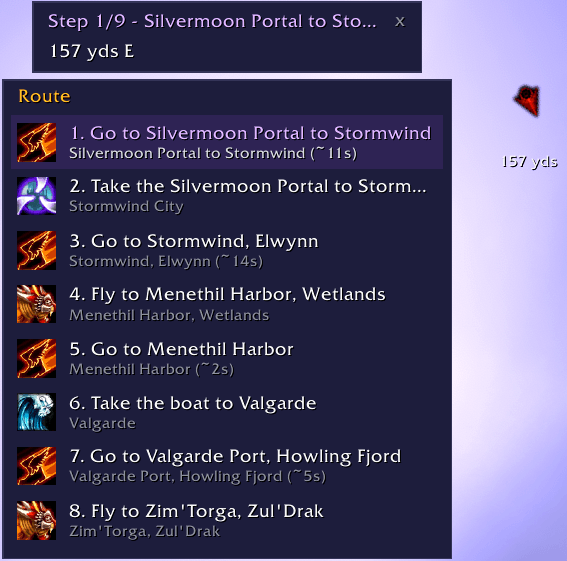
Step by step directions
Description
PeaversGetThere

A World of Warcraft addon that lets you search any location and gets you there — smart multi-leg routes through portals and your own teleports, map pins, a direction arrow, and step-by-step guidance.
Features
- Search every zone, city, dungeon, raid, flight point, portal hub, and city service (auction house, barber, bank...) from one box (
/pgtor/getthere) - Instant autocomplete with smart ranking — cities and exact matches first, results localized by the client
- Multi-leg routes computed over the portal/boat/zeppelin/tram network plus the teleports, hearthstones, and wormholes your character actually owns
- Step-by-step route panel: teleport steps are one-click secure buttons with cooldowns, travel steps advance automatically as you go
- Native Blizzard map pin + 3D super-tracking beacon, plus world map and minimap pins that clean up on arrival or cancel
- TomTom-style direction arrow with distance and ETA, colored by how close you are to facing the target
- Flight-map assist: your route's flight point is highlighted, with optional auto-select
- Sends waypoints to TomTom too, when installed
- Minimap button, keybinding, and
/pgt <zone> <x> <y>power syntax
Usage
- Type
/pgt(or/getthere), click the minimap button, or press your keybind to open the search box - Start typing a place name — e.g.
dornfinds Dornogal,marafinds the Maraudon entrance,ahfinds the auction houses - Use the arrow keys or mouse to pick a result and press Enter (or click)
- Follow the route panel: click teleport buttons, take the listed portals, and let the beacon, pins, and direction arrow guide the travel legs
/pgt elwynn forest 34 52guides straight to coordinates;/pgt clearcancels guidance;/pgt configopens the settings
Settings
/pgt config (or PeaversConfig) offers: TomTom hand-off, minimap pin, clear-pins-on-arrival, arrival announcement and sound, direction arrow (with scale), minimap button, teleport suggestions (with a max count), arrival radius, and auto-select for flight points on your route.
FAQ
Why can't it teleport me automatically? Blizzard protects all casting from addon code — no addon may cast a spell, use an item, or take a flight on its own. The only bridge Blizzard allows is a secure button whose action is wired up out of combat and which you physically click. That is exactly what the route panel's teleport steps are: your click casts the teleport, the addon just put the right button under your cursor.
Why does the route panel say "Suggestions update after combat"? Secure buttons cannot be rewired during combat (another Blizzard restriction). The panel keeps its last valid buttons until combat ends, then refreshes.
Where does the travel data come from? Runtime data (zones, flight points, dungeon entrances) comes from the game client, always localized and up to date. The portal network and teleport catalog ship in PeaversGetThereData, refreshed automatically from game-data exports.
Screenshots
Coming with the first release.
Installation
Recommended: PeaversUpdater
Download and install PeaversUpdater, the desktop updater for the whole Peavers collection. It installs PeaversGetThere together with its required dependencies and delivers updates before they reach CurseForge.
Alternative: CurseForge
- Download from CurseForge
- Ensure PeaversGetThereData is also installed
- Ensure PeaversCommons is also installed
- Ensure PeaversConfig is also installed
- Enable the addon on the character selection screen
Part of the Peavers addon collection · Report an issue · Support development on Patreon
PeaversGetThere Team

Owner