
Patron Material List
- By
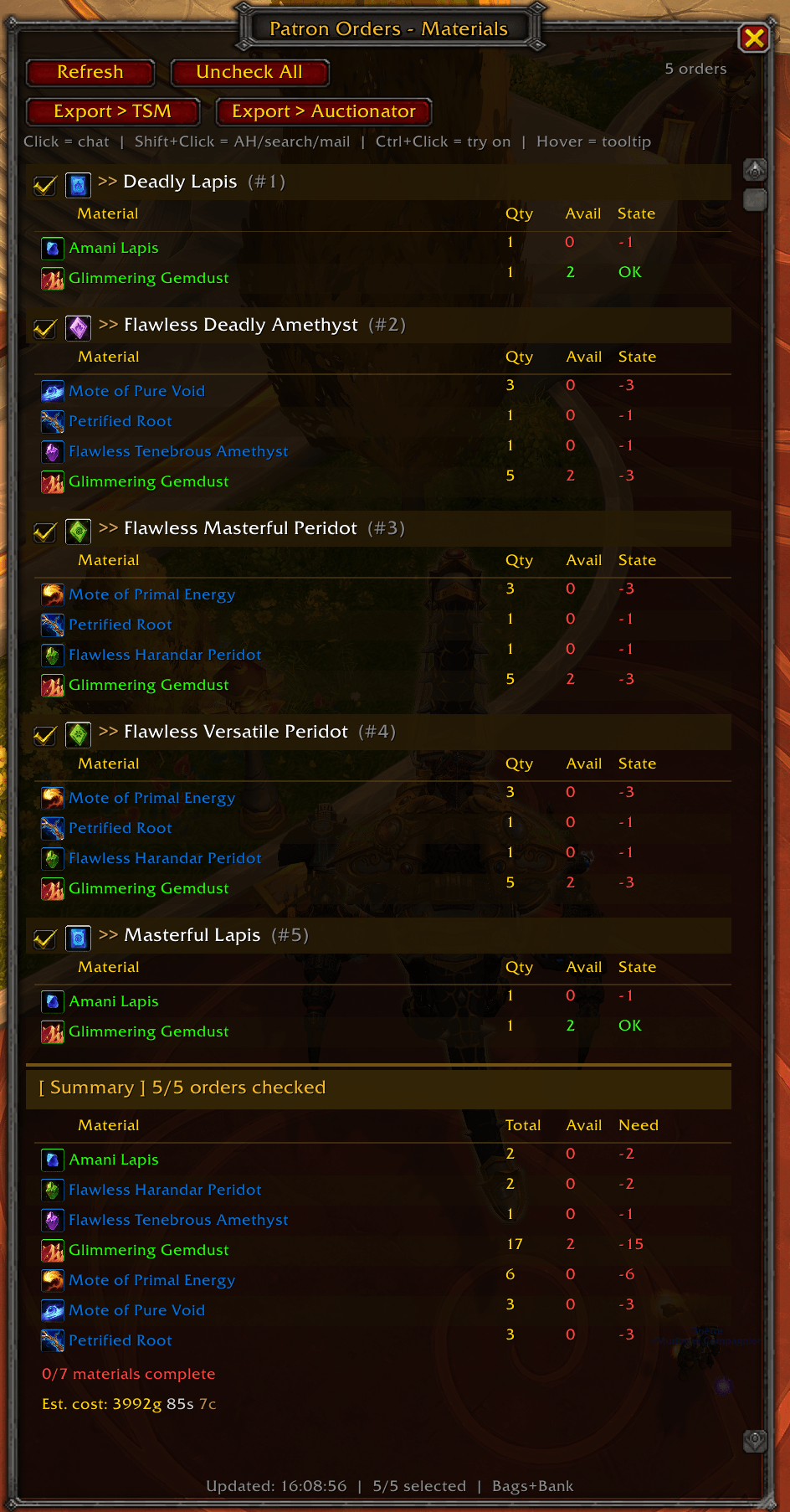
Shows a comprehensive list of only the materials YOU need to provide for NPC Patron Craft Orders
screenshot.png
Description
Patron Material List
Never lose track of what YOU need to bring for Patron Craft Orders again.
When you browse the Patron tab in the crafting UI, the interface shows you all reagents — but mixes together what the customer already provided and what you still need to supply yourself. This addon cuts through the noise and shows only what YOU need to bring.
Features
- Automatic scan — open the addon and hit Refresh after claiming orders; it reads directly from the game's crafting API
- Per-order breakdown — each claimed Patron Order is listed with its own material list, quantity required, and how many you already have available
- Color-coded status — green means you're covered, red shows exactly how many you're short
- Personal bank support — the availability count includes your personal bank in addition to your bags; toggle with
/pml bank - Selective summary — check/uncheck individual orders with a checkbox to filter the aggregated material list at the bottom; useful when you want to plan a shopping run for only some of your orders
- Export to TSM — one click generates a TradeSkillMaster Shopping string for all missing materials from your checked orders, ready to paste into TSM's Custom Search
- Export to Auctionator — one click generates an Auctionator Shopping List for all missing materials, ready to paste into Auctionator's shopping list importer
- Clickable items — click any material to print the item link in chat; Shift+Click inserts the link into whatever field is active (AH search bar, chat, mail, TSM filter); hover for the full item tooltip
- Quality borders — item icons display a colored border matching their quality tier (grey / green / blue / purple / orange)
- Estimated market cost — if TradeSkillMaster is installed, shows the estimated total gold cost of your missing materials using TSM's
dbmarketprice source - Minimap button — small icon on the minimap edge; left-click to open/close, drag to reposition; position is saved between sessions
- Resizable window — drag the bottom-right grip to resize; position and size are both saved to
SavedVariables
How to Use
- Open your Crafting UI (default: K)
- Go to the Patron tab and claim one or more orders
- Click the scroll icon on the minimap (or type
/pml) - Hit Refresh — your material list appears instantly
- Use Export > TSM or Export > Auctionator to copy a shopping list directly to your AH addon
Slash Commands
| Command | Action |
|---|---|
/pml |
Open / close the window |
/pml scan |
Open and re-scan immediately |
/pml bank |
Toggle personal bank counting on/off (default: ON) |
/pml minimap |
Show / hide the minimap button |
/pml reset |
Reset window position and size to default |
/pml debug |
Dump raw order data to chat (for bug reports) |
/pml help |
List all commands |
Compatibility
- WoW Midnight (Interface 12.0.1) and later
- Works with or without TradeSkillMaster (TSM price data is optional)
- Works with or without Auctionator (export is plain text, usable anywhere)
- Compatible with ElvUI, Bartender, and other UI replacements
Known Limitations
- Requires you to claim an order in the Patron tab before it can be scanned
- Bank item counts are only available after the bank has been opened at least once in the current session (WoW API limitation)
- TSM market price display requires TSM to be installed and to have recent price data scanned
Bug Reports & Feedback
Use the CurseForge issue tracker or the /pml debug command to capture raw order data and include it in your report.
Patron Material List Team
