

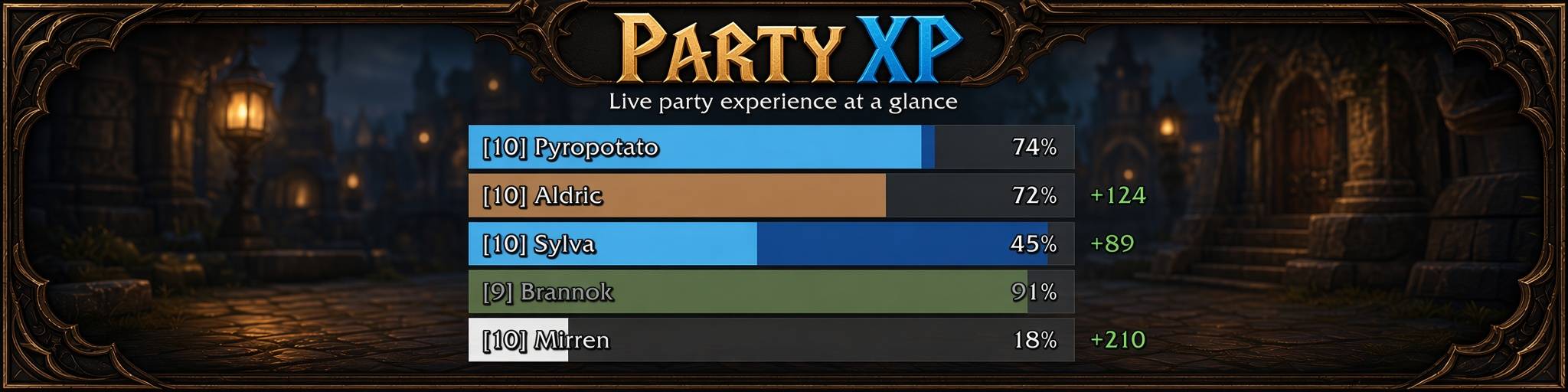
Description
PartyXP is a lightweight World of Warcraft Classic Era addon that shows live experience progress for everyone in your party.
In the base game you only see your own XP bar. In a group you often have no idea who is about to level, who is falling behind, or whether someone drifted out of XP range. PartyXP fixes that by sharing XP data between party members and displaying it in a small, clear panel.
What you get
Live party XP bars
Each party member appears as a class-colored bar with level, name, and percent toward the next level. You can see at a glance who is at 12% and who is at 91% without asking in chat.
Rested XP overlay
When a player has rested XP, a blue segment appears on their bar (similar to the default XP bar), so the group can tell who still has rested bonus left.
Recent XP gains
After a kill or quest turn-in, the amount of XP just gained can show on the right side of the bar for a few seconds (for example 124exp), so progress feels visible during grinding.
Detailed tooltips
Hover a bar to see:
Exact experience (current / max)
Progress percent
Rested XP remaining
Last XP gain
XP per hour
Estimated time to level
That helps with simple calls like “we’re about 10 minutes from your ding” without spreadsheet math.
Out of range and offline status
Bars dim when a member is beyond normal party XP range (~100 yards), and clearly mark offline players. That reduces the common problem of killing for a while only to realize one person got no XP.
Customizable UI
Right-click the panel for scale, opacity, width, and font size. Drag to move it anywhere. Position and settings are saved. The panel hides automatically when you are solo so it does not clutter the screen.
Test mode
Use /px test to show demo bars while solo so you can place and style the UI before grouping.
Level-up feedback
When you level, your bar flashes so the moment is easy to notice in the panel.
How it changes the experience
PartyXP does not change combat, loot, or XP rates. It only improves information while leveling in a group:
Less “what % are you?” spam in party chat
Easier to stay in range on purpose
Clearer sense of who is close to a ding
Better pacing for rested XP and grinding sessions
Requirements
Classic Era (also intended for Hardcore / Season of Discovery on the Era client)
Every party member who should appear on the panel needs PartyXP installed so XP can be shared
Commands
/px or /partyxp — show / hide
/px test — toggle solo test bars
/px options — open options
/px reset — reset position and settings
Right-click the panel — scale, opacity, width, font size
Why download it
If you level with friends or pugs and want a simple shared XP view without a heavy UI pack, PartyXP is made for that: small, focused, and built around party leveling on Classic Era.
