screenshot01.png
Description
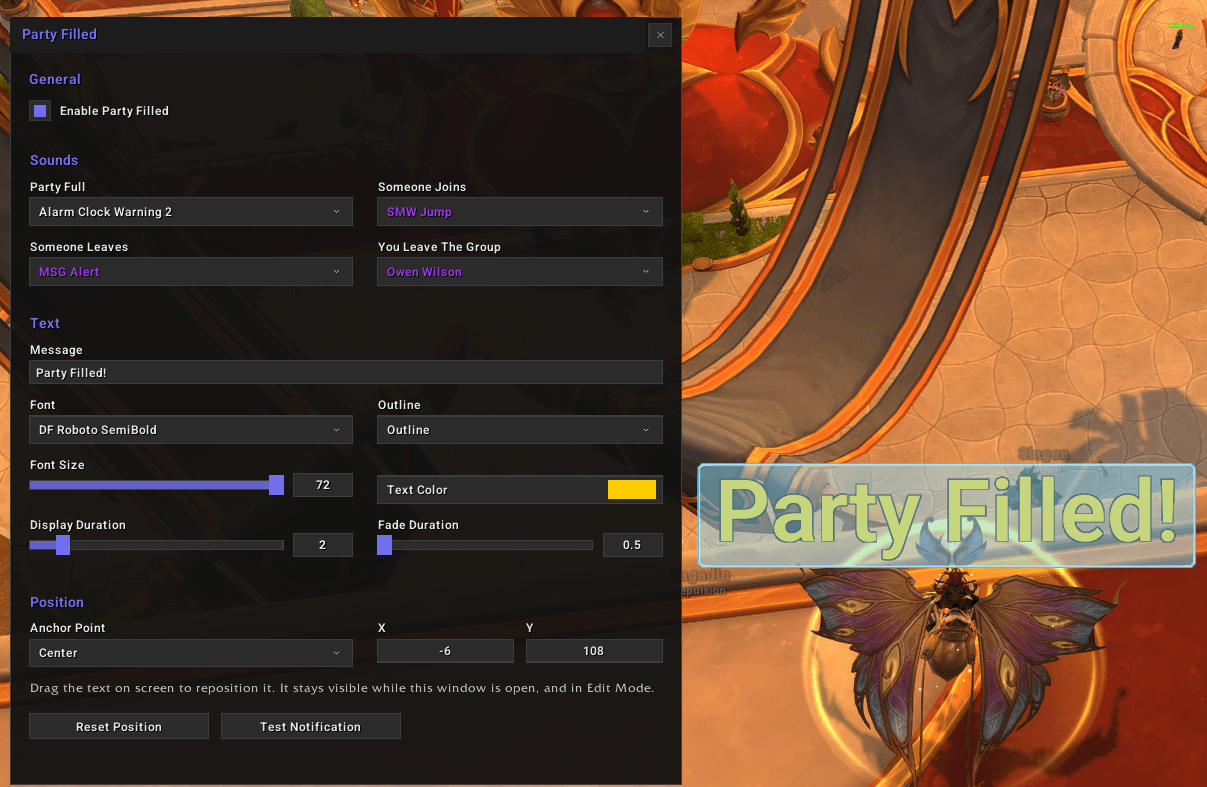
Party Filled watches your 5-man group and tells you the moment it reaches five members, so you can stop counting portraits while you queue or fill from chat. It plays a sound you pick and shows a line of text wherever you put it on screen. Separate sounds cover people joining, people leaving, and you leaving the group.
Notifications
- Party full alert — plays a sound and shows the text when a 5-man group reaches five members. It fires on the transition, so it does not repeat while the group stays full. Raids are ignored.
- Roster sounds — separate sounds for someone joining, someone leaving, and you leaving or being removed from the group. Each one can be set to None.
- Sound preview — every entry in a sound menu has a speaker button that plays it without changing your selection.
- Combat hold — nothing fires while you are in combat, and the on-screen text is taken down if combat starts while it is up. The roster is re-read when combat ends.
On-screen text
- Your own message — a free-form text field. Clearing it turns off the text display and leaves the sounds running.
- Font — any font registered with LibSharedMedia, at sizes from 12 to 72, with six outline styles and a color picker.
- Timing — how long the text holds at full opacity and how long it takes to fade out are set separately.
Placement
- Drag to place — the text appears with a drag handle for as long as the configuration window is open, and can be dropped anywhere on screen.
- Edit Mode — it also appears in Edit Mode with Blizzard's own highlight around it. Clicking it there opens the configuration window.
- Typed coordinates — an anchor point with X and Y offsets, for when dragging is not precise enough. The fields update as you drag.
- Reset position — puts the text back above the middle of the screen.
How to use
- Install Party Filled and reload.
- Type
/pfto open the configuration window. It is also reachable from Game Menu, Options, AddOns, Party Filled. - Choose your sounds and message, then drag the text on screen while the window is open.
Compatibility
- LibSharedMedia-3.0 supplies the sound and font lists. Party Filled does not embed it, and without it the sound menus contain nothing but None. Most sound packs and many large addons already ship it.
- Edit Mode is supported. The text can be positioned there alongside the rest of your interface.
Feedback
Bug reports and requests go on the Issues tab of this project.
Donate
Like what I do? Help me out!
Donate: https://ko-fi.com/raegx
PartyFilled Team