


Paparazzi
- By
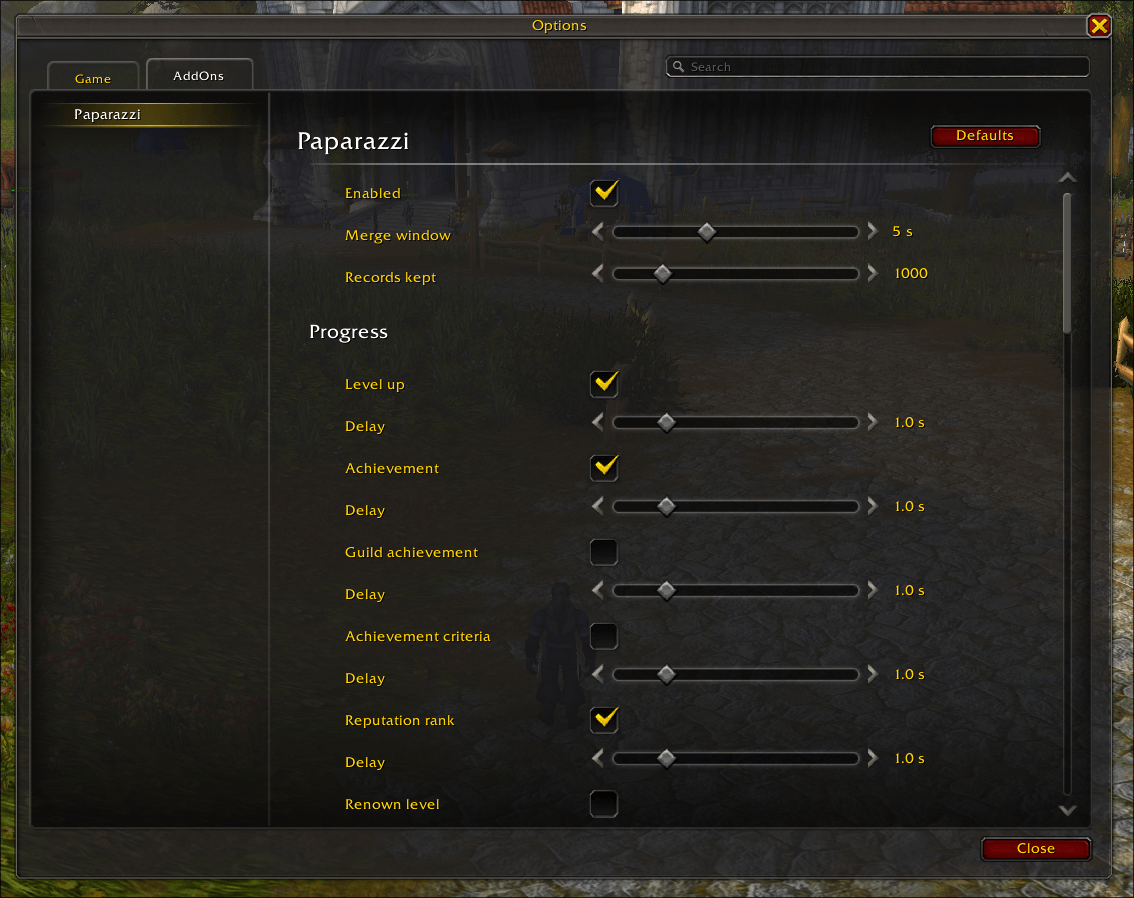
Paparazzi takes a screenshot when a configured game event occurs in World of Warcraft. It records why each screenshot exists.
Screenshot 2026-10-31 15.56.08.png
Description
Paparazzi
Paparazzi takes a screenshot when something important happens in your game. It also records why it took each one.
What it captures
- Progress: level up, achievement, guild achievement, achievement criteria, reputation rank, renown level, new recipe, Traveler's Log activity.
- Combat: boss kill, boss wipe, world boss kill, Mythic+ completed, Mythic+ new record, Delve completed, death.
- Collections: new mount, new pet, new toy, new housing item, house level.
- PvP: PvP match won, duel finished.
- Loot and trade: epic loot, legendary loot, trade.
- World: login, first visit to a zone.
Features
- Per-trigger control: turn each trigger on or off. Set a delay of 0 to 5 seconds for each one.
- Merge window: events that happen close together make one screenshot. Set the window from 2 to 10 seconds.
- Capture log: the addon keeps 100 to 5000 records of what it captured and why.
- Light on the game: the addon does not read the combat log. It does not change your settings or your interface.
Triggers
Each trigger has an on/off switch and a delay in the settings panel. The delay is in seconds.
| Trigger | Category | Default | Delay | Game versions |
|---|---|---|---|---|
| Level up | Progress | On | 1.0 | All |
| Achievement | Progress | On | 1.0 | retail, mists, titan, forever |
| Guild achievement | Progress | Off | 1.0 | retail, mists |
| Achievement criteria | Progress | Off | 1.0 | retail, mists, titan, forever |
| Reputation rank | Progress | On | 1.0 | All |
| Renown level | Progress | Off | 1.0 | retail |
| New recipe | Progress | Off | 1.0 | All |
| Traveler's Log activity | Progress | Off | 1.0 | retail, forever |
| Boss kill | Combat | On | 1.0 | All |
| Boss wipe | Combat | Off | 1.0 | All |
| World boss kill | Combat | On | 1.0 | retail, mists, titan |
| Mythic+ completed | Combat | On | 1.0 | retail, mists |
| Mythic+ new record | Combat | Off | 1.0 | retail, mists |
| Delve completed | Combat | Off | 1.0 | retail |
| Death | Combat | Off | 0.5 | All |
| New mount | Collections | On | 1.0 | retail, mists, titan |
| New pet | Collections | On | 1.0 | retail, mists, titan |
| New toy | Collections | On | 1.0 | retail, mists, titan |
| New housing item | Collections | Off | 1.0 | retail |
| House level | Collections | Off | 1.0 | retail |
| PvP match won | PvP | Off | 1.0 | All |
| Duel finished | PvP | Off | 1.0 | All |
| Epic loot | Loot | Off | 1.0 | retail |
| Legendary loot | Loot | On | 1.0 | retail |
| Trade | World | Off | 0.0 | All |
| Login | World | Off | 5.0 | All |
| First visit to a zone | World | Off | 2.0 | All |
Use
- Type
/paparazzito open the settings. - Type
/paparazzi testto take one test screenshot. - In Retail, you can also open the settings from the addon compartment.
Export the reasons (optional)
The game cannot write files from an addon. The free paparazzi-export tool solves this. It reads your saved data and writes a .json file next to each screenshot. The file says why the screenshot exists.
- It runs on Windows, macOS, and Linux.
- It never changes your images.
- Download it from the GitHub Releases page.
Known limits
- A game crash loses the records that are not saved yet.
- A manual screenshot just after an automatic one can get the wrong record.
/reloador logout cancels a pending screenshot.
Paparazzi Team
