PapaGreet
- By
LFG Assistant addon; aid in group queuing and randomize personalized greetings and farewells.
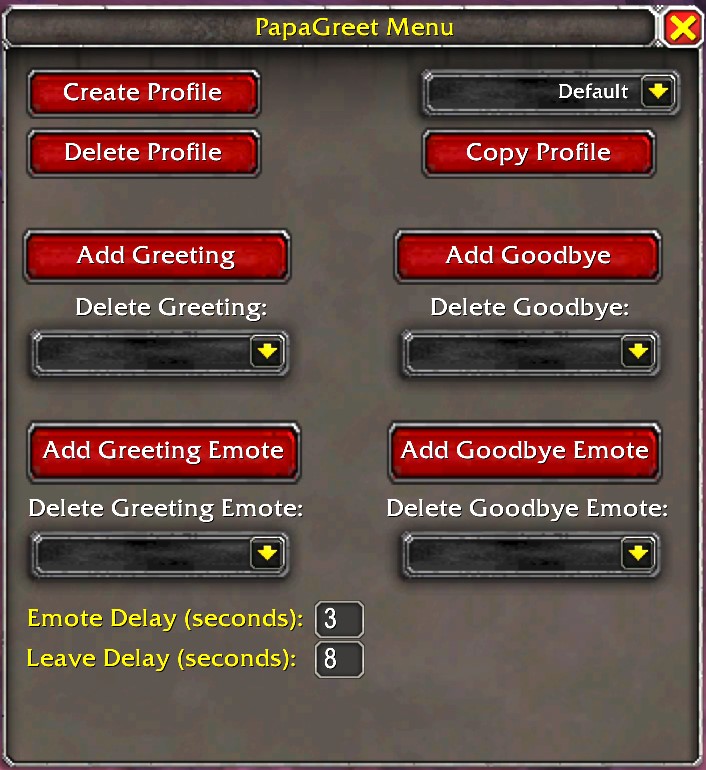
Configuration menu

Button
Description
1. Introduction
PapaGreet is a World of Warcraft LFG assistant addon designed to facilitate the queuing process for dungeons and automate greetings and farewells. This document provides a detailed description of the addon's functionality and the means to operate and customize it.
2. Purpose and Design
The primary objective of PapaGreet is to send randomized greetings at the start of a dungeon and automate the process of saying goodbye and leaving the instance group.
3. Interface and Interaction
The addon interface consists of a central button on the screen. The interaction with the button is as follows:
3.1 Left-click
Sends a random greeting and emote.
3.2 Right-click
Sends a random farewell and emote. Then leaves the instance group.
4. Customization
4.1 Accessing the menu
Ctrl+left-click the PapaGreet button to open the customization menu.
4.2 Customizing messages and emotes
From the menu, users can engage in the following activities:
- Create/Delete/Select profiles: Manage multiple profiles with ease.
- Customize greetings and farewells: Personalize your in-game communication.
- Design custom emotes: Craft unique emotes for an expressive experience.
- Configure delay settings: Adjust the delay for emotes and group departure after pressing the button.
5. Group Assistance
5.1 Shift+left-click
Opens the Looking for Dungeon window.
5.2 Shift+right-click
Opens the Looking for PvP window.
6. Moving the PapaGreet button
Hold the middle mouse button to move the button and release it to fix its position on the screen.
7. Slash Commands
PapaGreet offers the following slash commands for ease of use:
/papa menu | show | hide
PapaGreet Team