Fishbringer Reloaded
- By
Fishing companion for Classic Era, TBC and WoW Forever: zone skill, catch database, find list and statistics.
Screenshot 2026-11-14 171445.png
Screenshot 2026-11-14 171459.png
Description
Palda's Fishbringer Reloaded
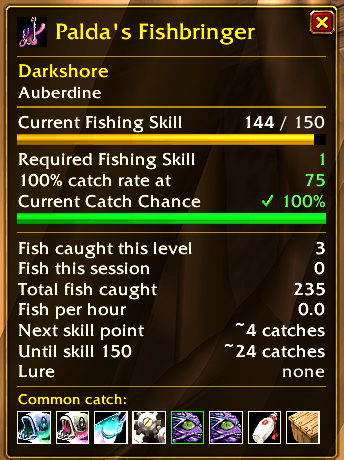
A fishing companion for Classic Era, TBC Classic, Wrath and WoW Forever. It shows the skill each zone needs, what you can catch there and how fast you are levelling, in one small window.
The window appears when you equip a fishing pole and hides again when you take it off.
Languages: English, Deutsch, Français, Español and Русский.
Feedback welcome! If something could be better, whether a feature, a wrong value, a missing fish or a clumsy translation, please let me know in the comments. Every comment helps make the addon better.
New in 6.5.34
- Everything is one click away: the right-click menu of the window now lists every feature, grouped into Fishing and Window: where to fish, catches in this area, fishing album, contests, value of your catch, fishing pools (show on map / delete), other fishing addons, options and features. No chat commands needed.
- Gear button next to the close button: left-click opens the options, right-click opens the menu.
- Less chat spam: zone list, contests, catch value, finds and the addon check open in a small info window next to the fishing window (press Esc to close). Lure, contest and new rare album entries are announced in the middle of the screen. The welcome line only appears after an update.
- Narrower window in German, French, Spanish and Russian thanks to shorter labels.
- Where should I fish? now starts with the recommendation (100 % catch chance).
- Fishing pools are now found by mouseover: move the mouse over a fishing pool or floating wreckage in the water and it is marked on the world map and minimap right away. Catches right after that count for that pool; the map tooltip shows its name, how often you fished there and the loot. (The game reports the bobber as loot source even in a pool, so the old detection never worked.)
- Louder splash only while fishing: music and ambience are muted when you cast, not as soon as you equip the pole, and come back 30 seconds after your last cast.
- Clearer value: amounts use the game's coin icons. Without auction data (Auctionator or TradeSkillMaster, after scanning the auction house) vendor prices are used, and the options say so.
- Zone and subzone share one line, the skill-up time has its own line, and hints wrap instead of widening the window.
- Fishing album: the active view (Rare / All) is easy to see.
- Login notices appear a few seconds after the loading screen, so they are no longer lost.
/pfb statusshows the addon version.
New in 6.5.22
- Fishing album: every catch from the database in one collection window (
/pfb album, right-click menu or key binding). Rare catches and all catches, caught ones in colour, missing ones greyed out. The tooltip shows where to catch each item and when you first caught it. Your earlier finds are taken over automatically. - Fishing contests: countdown in the window before and during the Stranglethorn Fishing Extravaganza (with your Tastyfish count) and, on Wrath, the Kalu'ak Fishing Derby. Optional chat notice 15 minutes before the start.
- Value of your catch: what this session's catch is worth, in total and per hour. Uses vendor prices, or auction prices from Auctionator or TradeSkillMaster if you have one installed.
- Fishing pools on the map: pools you spotted or fished from are marked on the world map and the minimap.
- Wrath catch database: Wrath clients now get the full catch tables and zone skill values (cMaNGOS WotLK-DB), including Northrend.
- New options page "Features" under the Fishbringer options, and key bindings for the window, the zone list and the album.
- The window is only redrawn when something has changed.
New in 6.5.21
- Where should I fish? Type
/pfb whereor use the right-click menu. You get a list of zones sorted by your catch chance: where nothing gets away any more (100 %), where you still lose fish, and which zones open up next. On Classic and TBC servers skill-ups do not depend on the zone, so the fastest way to level is fishing where every cast lands a catch. - Works alongside other fishing addons: Fishbringer detects other fishing addons (for example Classic Fishing Companion, Fishing Buddy, FishingKit and others). If one of them also offers a lure timer, lure warning or louder splash, you get a one-time notice and can turn off our version with
/pfb addons offor one click in the options.
New in 6.5.20
- Skill-up forecast: how many catches you need for the next skill point and up to your current maximum, with an estimated time based on your fish per hour.
- Lure timer: remaining lure time in the window, plus a warning (chat and sound) when the lure runs out while you fish.
- Louder splash (optional): while you fish, sound is turned on and music and ambience are muted, so you hear the bobber. Your sound settings come back 30 seconds after your last cast. Off by default.
- Fix: the fishing skill is now read correctly on German, French, Spanish and Russian clients.
New in 6.5.19
- Three new languages: French, Spanish (Spain and Latin America) and Russian. Texts that are not translated yet fall back to English.
- Additional finds: items that players caught but that are missing from the server database are now shown as possible catches, kept separate for Classic Era, WoW Forever and TBC.
- Easier reporting: the options page links to the CurseForge comments, and
/pfb exportgives you the text to post there.
What's new in 6.5
- Fishing database built in. Catch tables and zone skill values now come from the open-source server projects VMaNGOS (Vanilla) and cMaNGOS (TBC) instead of hand-written lists. That gives you every fish and item in every fishing area, sub-zones included, with real drop chances.
- Common and rare catches. The window splits the possible catch into common and rare (below 1 %). Hover an icon to see its chance per catch, and whether it needs a quest or only bites at certain times (day/night/season).
- Your own find list. The addon remembers what you have caught in each zone and how often. New rare finds are announced in chat.
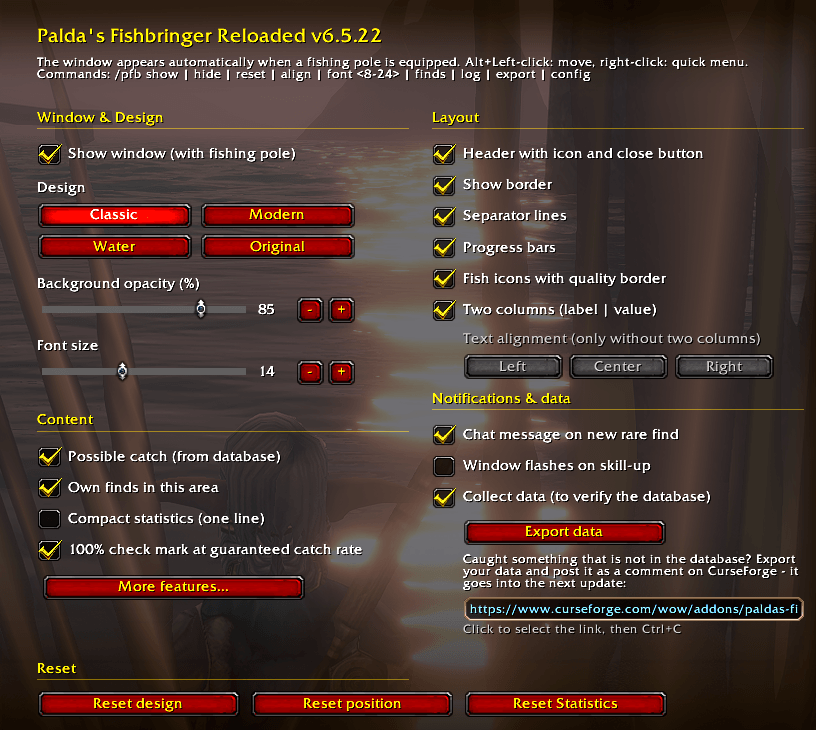
- New design options. Four themes (Classic, Modern, Water, Original), two-column layout, progress bars, quality borders on fish icons, compact statistics, adjustable font size and background opacity.
- Options page under Options → AddOns (or
/pfb config). - Now licensed under GPL-3.0 (required by the fishing data it uses).
Features
Live fishing info
- Current zone with the skill needed for a 100 % catch rate
- Your current fishing skill (with lure/gear bonus) and current catch chance
- Fish caught this skill level, this session and in total
- Fish per hour
- Skill-up forecast: catches to the next point and to your current maximum, with estimated time
- Lure timer with a warning when the lure runs out
- Optional louder splash while you fish
- Where should I fish? Zones sorted by catch chance for your skill (
/pfb where) - Plays well with others: detects other fishing addons and lets you switch off features that are doubled
- Value of your catch per session and per hour (vendor or auction prices)
- Fishing contest countdown (Stranglethorn, Kalu'ak) with your Tastyfish count
- Progress bars and a glow when you skill up
What can I catch here?
- Possible catch for the zone from the database, split into common and rare
- Tooltip per fish: chance per catch, quest-only or time/season-only
- Caught here: your own catches in this zone, with how often each one dropped
- Chat message when you find something rare or something missing from the database
- Additional finds: items that players actually caught but that are missing from the server database are added per game version (Classic Era, WoW Forever, TBC) with their measured chance. Found something missing? Type
/pfb export(or use the button in the options), copy the text and post it in the comments here, so it can go into the next update.
Collect and explore
- Fishing album with every catch of your game version, rare ones and all, with progress and where to catch each item
- Fishing pools you hover over or fish from are marked on the world map and the minimap
Look and handling
- Themes: Classic, Modern, Water, Original
- Toggle header, border, two columns, bars, separator lines, icon borders, compact stats and effects
- Font size 8 to 24, background opacity, text alignment
- Alt+Left-click to move, right-click for the quick menu
- Key bindings (Options, Key Bindings, AddOns): show/hide window, where should I fish, fishing album
- English, German, French, Spanish and Russian (see "Translations" below)
Commands
/pfb show           show the window
/pfb hide           hide the window
/pfb config         open the options page
/pfb features       open the "Features" options page
/pfb album          open the fishing album
/pfb value          value of this session's catch
/pfb contest        next fishing contests
/pfb pools          saved fishing pool spots on this map
/pfb pools reset    delete the pool spots on this map
/pfb where          zones sorted by catch chance for your skill
/pfb addons         other fishing addons and doubled features
/pfb addons off     turn off our features that another addon also offers
/pfb reset          reset statistics
/pfb align          cycle text alignment
/pfb font <8-24>    set font size
/pfb finds          list your finds in this zone
/pfb finds reset    clear the find list for this zone
/pfb log            show collected data for this zone (casts, catches, catch rate)
/pfb log reset      delete collected data
/pfb export         open a window with all collected data to copy (Ctrl+C)
/pfb zone           show zone info (please include this in bug reports)
/pfb status         show addon version and detected game client
/paldasfishbringer works as well.
Supported game versions
| Client | Status |
|---|---|
| Classic Era / Anniversary (1.15.x) | Fully supported, Vanilla database |
| TBC Classic / Anniversary (2.5.x) | Fully supported, TBC database (Azeroth + Outland) |
| WoW Forever | Supported with the Vanilla database, not fully tested yet |
| Wrath Classic / Titan Reforged (3.x) | Wrath database (Azeroth, Outland, Northrend), not fully tested yet |
| Cataclysm Classic | Zone skill values only, no catch database, not fully tested |
On clients that are not fully tested, the addon shows a short notice in chat once per version.
Installation
Automatic: install with the CurseForge app or WowUp.
Manual: extract the ZIP into your Interface\AddOns folder of the right game version (for example _classic_era_ or _anniversary_), so that you have Interface\AddOns\PaldasFishbringerReloaded\. Restart the game and enable the addon on the character screen.
Bug reports and missing zones
If a zone shows "No data" or a value looks wrong, please help out. Stand in the zone, type /pfb zone and post the output in the comments or the Issues tab, together with:
- the addon version (
/pfb status) - your game version (Era, TBC, Forever, …)
- what you expected and what you saw
- any Lua error (BugSack helps here)
In WoW Forever, Lua errors are hidden by default. The addon prints its own errors to chat once, so please copy those.
Translations and feedback
The addon is available in English, German, French, Spanish and Russian. French, Spanish and Russian are new. If a text sounds odd, gets cut off in the options, or does not use the same word as the game, please post a better version in the comments. It would help to include:
- your game language
- where the text appears (window, options, tooltip, chat)
- the current text and your suggestion
Would you like the addon in another language? Say so in the comments as well. Translations are very welcome.
General ideas and wishes are welcome too. Just leave a comment.
Credits and license
- Based on the original Fishbringer by Kalerath, rewritten and extended by Palda.
- Fishing data: VMaNGOS (GPL-2.0+), cMaNGOS TBC-DB and cMaNGOS WotLK-DB (GPL-3.0). Area data via wago.tools, fishing pool names via Wowhead.
- License: GPL-3.0-or-later.
World of Warcraft is a trademark of Blizzard Entertainment.
Tight lines and happy fishing!
Fishbringer Reloaded Team