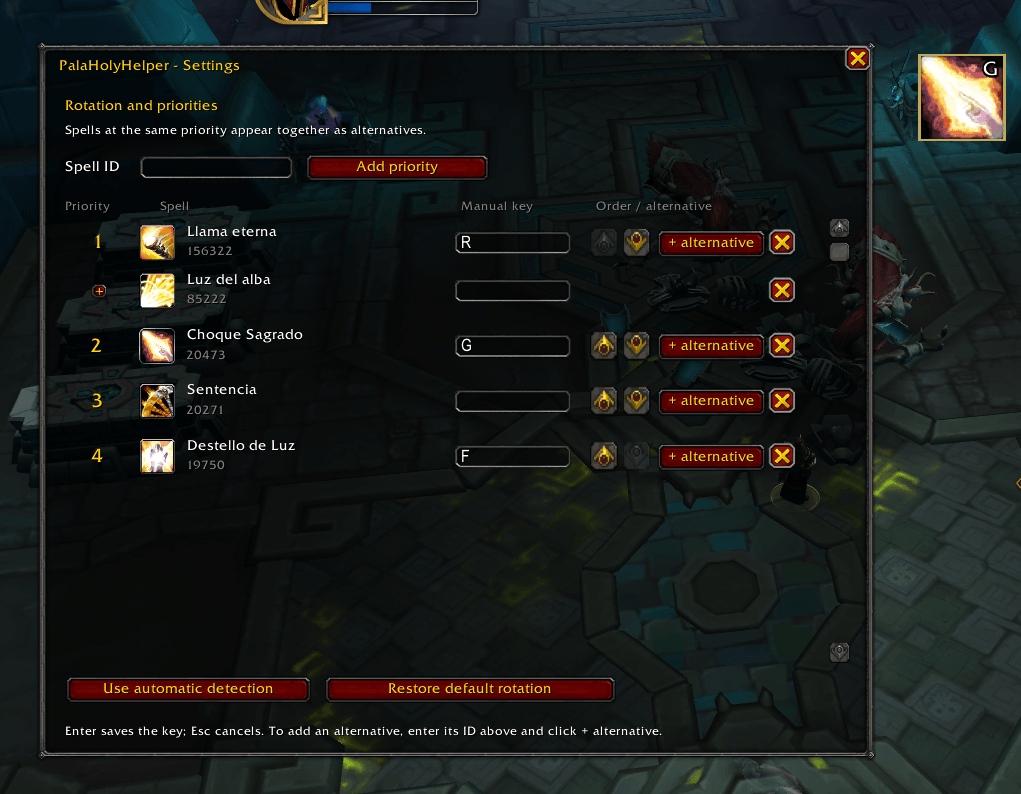
palaholyhelper.png
Description
PalaHolyHelper
A clear, configurable healing priority display for Holy Paladins.
PalaHolyHelper is a lightweight World of Warcraft Retail addon that recommends the next healing ability from a priority list you control. Alternative spells at the same priority appear side by side, making it easy to choose between single-target and group healing without losing sight of the rotation.
Features
- Editable healing rotation: add spells by Spell ID, remove them, and reorder complete priority groups.
- Alternative spell groups: place several spells at the same priority and display every available choice side by side.
- GCD prediction: keeps the next expected ability visible while the global cooldown is active.
- Default Holy Paladin priority: starts with
156322 + 85222 -> 20473 -> 19750and can be restored at any time. - Automatic key labels from Blizzard action bars, direct spell bindings, and supported spell macros.
- Manual key labels for Dominos or any setup that automatic detection cannot identify.
- Movable and resizable display while settings are open.
- Per-character settings for rotation, key labels, position, and icon size.
- Holy Paladin visibility: the display automatically hides on other classes and specializations.
- Combat-safe settings lock: configuration closes and the display locks when combat begins.
- No additional addons or libraries required.
Getting Started
Right-click the display or type /phh or /palaholyhelper while out of combat to open settings.
- Enter a Spell ID and click Add priority to add a new step to the rotation.
- Enter a Spell ID and click + alternative beside a group to add another choice at the same priority.
- Use the graphical up and down buttons to reorder groups.
- Drag the indicator to move it, or drag its bottom-right corner to resize every icon.
- Use Restore default rotation to return to the original priority.
The display becomes locked when settings close. Use /phh reset with settings open to restore the default position and size.
Key Labels
PalaHolyHelper can detect shortcuts from the Blizzard main bar and seven additional bars, including current action-bar pages, direct SPELL bindings, supported spell macros, and CLICK bindings. If your bar addon does not expose a shortcut in those places, enter any manual label you want to see, such as Q, S-2, or Ctrl+3.
Manual labels only change the text displayed on the icon. Actual bindings remain managed by WoW or your action-bar addon.
Compatibility and Scope
Designed for World of Warcraft Retail / Midnight. The addon interface is currently in English.
PalaHolyHelper checks whether a spell is usable and whether its cooldown is only the global cooldown. It does not select a target, inspect party health, check range or line of sight, or cast abilities. The recommendation is a visual priority hint and cannot guarantee that a cast will succeed.
The addon is independently developed and is not affiliated with or endorsed by Blizzard Entertainment or other rotation-helper addon authors.
The PalaHolyHelper Team