PaladinHelper
- By
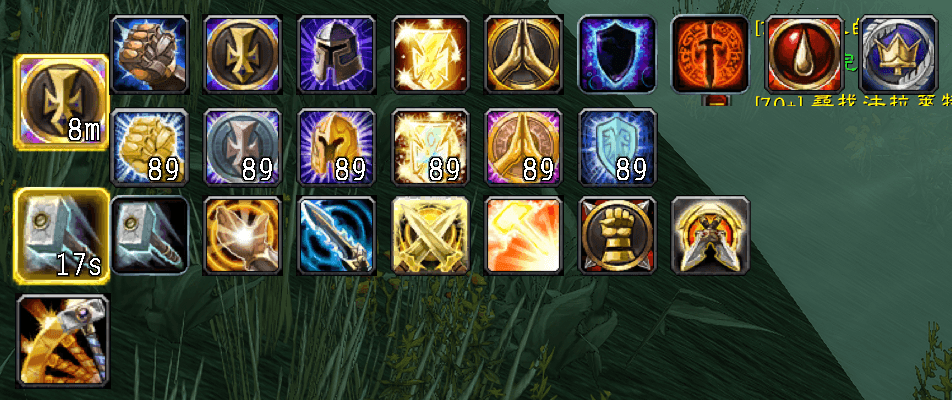
The Paladin-exclusive skill shortcut bar supports one-click casting of Blessing/Seal/Judgment, automatic combat deployment (controllable), and real-time display of cooldown times.
68_144.png
Description
PaladinHelper Function Description
PaladinHelper is a user-friendly enhancement addon designed for Paladins, integrating Blessings, Seals, and Judgments into three compact main buttons, providing intuitive status display and quick casting.
Core Functions
1. Blessing Button (Main Button)
Displays the icon and remaining time of currently active blessings (such as Blessing of Might, Blessing of Kings, etc.).
Hovering the mouse over or clicking the main button automatically expands a sub-button panel listing all learned blessings (minor and major blessings are arranged in two rows).
Sub-Button Operations:
Clicking any sub-button casts the corresponding blessing on the current target (or the target hovering over, or yourself).
Major blessing sub-buttons display the amount of materials in your inventory (requires "Mark of Kings"). A red "0" is displayed when materials are insufficient.
Status Synchronization: The addon continuously monitors the blessing aura on the user, automatically updating the main button's icon, highlight, and remaining time.
2. Seal Button (Main Button)
Displays the icon and remaining time of currently active Seals (such as Seal of Command, Seal of Justice, etc.).
Hovering the mouse over or clicking the main button expands the sub-button panel, listing all learned Seals.
Clicking a sub-button directly switches Seals.
3. Judgment Button (Independent Button)
Directly casts the "Judgment" skill, while displaying the skill's cooldown countdown.
Clicking casts Judgment on the current target.
Interaction and Operation
Drag and Drop: Hovering the mouse over the semi-transparent drag bar that appears above the main frame and holding down the left mouse button allows you to adjust the position of the entire UI (dragging is prohibited in combat).
Auto-Expand: Upon entering combat, all sub-button panels automatically expand (for quick clicking); they automatically collapse after leaving combat. You can toggle this function out of combat using the commands /ph auto or /ph toggle.
Mouse Hover Expand: Out of combat, hovering the mouse over any main button or its invisible bridging area to the right automatically expands the sub-panel; it automatically collapses when the mouse moves away. Settings & Commands
/ph auto – Toggle the "Automatically expand sub-panels during battle" function on/off.
All settings (location, selected blessings/seals, automatic expansion switch) are saved in your account settings and will be automatically restored upon logging back in.
PaladinHelper 功能说明
PaladinHelper 是一款为圣骑士定制的便捷操作增强插件,将祝福、圣印和审判整合为三个紧凑的主按钮,提供直观的状态显示与快速施法。
核心功能
1. 祝福按钮(主按钮)
-
显示当前已激活的祝福(如力量祝福、王者祝福等)的图标和剩余时间。
-
鼠标悬停或单击主按钮,会自动展开一个子按钮面板,列出所有已学会的祝福(小祝福与大祝福分两行排列)。
-
子按钮操作:
-
点击任一子按钮,即可向当前目标(或鼠标悬停目标、或自己)施放对应祝福。
-
大祝福子按钮会显示背包中的材料数量(需要“王者印记”),材料不足时显示红色“0”。
-
-
状态同步:插件会实时检测身上的祝福光环,自动更新主按钮的图标、高亮和剩余时间。
2. 圣印按钮(主按钮)
-
显示当前已激活的圣印(如命令圣印、正义圣印等)的图标和剩余时间。
-
鼠标悬停或单击主按钮,展开子按钮面板,列出所有已学会的圣印。
-
点击子按钮直接切换圣印。
3. 审判按钮(独立按钮)
-
直接施放“审判”技能,同时显示技能冷却倒计时。
-
点击即对当前目标施放审判。
交互与操作
-
拖拽移动:鼠标悬停在主框架上方出现的半透明拖拽条上,按住左键拖动可调整整个UI的位置(战斗中禁止拖动)。
-
自动展开:进入战斗后,所有子按钮面板会自动展开(方便快速点击);脱离战斗后自动收起。您可以在脱战下通过命令
/ph auto或/ph toggle切换此功能。 -
鼠标悬停展开:非战斗状态下,鼠标悬停在任何主按钮或其右侧的隐形桥接区域,子面板会自动展开;鼠标移出后自动收起。
设置与命令
-
/ph auto– 切换“战斗中自动展开子面板”功能的开启/关闭。 -
所有设置(位置、选择的祝福/圣印、自动展开开关)会保存在账号配置中,重新登录后自动恢复。
The PaladinHelper Team