Pacesetter
- By
Screenshot 2026-10-17 052730.png
Screenshot 2026-10-17 052949.png
Description
See your XP per hour and race other players with live guild and public leveling leaderboards.
See how fast you're leveling, and who's setting the pace.
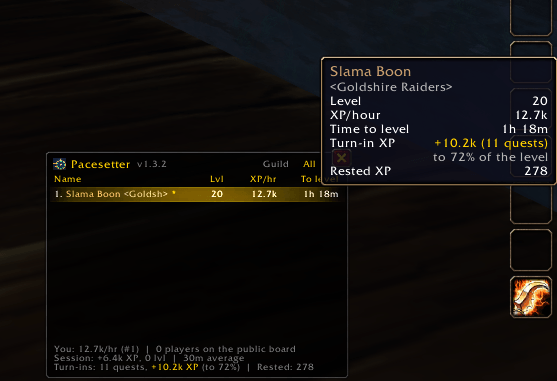
Pacesetter tracks your XP per hour as you play and ranks you on live leaderboards against your guild and against other players on WoW Forever.
⭐ Race everyone, not just your guild
The Public board is on by default. Open the leaderboard and click the All tab to see every Pacesetter user near you.
- Give it a few minutes. Players on your realm show up within about a minute. Players from other realms can take up to about 5.
- Rather keep it to your guild? Type
/pace publicto opt out.
The boards grow as more people use Pacesetter. You'll only see players who have it installed, and it's new, so expect a short list at first. Tell your guild and your friends!
Features
- Your XP per hour, time to your next level, and session totals
- Guild board: guildmates ranked by XP/hour
- Public board (All tab): players on your realm, plus players from other realms passed along through guilds
- Turn-in XP: how much XP is waiting in your completed quests, and whether turning them in levels you up
- Rested XP shown in the footer
- Hover any name for guild, level, XP/hour, time to level, turn-in XP and realm
- Right-click any name to ignore that player
- Update alerts when a newer version of Pacesetter is out
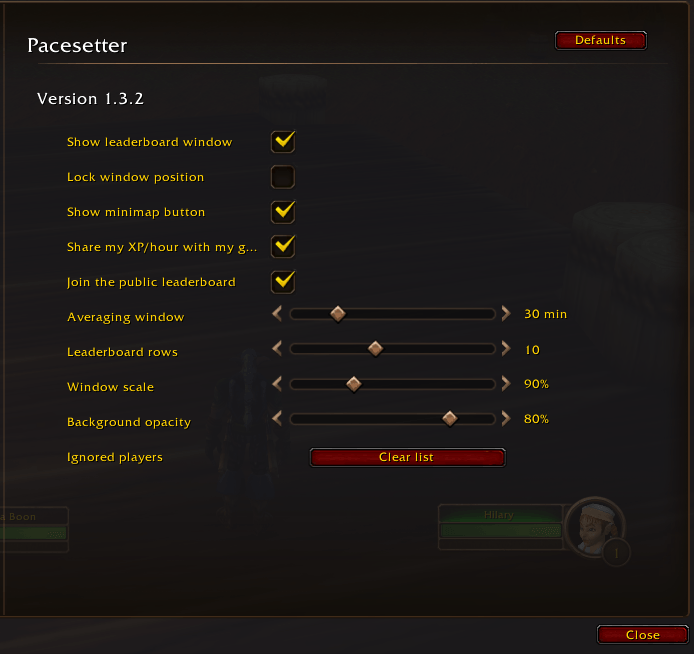
- Minimap button and a full options page (size, opacity, rows and more)
- Updates once a minute and never posts in chat
Getting started
- Install and log in. The leaderboard window and a stopwatch minimap button appear.
- Left-click the minimap button to show or hide the leaderboard. Right-click it for options.
- Switch between the Guild and All tabs at the top of the window.
Commands
| Command | What it does |
|---|---|
/pace |
Show or hide the leaderboard |
/pace public |
Join or leave the public board |
/pace options |
Open the options page |
/pace guild / /pace all |
Switch boards |
/pace quests |
List completed quests and their XP |
/pace window <minutes> |
How many minutes your XP/hour is averaged over (5–120) |
/pace reset |
Start a new session |
/pace ignored / /pace unignore <name> |
Manage ignored players |
What it shares
- Guild board: your name, level, XP/hour and class, once a minute, only to guildmates running Pacesetter. You can turn sharing off and still watch.
- Public board: the same, plus your guild name, to other Pacesetter users through a hidden channel that never appears in your chat. Opt out any time with
/pace public.
Built for World of Warcraft: Forever. Free and open source (MIT).
<sub>Found a bug? Type /console scriptErrors 1, reproduce it, and post a screenshot of the error and of /pace debug in the comments.</sub>
Pacesetter Team