Overpower
- By
Triggers when player dodges attack and show icon with timer for overpower spell with sound effect from sharedmedia
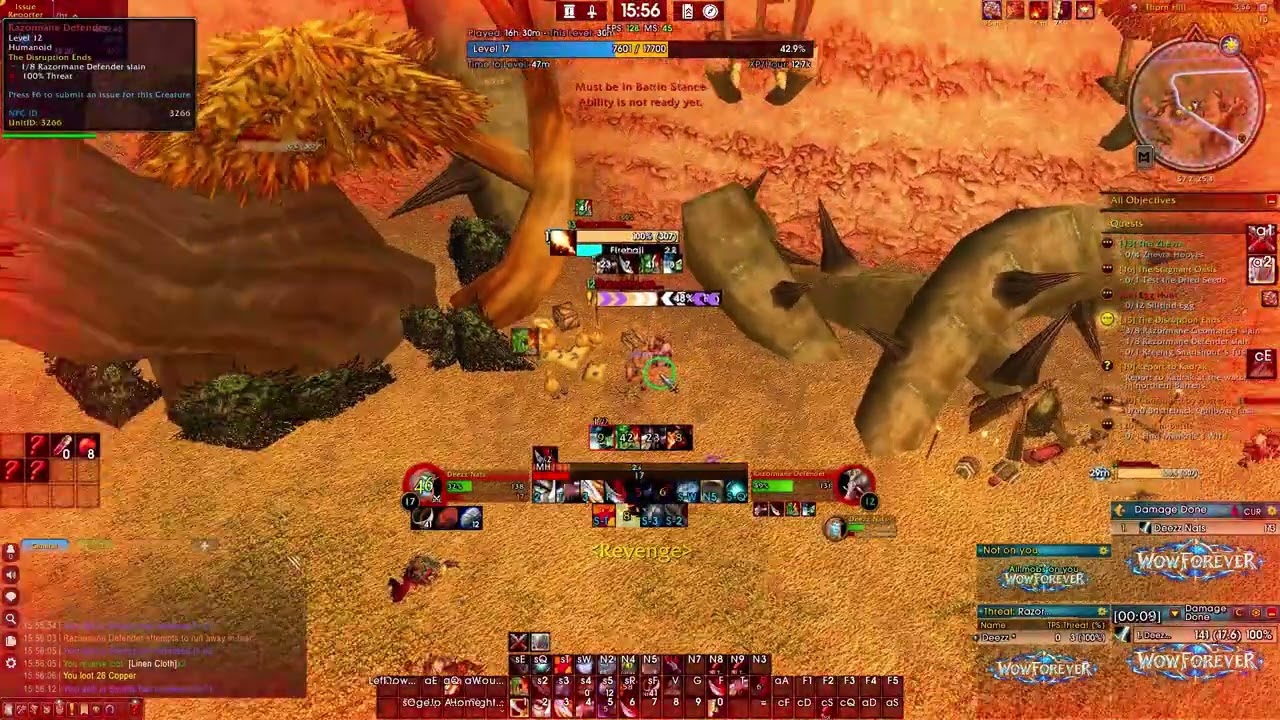
Description
https://www.youtube.com/watch?v=oguFxhx0icM
https://www.youtube.com/watch?v=oguFxhx0icM
Overpower Alert
Never miss an Overpower again. A lightweight alert for Warriors on WoW Forever and Classic Era.
What problem does it solve?
In Classic, Overpower can only be used for about 5 seconds after your target dodges one of your attacks. The default game gives no glow, sound or warning when that happens. You have to keep watching your action bar for the button to light up, and in a busy fight that window is easy to miss. Overpower Alert tells you the moment it's ready, so you can hit it every time.
Features
- Big on-screen Overpower icon. When your target dodges, a large Overpower icon pops into the middle of your screen with a pulsing glow, so you see it without looking at your bars.
- Live countdown. A timer on the icon counts down the 5-second window (5.0, 4.9 …), so you know exactly how long you have to use it.
- Action bar glow. Every action bar button that holds Overpower gets a pulsing glow, so your eyes go straight to the right key. It's drawn as a separate layer on top of your buttons and never touches Blizzard's action bar code, so it won't cause "action blocked" errors.
- Sound alert. A sound plays the moment Overpower becomes usable. Choose from built-in sounds (Raid Warning, Alarm, Ready Check, Level Up, Quest Complete) or any sound from other addons that use SharedMedia. You can also pick the volume channel (Master, SFX, Music, Ambience or Dialog), so it's still audible with music turned down.
- Status text under the icon.
- OVERPOWER: ready, press it now.
- Battle Stance!: your target dodged, but you're in the wrong stance. The icon also turns grey so you know to switch stances.
- Need rage: the window is open, but you don't have enough rage yet.
- Tracks your current target. The window belongs to the mob that dodged. If you switch targets, the alert clears. If the same target dodges again, the timer restarts.
- Works with every rank of Overpower (Rank 1–4).
- Only alerts Warriors. On other classes it stays switched off and does nothing.
Customization
Type /op to open a small, easy options window. You can also find it under Esc → Options → AddOns → Overpower Alert.
- Turn the big icon, countdown number, status text and action bar glow on or off separately
- Move the icon anywhere on your screen and resize it (24–128 pixels)
- Change the glow color to anything you like
- Pick a sound and preview it, or turn the sound off
- "Only in combat" mode so it never goes off while you're out of combat
- "Test alert" button to preview everything without needing a dodge
- "Reset" button to restore the default settings
Slash commands
- /op: open the options window
- /op test: show the alert for 5 seconds
- /op unlock and /op lock: drag the icon to a new spot
- /op size 24-128: set the icon size
- /op sound: go to the next sound (/op sound off or /op sound on to toggle it)
- /op bars: toggle the action bar glow
- /op icon: toggle the big icon
- /op combat: only alert while in combat
- /op reset: reset position and settings
- /op help: list all commands
Who is it for?
Any Warrior who wants to get more out of Overpower. It's a strong, cheap hit (it can't be dodged, blocked or parried), and using it every time it comes up adds real damage while you level, in dungeons and in PvP. Overpower Alert turns "I missed it again" into a reflex.
Lightweight
It's a single file with no required libraries. It only reacts when the game reports a change, so it has no effect on your frame rate.
Overpower Team

Owner