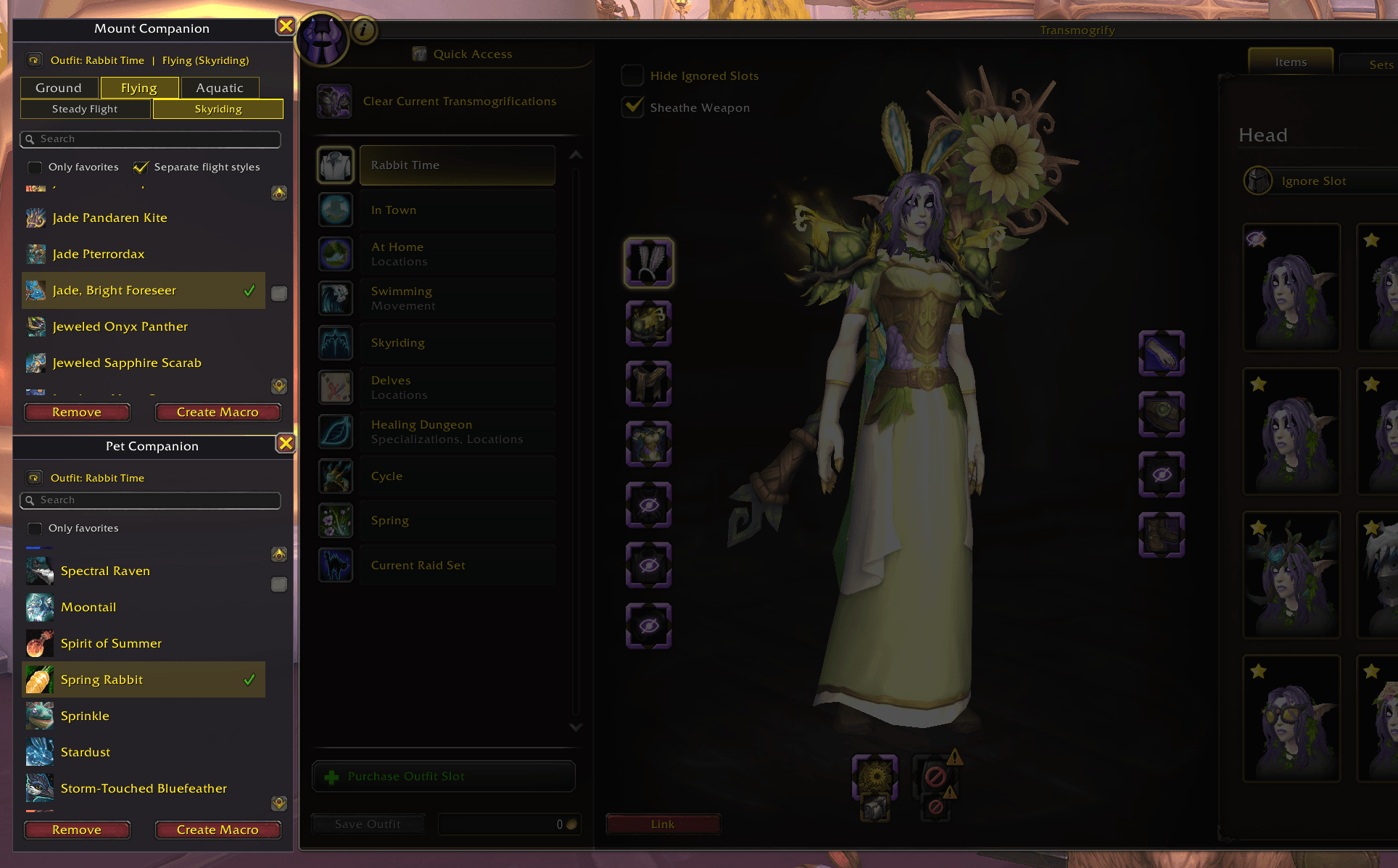
Selection panels will appear to the left of the Transmog window
Description
Assign mounts and a pet to each Transmog Outfit!
(Applies to the new Outfit slots & swapping feature in Midnight, not saved sets)
Lite mode available in addon settings (ESC > Options > Addons > Outfit Companions)
Features:
- Adds extra panels to the left of the Transmog window for selecting mounts and a pet for the Outfit you've highlighted (you may need to click on and off whatever is already selected when you open the window sometimes, so check what name is displayed in the addon windows to make sure you are assigning to the correct Outfit!)
- Gain access to assigning to the "no Transmog" Outfit ID by clicking the refresh button to the left of the Outfit name in those panels (top left-ish)
- You can also right click on a mount or pet in the in-game collections list (shift +P) and assign from there
- Select a mount for ground, flying, and underwater. You can even select separate mounts for skyriding and steady flight by enabling the toggle. Note that some mounts like the Otterworldly Ottuk Carrier and the Wondrous Wavewhisker change their capabilities based on what kind of flight you have enabled, so to fly with the Ottuk for example you'll need to toggle this separation on and assign that mount to Flying > Steady Flight.
- Toggle showing only favorite mounts or pets in the lists
- Toggle showing flying mounts in the ground mount assignment tab
- Pets will be summoned when you swap outfits
- Create a Macro for your mount selections from the mount selection window (it will be named *OutfitCMount in your macros, towards the top of the list due to the asterisk, with a brown horse icon by default). This will summon your assigned mount based on context like ground-only, flying available, underwater, and of course what outfit you are wearing!
- Create a Macro for your pet selection from the pet selection window (it will be named *OutfitCPet in your macros, towards the top of the list due to the asterisk, with a raccoon icon by default). This will summon your assigned pet based on the Outfit you are wearing. We all know that companion pets tend to wander off in Azeroth, so call them back easily with this Macro!
How to use the Macros:
1) Assign mounts and pets to your Outfits with this addon
2) Click the "Create Macro" button on each of the two addon windows
3) Access your Macros by typing /m
4) Locate the new Macros *OutfitCMount and/or *OutfitCPet (horse and raccoon icons by default, but you can change them if you want to)
5) Drag the Macro(s) to your bars
6) Make sure you have keybinds assigned to the bar slots
7) Press that keybind or click the Macro on the bar to use it!
Macros:
Mount
/cancelaura
/run PetOutfit_SummonMount()
Pet
/run OutfitCompanions_SummonPet()
Send bug reports to discord @sarracuda or email wolfmuse.tv@gmail.com
Outfit Companions Team