OptiScore
- By
Rates how well your gear fits your spec and shares your OptiScore in the Group Finder.
Captura de pantalla 2026-10-18 120709.png
Captura de pantalla 2026-10-18 120807.png
Description
# OptiScore
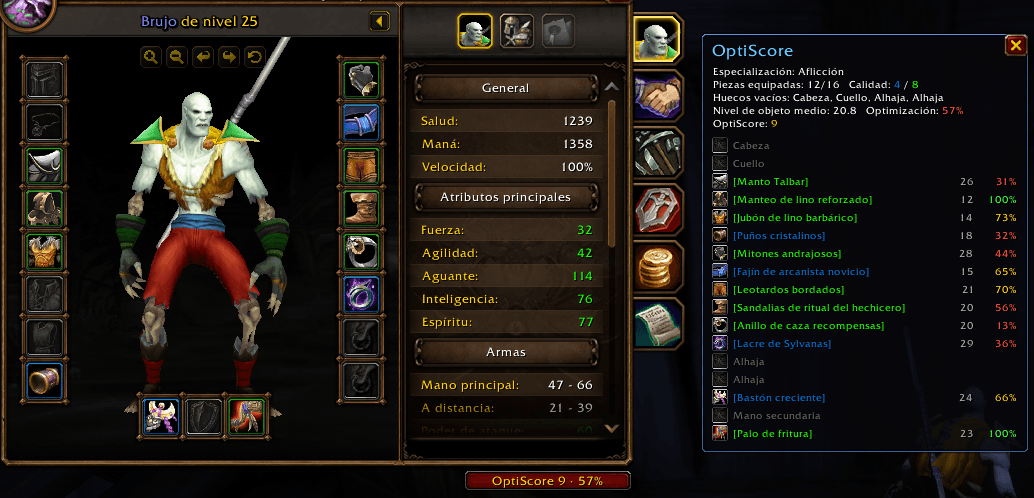
**How optimized is your gear for your spec?** OptiScore counts your equipment, checks every piece against your specialization and gives you a single number you can share with other players.
## Features
- **Gear count** – equipped pieces, empty slots and how many items you have of each quality.
- **Optimization % per item** – how much of each item's stats are actually useful for your spec. Wrong armor type or wrong primary stat? OptiScore flags it.
- **OptiScore** – one score combining your average item level, your optimization and your gear coverage.
- **Item tooltips** – see the optimization % of any equippable item at a glance. Perfect for judging loot.
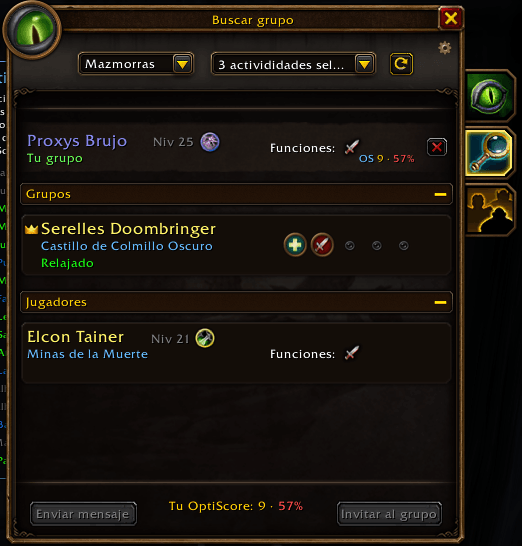
- **Group Finder integration**
- As a **leader**, applicants who use OptiScore show their score next to their item level.
- When you **apply** to a group, your OptiScore is sent to the leader automatically.
- Group tooltips show the **leader's OptiScore** and yours.
- **Player tooltips** – hover over any player of your faction who uses the addon to see their OptiScore.
- **Automatic sharing** – scores are exchanged silently when you join a party or raid. No chat spam.
## Supported versions
- **WoW: Forever** – uses the talent tree with the most points spent. Before level 10 it uses a general profile for your class.
- **Retail (Midnight)** – uses your active specialization, its primary stat and a secondary stat priority.
## Commands
- `/os` – show or hide the OptiScore window
- `/os button` – toggle the button below the character sheet
- `/os reset` – reset the window position
- `/os debug` – print the raw stats of your equipped items
## Notes
- Only players who have OptiScore installed can share and see scores.
- Scores can't be exchanged across factions (game limitation).
- Items with no stats (starter gear) count as neutral.
- Available in English and Spanish.
Feedback and suggestions are welcome in the comments!
OptiScore Team