OneCoke - Bagfind
- By
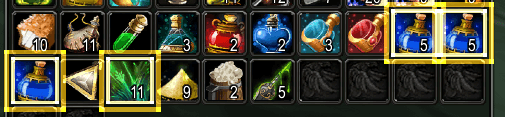
Pin up to 6 favorite items and their icons will glow with a pulsing border wherever they appear in your bags.
ufMjVuyLOo.png
2fn5jTWeJD.png
Description
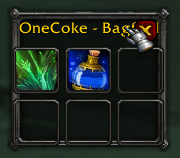
OneCoke - Bagfind adds a small, movable panel with 6 item slots. Drag any item onto a slot to "pin" it from that point on, whenever that item is sitting in your bags, its icon gets a pulsing glowing border so it's instantly easy to spot, no matter how full or disorganized your bags are.
Your pins are saved per-character and persist through logout, reload, and relogging.
Features
- 6 pin slots (3x2 grid) drag any item from your bags onto a slot to pin it, right-click a filled slot to unpin it
- Animated glow border pinned items get a two-layer pulsing gold border (soft outer halo + bright inner ring) in your bags, without dimming or tinting the item icon itself
- Minimap icon click to open/close the pin panel; drag to reposition like any standard minimap button
/bagfindslash command toggles the panel without touching the mouse- Per-character saved settings pins and minimap position persist across sessions, scoped to each character individually
- Works with default bags and Bagnon highlighting hooks into the shared icon-rendering function both use, rather than assuming one specific bag UI, so it isn't limited to Blizzard's stock bag frames
- Tooltips hover a pin slot to see what's pinned there, or a hint to drag an item in if it's empty
How to use
- Click the minimap icon (or type
/bagfind) to open the pin panel. - Drag any item from your bags onto one of the 6 slots.
- Close your bags and reopen them the pinned item now glows wherever it appears.
- Right-click a filled pin slot to remove it.
Notes
- Only backpack/bag slots are highlighted (bank, guild bank, and vendor windows are intentionally excluded).
/bagfinddebugtoggles diagnostic chat logging, useful if highlighting ever misbehaves with a particular bag addon.
OneCoke - Bagfind Team