OneClickFish
- By
One key casts and loots. A session HUD tracks catches, value and gold per hour.
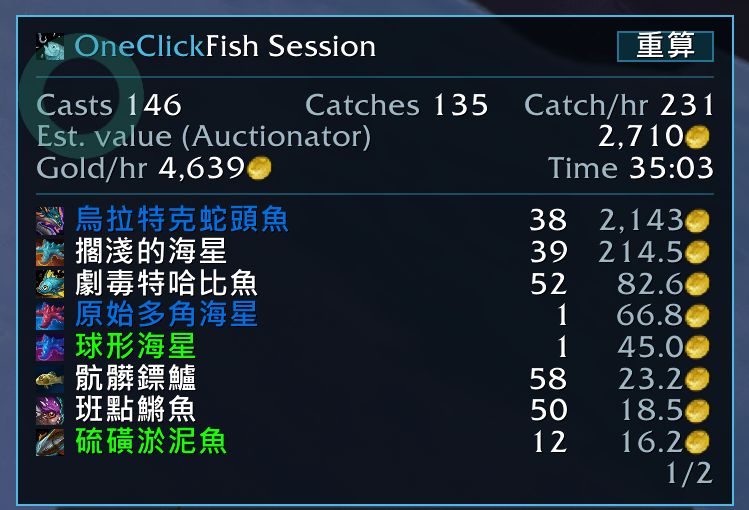
fish session
Description
OneClickFish: one key casts Fishing, and the same key loots the bobber. Supports World of Warcraft Retail (Midnight). 繁體中文說明
One key
Bind a key under Key Bindings > AddOns > OneClickFish, or in /ocfish. Press it at the water to cast. When the bobber splashes, press it again: it loots, no aiming, no mouse. While the line is out the game's soft-target interact is switched on, so Interact reaches a bobber cast far out; your own settings are put back when the line is in.
Around the cast
A fishing pole from your bags is equipped before the cast, and a fishing hat if you picked one from your bags; what was on your head before comes back when fishing mode is switched off. A lure of your choice: what is left of it on the HUD, the cast button amber when the pole wants a new one, and, if you like, put on the pole by the button before a cast. The catch goes straight to your bags, no loot window. A short ping when the line lands.
Sound
There is no event for a bite: the splash is the cue. Music and ambience are lowered while the line is out and put back when it is in; sound effects can be boosted as well. The levels are yours to set.
Session HUD
A small box from the first cast on, three lines: casts / catches / per hour, value, gold per hour with the time, and under them what was caught, the most caught first, with its count and value; hover a row for the item. Prices come from Auctionator or TSM when one is installed, else from the vendor. The channel drains along the bottom while the line is out, and a Reset button in the title row starts over. The box goes after a few minutes without a cast and comes back with the next; thirty minutes without a cast starts a new session. Drag to move, Ctrl + mouse wheel to resize, right click for the settings.
On screen
A cast button wearing the pole in your fishing tool slot, with that pole's tooltip: left click casts or loots, right click opens the settings. A minimap button with the Fishing profession's icon: left click switches fishing mode on or off, right click opens the settings.
For other addons
OneClickFish.GetStats() and OneClickFish.RegisterCallback(fn) hand out the session.
No libraries, no texture or font files. English and 繁體中文.
OneClickFish Team