OneClickBars
- By
Screenshot 2026-10-18 at 6.22.49â¯PM.png
Description
# OneClickBars
Set up your action bars once, then copy them to any character on your account with one click. No import strings.
## How it works
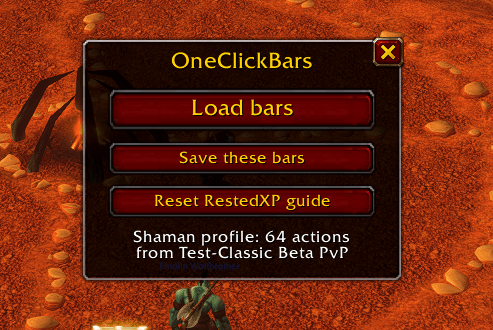
1. On a character with the bars you want, click "Save these bars". This saves the layout as the profile for that class.
2. On another character of the same class, click "Load bars".
3. New level 1 characters load their class profile automatically on first login.
4. Spells you haven't learned yet are placed in their saved slot as soon as you learn them, including higher ranks.
OneClickBars copies spells, macros, items, mounts, equipment sets and stance bars. Missing macros are created. Profiles are saved per class and shared across the whole account.
## RestedXP support
If RestedXP Guides is installed, new level 1 characters start at step 1 of the 01-06 Durotar guide. The "Reset RestedXP guide" button does the same at any level. To use a different starting guide, load it in RestedXP and type `/1cb guide here`.
## Commands
- `/1cb` show or hide the window (or click the minimap button)
- `/1cb load` and `/1cb save`
- `/1cb list` show saved profiles
- `/1cb delete` delete this class's profile
- `/1cb scale 1.5` resize the window
- `/1cb auto off` stop placing new spells as you learn them
- `/1cb new off` stop auto-loading on new characters
- `/1cb guide off` stop the RestedXP reset on new characters
Key bindings for "Load action bars" and "Reset RestedXP guide" are under Key Bindings, AddOns.
Keybindings are not copied. WoW keeps them account-wide unless "Character Specific" is ticked.
OneClickBars Team